Azure Custom Role Cloning Scope Constraints
Short answer
New Role 1 is cloned from Role1 and built-in Microsoft Entra ID roles. New Role 2 is cloned from Role2 and built-in Azure RBAC roles. New Role 3 is cloned from Role1 and built-in Microsoft Entra ID roles.
Question
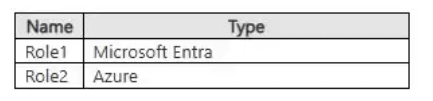
You have an Azure subscription that contains the custom roles shown in the following table.
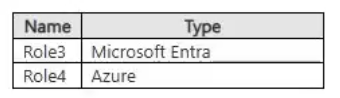
In the Azure portal, you plan to create new custom roles by cloning existing roles. The new roles will be configured as shown in following table.
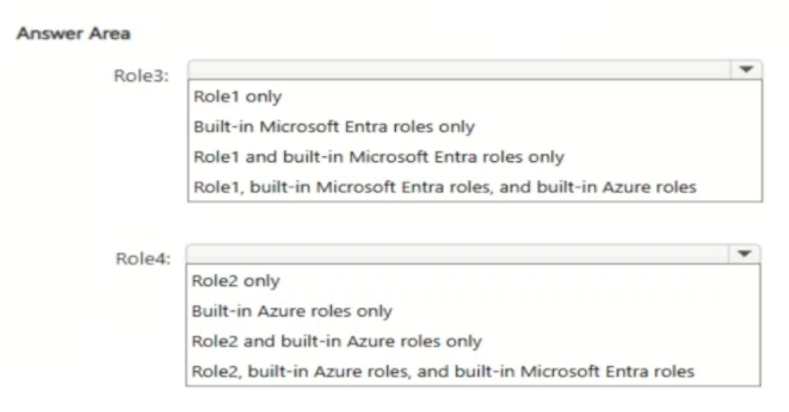
Which roles can you clone to create each new role? To answer, select the appropriate options in the answer area.
NOTE: Each correct selection is worth one point.
Key Takeaways
The main trap is assuming a unified cloning pool; candidates often incorrectly try to clone an Azure RBAC role from an Entra ID role or vice versa, ignoring the distinct identity domains.
This page explains how to correctly clone Azure custom roles by adhering to strict source restrictions: Microsoft Entra ID custom roles must be cloned from Entra ID sources, while Azure RBAC custom roles must be cloned from Azure RBAC sources.
Common mistake: Selecting Azure built-in roles as a source for creating a Microsoft Entra ID custom role. This fails because Azure RBAC and Microsoft Entra ID manage permissions in separate scopes and do not allow cross-domain cloning of role definitions.
Expert Analysis
The question tests the strict scope boundaries of custom role cloning in Azure RBAC versus Microsoft Entra ID (formerly Azure AD). The core constraint is that a custom role can only be cloned from roles within the same identity system; cross-system cloning is prohibited.
For New Role 1 (a Microsoft Entra ID custom role), the valid sources are limited to existing Microsoft Entra ID roles. This includes other custom Microsoft Entra ID roles, such as Role1, and built-in Microsoft Entra ID roles. It cannot be cloned from Azure RBAC roles because they reside in different directories with incompatible permission models.
For New Role 2 (an Azure RBAC custom role), the valid sources are existing Azure RBAC roles. This includes other custom Azure RBAC roles, such as Role2, and built-in Azure RBAC roles. It cannot be cloned from Microsoft Entra ID roles for the same reason: the systems do not share a unified role definition store for cloning purposes.
For New Role 3 (another Microsoft Entra ID custom role), the logic mirrors New Role 1. It must be cloned from Microsoft Entra ID sources, specifically Role1 or built-in Microsoft Entra ID roles. Attempting to clone from Azure roles would fail due to the architectural separation between Azure RBAC and Microsoft Entra ID built-in/custom roles.
Official Reference
https://learn.microsoft.com/en-us/azure/role-based-access-control/custom-roles
This link opens the official vendor documentation in a new tab.
Exam Strategy
When encountering 'HOTSPOT' or mapping questions involving Azure security, always first identify the specific identity service (Entra ID vs. Azure RBAC) for the target resource. Then, filter the available sources to ensure they belong to the exact same service domain. Do not assume interoperability between built-in roles of different identity providers.
Frequently Asked Questions
Can I clone a built-in Azure RBAC role to create a Microsoft Entra ID custom role?
What is the difference between cloning in Azure RBAC and Microsoft Entra ID?
Discussion 1 contributions
Compiled from public community threads and reader submissions, lightly edited for clarity. Handles and vote tallies are shown as recorded, and comments reflect the views of individual contributors.
From public community threads 1
-
azuretrainer1 👍 1Role1 and built-in Microsoft Entra roles only and Role2 and built-in Azure roles only Role3 (Microsoft Entra Role): Role1 and built-in Microsoft Entra roles only (or the respective option matching custom Microsoft Entra role cloning which allows cloning from existing custom Microsoft Entra roles like Role1 and Microsoft Entra built-in roles, but not Azure built-in roles since Entra ID and Azure RBAC are separate directory/control planes). Role4 (Azure Role): Role2 and built-in Azure roles only (allowing cloning from existing custom Azure roles like Role2 and built-in Azure roles).
Reader comments & corrections
No reader corrections yet — spotted an error or have a note? Share it below.
Related Analysis
Practice All SC-500 Questions
Access 100 questions with complete answers and detailed explanations.
View Full SC-500 Practice Test →