Which Recipients Can User1 Revoke in Advanced Message Encryption?

Answer Correct answer: B — Only Recipient4 (Gmail) receives a link-based branded encrypted email, which is required for User1 to revoke it.

You have a Microsoft 365 E5 tenant that uses a domain named contoso.com. A user named User1 sends link-based, branded emails that are encrypted by using Microsoft Purview Advanced Message Encryption to the recipients shown in the following table. exhibit For which recipients can User1 revoke the emails?
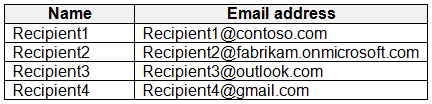
  1. Recipient1 only
  2. Recipient4 only Correct Answer
  3. Recipient1 and Recipient2 only
  4. Recipient3 and Recipient4 only
  5. Recipient1, Recipient2, Recipient3, and Recipient4

Community Insight

Tests which recipient identity types receive link-based branded encrypted email; the trap is assuming every external recipient or every recipient can be revoked.

Microsoft Purview Advanced Message Encryption revocation depends on whether the recipient gets a link-based branded experience or an inline Outlook experience; only Recipient4 (Gmail) meets that condition, so the answer is B.

Choosing D or E by assuming all external recipients receive link-based branded mail; internal Microsoft 365 and Outlook.com recipients get inline encryption, which cannot be revoked.

Community Discussion (9 comments)

kollyp2000 👍 1 Selected: B
Revocation works only when the recipient actually reads the mail in the encryption portal. Learn: “Admins and message senders can revoke encrypted emails if the recipient received a link-based, branded encrypted email. If the recipient received a native inline experience in a supported Outlook client, then you can’t revoke the message.”
JamesM9 👍 1 Selected: B
"Whether a recipient receives a link-based experience or an inline experience depends on the recipient identity type: Microsoft 365 and Microsoft account recipients (for example, outlook.com users) get an inline experience in supported Outlook clients. All other recipient types, such as Gmail and Yahoo recipients, get a link-based experience". Based on this, only recipient 4 (GMail) would receive a link. https://learn.microsoft.com/en-us/purview/revoke-ome-encrypted-mail Answer: B - Recipient 4
jorgs4 👍 1 Selected: E
Microsoft Purview Advanced Message Encryption (AME) allows you to: “Revoke access to encrypted messages sent using custom links, regardless of the recipient's domain.” And also: “Recipients can be internal, external, Microsoft domains, or public domains like Gmail or Outlook.” This means that revocation is domain-independent. As long as the message was sent using AME with custom links, the sender can revoke access at any time.
Blabla532 👍 1 Selected: D
Recipient1 is internal to the sender’s domain — revocation is not supported. Recipient2 is external but part of a Microsoft 365 tenant — revocation is not supported for tenant-to-tenant encrypted mail. Recipient3 and Recipient4 are external and use link-based branded encryption, which supports revocation.
Eltooth 👍 1 Selected: B
B is correct answer. Based on explanations below -only gmail would receive link based branded encrypted email that could be revoked.
gabbinu 👍 11 Selected: B
https://learn.microsoft.com/en-us/purview/revoke-ome-encrypted-mail Admins and message senders can revoke encrypted emails if the recipient received a link-based, branded encrypted email. If the recipient received a native inline experience in a supported Outlook client, then you can't revoke the message. Whether a recipient receives a link-based experience or an inline experience depends on the recipient identity type: Microsoft 365 and Microsoft account recipients (for example, outlook.com users) get an inline experience in supported Outlook clients. All other recipient types, such as Gmail and Yahoo recipients, get a link-based experience.
Gtc_ 👍 3 Selected: B
Of the options listed, only Gmail gets link-based. https://learn.microsoft.com/en-us/purview/revoke-ome-encrypted-mail?utm_source=chatgpt.com Encrypted emails that you can revoke: Admins and message senders can revoke encrypted emails if the recipient received a link-based, branded encrypted email. If the recipient received a native inline experience in a supported Outlook client, then you can't revoke the message. Whether a recipient receives a link-based experience or an inline experience depends on the recipient identity type: Microsoft 365 and Microsoft account recipients (for example, outlook.com users) get an inline experience in supported Outlook clients. All other recipient types, such as Gmail and Yahoo recipients, get a link-based experience. Admins and message senders can revoke messages that are encrypted using encryption applied directly from Outlook on the web. For example, messages encrypted with the Encrypt Only option."
Suranka 👍 2 Selected: D
Based on Microsoft Purview Advanced Message Encryption capabilities, User1 can revoke the emails sent to Recipient3 and Recipient4.
deeptha92 👍 3 Selected: B
Whether a recipient receives a link-based experience or an inline experience depends on the recipient identity type: Microsoft 365 and Microsoft account recipients (for example, outlook.com users) get an inline experience in supported Outlook clients. All other recipient types, such as Gmail and Yahoo recipients, get a link-based experience.

Comments & Corrections

No comments yet — spotted an error or have a note? Share it below.

Log in to comment, report an error, or add a note about this question.

Submitted for moderation before publishing. Keep it helpful and respectful.

Expert Analysis

Why the Answer Is Correct

Microsoft Purview Advanced Message Encryption supports revocation only when the recipient actually receives a link-based, branded encrypted email. Recipient4 is the Gmail recipient, a non-Microsoft identity type, so the message renders through the encryption portal link rather than inline in Outlook. Recipient1 is internal to contoso.com, and Recipient2 and Recipient3 are Microsoft 365 or Microsoft account/outlook.com recipients, which get an inline experience in supported Outlook clients. Therefore only the Gmail recipient is revocable, making B the only defensible choice.

Why the Other Options Are Wrong

A fails because Recipient1 is internal to the sending tenant; internal Microsoft 365 recipients get inline encryption and cannot be revoked. C fails for the same reason and additionally includes Recipient2, another Microsoft identity. D fails because it adds Recipient3, who is an Outlook.com/Microsoft account recipient and therefore receives inline encryption; only Recipient4 qualifies. E assumes revocation is domain-independent for every recipient, but the documentation keys revocation to the link-based branded experience, not merely to external delivery.

Community Comment Notes

gabbinu and Gtc_ both point to the Microsoft Learn revocation article and emphasize that revocation works when "the recipient received a link-based, branded encrypted email." deeptha92 and JamesM9 cite the identity-type rule, with deeptha92 noting that "Gmail and Yahoo recipients, get a link-based experience," which supports singling out the Gmail recipient. kollyp2000 and Eltooth reach the same practical conclusion, while Suranka and Blabla532 argue for D by treating Recipient3 as link-based without accounting for the Microsoft-account inline behavior. jorgs4's E answer overgeneralizes AME revocation as domain-independent; the recipient's identity type remains the deciding factor in the official documentation.

Official Reference

Exam Strategy

Memorize the identity-type split: Microsoft 365 and Microsoft account recipients get inline encryption, while Gmail/Yahoo and other non-Microsoft recipients get link-based branded mail. When a question asks about revocation, first classify each recipient, then select only the link-based ones.

Frequently Asked Questions

Why can’t User1 revoke the email sent to Recipient1 even though it is in the same tenant?

Recipient1 gets an inline encrypted experience in Outlook, and Microsoft Purview revocation applies only to link-based branded encrypted messages, not native inline encryption.

Does Recipient3 receive link-based encryption because the address is external?

No. Microsoft 365 and Microsoft account/outlook.com external recipients still get inline encryption in supported Outlook clients; only non-Microsoft types such as Gmail get link-based mail.

More SC-401 FAQ →

Related Analysis

← Back to SC-401 Study Guide