Maximum Primary Elements in Microsoft Purview EDM Classifier
You have a Microsoft 365 E5 subscription that uses Microsoft Purview.
You are creating an exact data match (EDM) classifier named EDM1.
For EDM1, you upload a schema file that contains the fields shown in the following table.
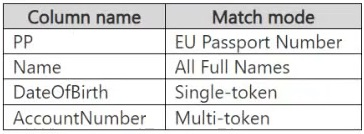 What is the maximum number of primary elements that EDM1 can have?
Community Insight
The exam tests the distinction between the absolute maximum number of primary elements allowed (10) and the practical limit imposed by the schema's multi-token field rules (3). The common trap is confusing the general system limit with the specific constraint of the provided table.
This question tests the configuration limits of Exact Data Match (EDM) classifiers in Microsoft Purview. It establishes that while a single SIT can have multiple primary elements, the composite key structure imposes specific constraints on multi-token fields.
Most candidates incorrectly select D (4) because they recall the general rule that an EDM classifier can support up to 10 primary elements, failing to apply the specific restriction regarding multi-token fields present in the scenario.
Community Discussion (14 comments)
Comments & Corrections
No comments yet — spotted an error or have a note? Share it below.
Expert Analysis
Why the Answer Is Correct
The correct answer is C (3). While Microsoft documentation states you can select up to 10 primary elements for an Exact Data Match (EDM) sensitive information type (SIT), there is a critical structural constraint: you can only include one multi-token primary element in a composite key. In the provided schema, 'Name' is a multi-token field ('All Full Names') and 'AccountNumber' is also a multi-token field ('Multi-token'). You cannot have two multi-token primary elements. Therefore, you must choose either 'Name' or 'AccountNumber' as the sole multi-token representative. This leaves you with 1 multi-token field + 2 single-token fields (Passport Number and Date of Birth) = 3 possible primary elements.Why the Other Options Are Wrong
Option A (1) is incorrect because a composite key allows more than one element. Option B (2) is incorrect because it ignores the possibility of including the third single-token field alongside the chosen multi-token field. Option D (4) is incorrect because it assumes all four columns can be primary elements simultaneously, which violates the 'one multi-token per composite key' rule.Community Comment Notes
Several users correctly identified the limit of 10 but missed the multi-token constraint. For instance, user '7259dc7' noted the general limit of 10 but failed to apply the specific schema logic. User 'PsiCzar' claimed testing showed 4 was possible, but this likely reflects a misunderstanding of the validation rules or a non-standard environment. User '58d4802' correctly reasoned that only one multi-token field is allowed, leading to the conclusion of 3. User 'alexfk' incorrectly argued based on uniqueness rather than the technical definition of primary elements in EDM.Official Reference
Exam Strategy
When configuring EDM classifiers, always check for multi-token fields in your schema. Remember that while the system allows up to 10 primary elements, a composite key can only contain ONE multi-token primary element. If your schema has multiple multi-token fields, you must reduce the count accordingly.
Frequently Asked Questions
Why can't I select all 4 columns as primary elements?
You can only have one multi-token primary element in a composite key. Since both Name and AccountNumber are multi-token, you must exclude one.
Is the limit always 10 primary elements?
No. While the system supports up to 10, practical limits exist if your schema contains multiple multi-token fields, restricting the count further.