Microsoft Purview Sensitivity Label Marking Limitations
Short answer
No, No, No. Sensitivity labels require manual application or specific policy targeting, do not apply watermarks to emails, and use distinct watermark elements rather than headers.
Question
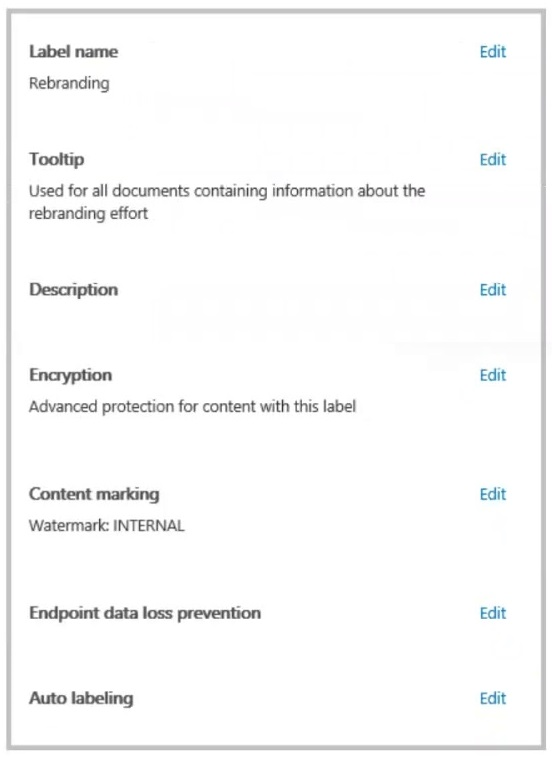
You have a Microsoft 365 sensitivity label that is published to all the users in your Microsoft Entra tenant as shown in the following exhibit.
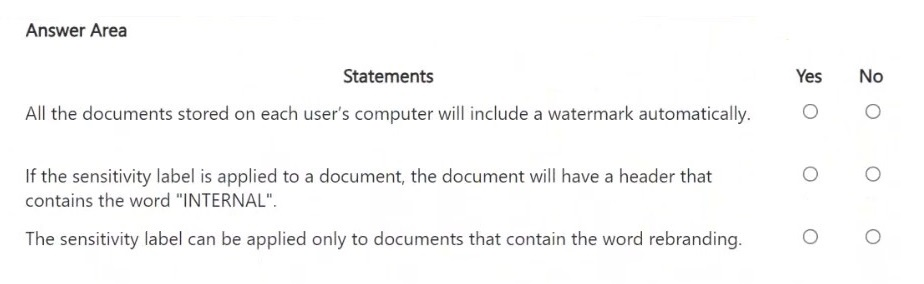
For each of the following statements, select Yes if the statement is true. Otherwise, select No.
Key Takeaways
The primary trap is confusing general protection actions (like encryption) with marking actions (like watermarks), which have strict platform-specific support limits.
This guide explains why sensitivity labels with watermark settings do not auto-apply to all files, cannot be placed in email headers, and do not support watermarks in Outlook messages.
Common mistake: Learners often assume that because encryption applies to email, all label features including watermarks do too, or they confuse the visual placement of watermarks with headers.
Expert Analysis
The question presents a Microsoft Purview sensitivity label configuration where the Marking option is set to apply a watermark containing the text 'INTERNAL'. To determine the truth of the statements, one must understand the scope and mechanics of sensitivity label markings.
First, regarding automatic application: Sensitivity labels are not automatically applied to all documents on a user's computer. They must be manually applied by the user within supported applications (such as Word, Excel, or Outlook) or via automated policies that target specific content locations. Therefore, the statement claiming all documents will include a watermark is false.
Second, regarding headers versus watermarks: The configuration explicitly specifies a watermark. In Microsoft Office applications, a watermark is a distinct feature that overlays text or images diagonally across the page background. It is technically separate from header/footer regions. While both can contain text, configuring a watermark does not result in text appearing in the header section. Thus, the statement about a header containing 'INTERNAL' is false.
Third, regarding email applicability: Watermarks are supported in document-based applications like Word and Excel. However, they are not supported for emails in Outlook. When a sensitivity label with marking settings is applied to an email, the marking (watermark/header/footer) is ignored, although encryption or other restrictions might still apply. Consequently, the statement implying emails will have the watermark is false.
All three statements are incorrect because they misunderstand the selective nature of label application, the specific UI element used (watermark vs. header), and the platform limitations (no watermarks in email).
Official Reference
- https://learn.microsoft.com/en-us/purview/sensitivity-labels-office-apps
- https://learn.microsoft.com/en-us/purview/create-sensitivity-labels
These links open the official vendor documentation in a new tab.
Exam Strategy
When analyzing sensitivity label configurations, always check the 'Marking' tab separately from 'Encryption'. Remember that watermarks only work in document apps (Word/Excel), never in email. Also, recall that labels are rarely automatic without explicit DLP or retention policies; users usually apply them manually.
Discussion 8 contributions
Compiled from public community threads and reader submissions, lightly edited for clarity. Handles and vote tallies are shown as recorded, and comments reflect the views of individual contributors.
From public community threads 8
-
dmoorthy 👍 7The given answer is Correct, No, No, No.
-
AttackOnMinion 👍 5NONONO Mark the content when you use Office apps, by adding watermarks, headers, or footers to email, meeting invites, or documents that have the label applied. Watermarks can be applied to documents and Loop component and pages, but not email or meeting invites. Example header and watermark https://learn.microsoft.com/en-us/purview/ai-microsoft-purview-considerations
-
RamyKetata 👍 3A watermark labeled "INTERNAL" typically appears as a faint text or image overlaid on each page of a document, often in the background. So: NO,NO,NO
-
TheMCT 👍 2The given answer is Correct, No, No, No. The label applies a watermark, not a header. A watermark typically appears diagonally across the page, not in the header section.
-
jgalanj 👍 2N Y N in the answer b. No body talk about emails only documents then if its applied manually to a document it will be show the watermark watermark.
Show 3 more comments
-
Fiqri 👍 2NO, YES, NO.
-
NeerajSap 👍 1StatementYes / NoExplanationAll the documents stored on each user's computer will include a watermark automatically.NoOnly documents to which the sensitivity label is applied receive the watermark.If the sensitivity label is applied to a document, the document will have a header that contains the word "INTERNAL".NoThe label applies a watermark containing "INTERNAL", not a header.The sensitivity label can be applied only to documents that contain the word rebranding.NoThe tooltip is informational only. It does not enforce labeling based on document content.
-
Shad_700 👍 1No No NO, is correct answer
Reader comments & corrections
No reader corrections yet — spotted an error or have a note? Share it below.