Microsoft Purview Custom Classification with CSV Keyword Lists
Short answer
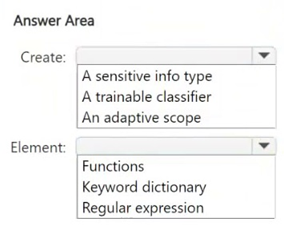
Create a Sensitive Info Type and select Keyword Dictionary as the element type.
Question
You have a Microsoft 365 E5 subscription.
You have a file named Customer.csv that contains a list of 1,000 customer names.
You plan to use Customer.csv to classify documents stored in a Microsoft SharePoint Online library.
What should you create in the Microsoft Purview portal, and which type of element should you select? To answer, select the appropriate options in the answer area.
NOTE: Each correct selection is worth one point.
Key Takeaways
Use Sensitive Info Types with Keyword Dictionaries for exact matching against predefined lists, rather than Trainable Classifiers which require sample training data.
Learn how to classify SharePoint documents using a CSV file by creating a Sensitive Info Type with a Keyword Dictionary in Microsoft Purview.
Common mistake: Selecting Trainable Classifier instead of Sensitive Info Type. Trainable classifiers use ML models based on seed documents and cannot ingest keyword dictionaries or CSV lists for direct string matching.
Expert Analysis
The scenario requires classifying documents in SharePoint Online based on a specific list of customer names contained in Customer.csv. The key constraint is that the classification logic must match content against this pre-defined structured data list.
In Microsoft Purview, there are two primary methods for custom classification: Trainable Classifiers and Sensitive Information Types (SITs). Trainable classifiers rely on machine learning models trained on sample documents; they do not use external keyword lists or dictionaries. Therefore, any option suggesting a trainable classifier is incorrect for this specific requirement.
To detect specific strings like customer names from a CSV file, you must create a Sensitive Information Type. Within the configuration of this SIT, you need to define how it identifies the data. Since the source is a list of values, the appropriate element type is a Keyword Dictionary. This allows you to upload the hashed data from Customer.csv so the system can match document content against the dictionary entries. This method is known as Exact Data Match (EDM).
Comments confirm this approach, noting that while some might confuse EDM with other elements, the correct pairing for using a CSV list of keywords/names is a Sensitive Info Type with a Keyword Dictionary. Trainable classifiers cannot use keyword dictionaries, ruling them out immediately.
Official Reference
This link opens the official vendor documentation in a new tab.
Exam Strategy
When a question mentions uploading a file (CSV/TSV) containing specific values to detect in documents, always choose 'Sensitive Information Type' paired with 'Keyword Dictionary'. Avoid 'Trainable Classifier' unless the question explicitly mentions training a model using sample documents or images.
Frequently Asked Questions
Can I use a Trainable Classifier with a CSV file?
What is Exact Data Match (EDM)?
Discussion 12 contributions
Compiled from public community threads and reader submissions, lightly edited for clarity. Handles and vote tallies are shown as recorded, and comments reflect the views of individual contributors.
From public community threads 12
-
geekygurl 👍 36wrong, it should be Sensitive Info Type/ Keyword dictionary
-
CuentaRM10 👍 13Should be SIT/Keyword
-
Shad_700 👍 4the right answer is SIT / Keyword SITs support dictionary uploads (CSV). Ideal when you already have a defined list of keywords or names to detect. Fast, accurate, and does not require training documents.
-
58d4802 👍 4More specifically, you would use an Exact Data Match (EDM) sensitive information type. So correct answer is Sensitive Info Type/Keyword Dictionary
-
Eltooth 👍 4SIT and keyword dictionary.
Show 7 more comments
-
leprechaun 👍 4SIT/Keyword is right
-
Suranka 👍 3To classify documents in SharePoint Online using a list of customer names from a Customer.csv file, the correct approach in Microsoft Purview is: Create: A sensitive info type Custom Sensitive Information Types (SITs) allow you to define patterns that identify specific content, such as customer names. Element: Keyword dictionary
-
dmoorthy 👍 3Answer is a SIT(EDM based) and Keyword dictionary.
-
Ariasjose 👍 2Create: A sensitive info type Element: Keyword dictionary Because the CSV contains a list of customer names, a custom sensitive info type with a keyword dictionary is the best option to detect those names in SharePoint documents.
-
MultiCloudIronMan 👍 1Create → A sensitive info type: You must create a custom sensitive info type that references the structured data in Customer.csv. . This is the foundation for EDM-based classification. Element → Keyword dictionary: While EDM uses hashed data, the sensitive info type references a keyword dictionary or hashes derived from the source file. This element helps match content in documents against the values in Customer.csv.. Note: You’ll also need to create an EDM schema and use the EDM Upload Agent to hash and upload the source data securely, but the sensitive info type is the first step in the Purview portal.
-
646e337 👍 1You are correct. For everyone else, trainable classifiers do not support Keyword dictionary elements. SITs and Trainable classifiers belong to two different models of classification. Trainable classifiers are (according to MS documentation) sample-based training ONLY. They use seed content, not dictionaries.
-
NeerajSap 👍 1In Microsoft Purview, when you want to match document content against a list of words or phrases from a file, you create a Sensitive Information Type (SIT) and use a Keyword Dictionary as the element.
Reader comments & corrections
No reader corrections yet — spotted an error or have a note? Share it below.