Microsoft Purview Auto-Labeling Policy Scope and Content Matching Logic
Short answer
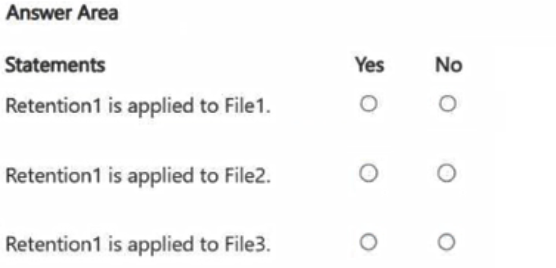
File 1: No; File 2: Yes; File 3: No. File 2 meets all content conditions and is in a targeted location (SharePoint). File 1 fails the SWIFT code condition. File 3 is excluded because OneDrive is not a targeted location.
Question
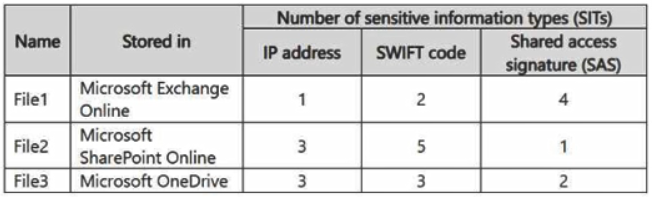
You have a Microsoft 365 subscription that has a retention label named Retention1. The subscription contains the files shown in the following table.
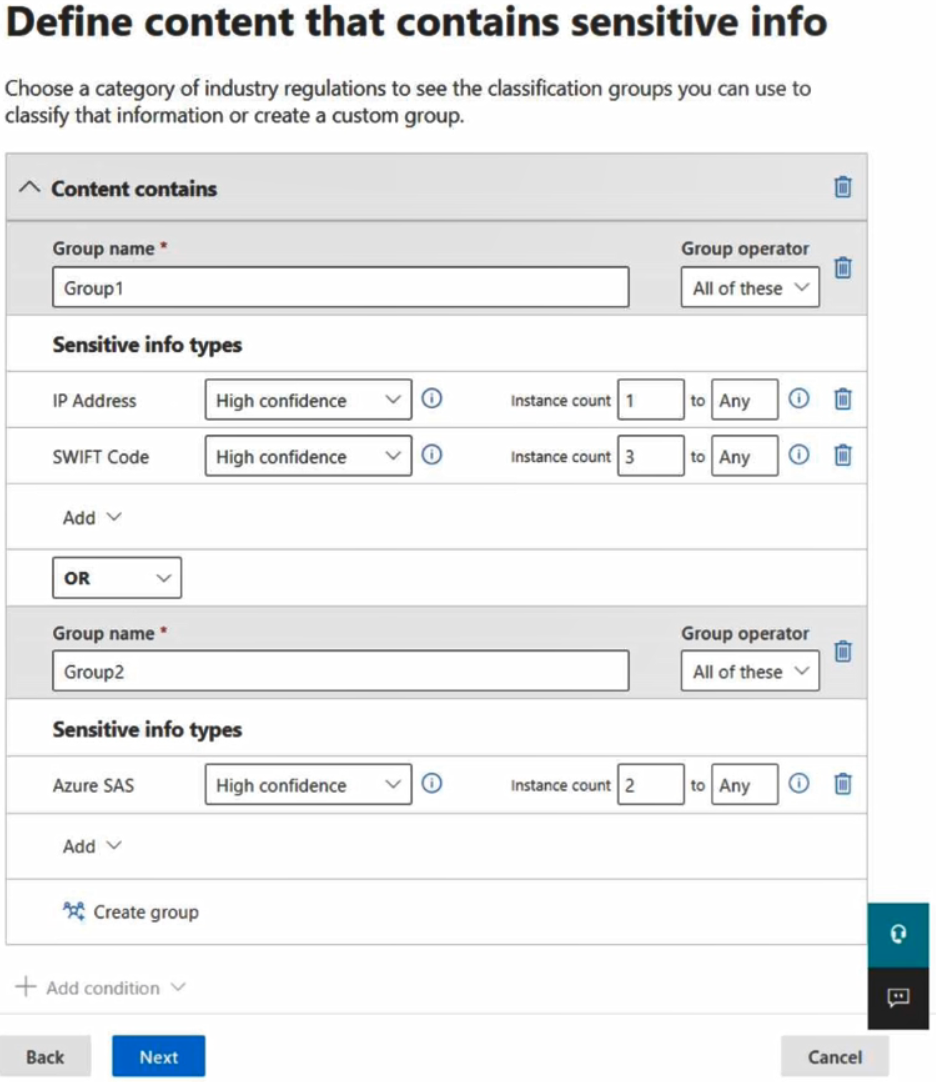
You create an auto-labeling policy named Policy1 that will automatically apply Retention1 as shown in the Auto-labeling policy exhibit. (Click the Auto-labeling policy tab.)
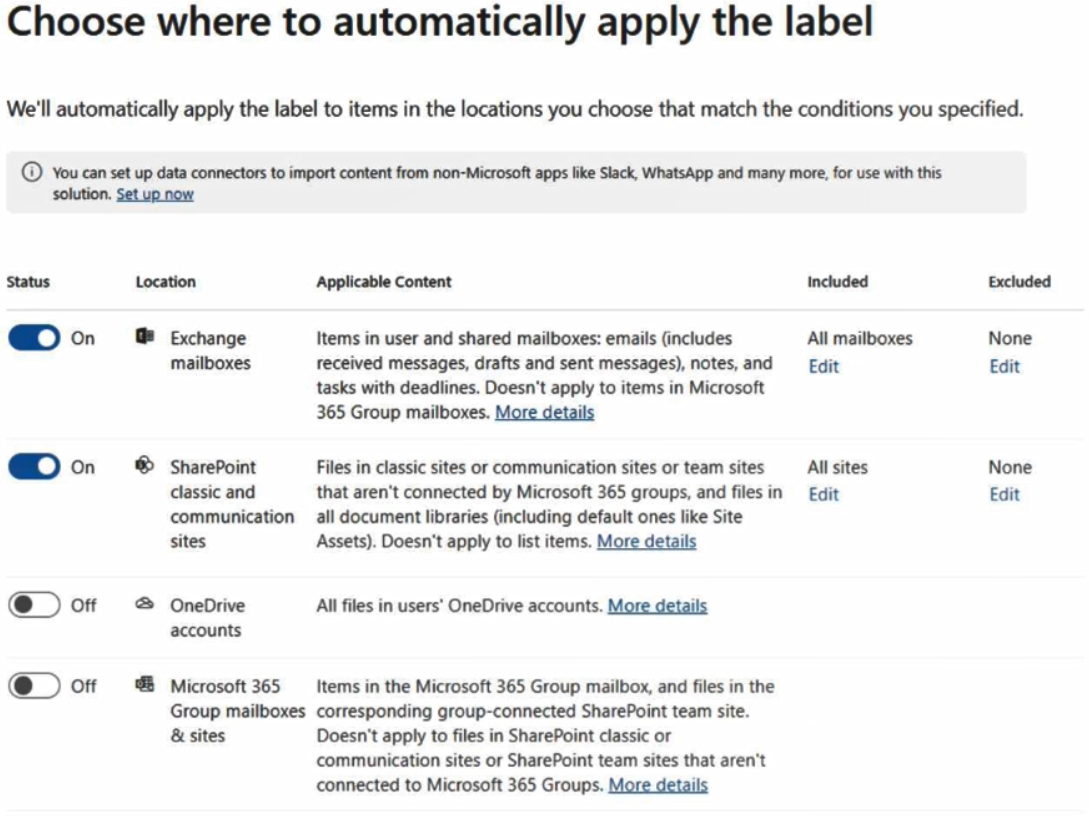
You configure Policy1 to apply Retention1 as shown in the Locations exhibit. (Click the Locations tab.)
For each of the following statements, select Yes if the statement is true. Otherwise, select No.
NOTE: Each correct selection is worth one point.
Key Takeaways
Auto-labeling policies only run on explicitly configured locations; files in unlisted stores like OneDrive are skipped entirely, regardless of content match.
Determine which files receive retention labels based on Microsoft Purview auto-labeling policies. Correctly apply location filters and logical operators to identify target items.
Common mistake: Learners frequently select 'Yes' for File 3 because they focus only on the content match and ignore that OneDrive is not included in the Locations tab. Others fail File 1 by missing the strict 'All of these' requirement for the SWIFT code.
Expert Analysis
The core of this question tests the intersection of Microsoft Purview Auto-labeling policy locations and Content Match conditions. To determine the correct selection for each file, you must verify two independent criteria: whether the content matches the defined labels, and whether the storage location is included in the policy scope.
First, analyze the Locations tab. The exhibit shows that Policy1 targets Exchange mailboxes and SharePoint sites. Crucially, it does not include OneDrive for Business. Any item stored in OneDrive will be ignored by this specific auto-labeling policy, regardless of its content. This immediately resolves the status for File 3: since it is stored on OneDrive, the answer is No, even though it might meet the content criteria.
Next, evaluate the Content Match conditions. The policy uses an operator "All of these are true" with two conditions:
- Contains IP addresses (e.g.,
xx.xx.xx.xx) - Contains SWIFT codes (e.g.,
AAAAUSBBXXX)
For File 1, it is stored in Exchange (included in scope). It contains an IP address but lacks a valid SWIFT code format. Since the operator requires all conditions to be true, the label is not applied. The answer is No.
For File 2, it is stored in SharePoint (included in scope). It contains both a valid IP address and a valid SWIFT code. Both conditions are met, so Retention1 is applied. The answer is Yes.
A common trap, as noted by learners, is misreading the operator or ignoring the location filter. Learners often assume all files are scanned or confuse "Any of these" with "All of these." Remember: if the location isn't listed, the policy never runs.
Official Reference
- https://learn.microsoft.com/en-us/purview/autolabel-policy
- https://learn.microsoft.com/en-us/purview/autolabel-content-match
These links open the official vendor documentation in a new tab.
Exam Strategy
When analyzing hotspot questions on Purview policies, always check the 'Locations' tab first. If a file's storage location is not explicitly listed, the answer is automatically 'No'. Next, verify the logical operator ('Any of these' vs 'All of these') against the file's content attributes. Never assume a policy applies globally unless 'All supported locations' is selected.
Frequently Asked Questions
Does an auto-labeling policy apply to OneDrive by default?
What is the difference between 'Any of these' and 'All of these' operators?
Discussion 3 contributions
Compiled from public community threads and reader submissions, lightly edited for clarity. Handles and vote tallies are shown as recorded, and comments reflect the views of individual contributors.
From public community threads 3
-
FableFa 👍 3Correct
-
TDAC 👍 1Answer is correct. FIle 1 = YES, it meets the IP address condition and is stored on Exchange. File 2 = YES, it meets the IP address condition and the SWIFT code condition and is stored on SharePoint File 3 = No, it meets the IP Address and SWIFT Code condition BUT is stored on OneDrive. The policy is not applied to OneDrive.
-
stevecammipiace 👍 1File 1 = No, the operator says all of these only 2 SWIFT Code not match.
Reader comments & corrections
No reader corrections yet — spotted an error or have a note? Share it below.