Microsoft 365 Copilot Sensitivity Label Inheritance
Short answer
Yes, Yes, Yes. Microsoft 365 Copilot automatically inherits the sensitivity label of the most sensitive source file for each summary.
Question
You have a Microsoft 365 E5 subscription that contains three DOCX files named File1, File2, and File3.
You create the sensitivity labels shown in the following table.

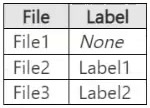
You apply the labels to the files as shown in the following table.
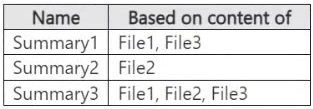
You ask Microsoft 365 Copilot to summarize the files, and you receive the results shown in the following table.
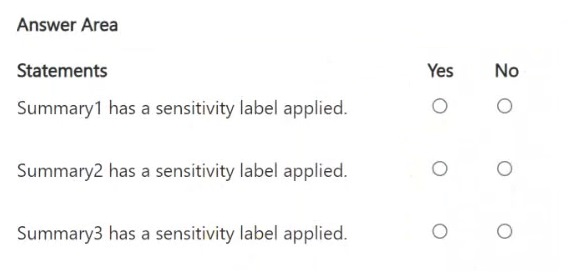
For each of the following statements, select Yes if the statement is true. Otherwise, select No.
NOTE: Each correct selection is worth one point.
Key Takeaways
Copilot always applies a sensitivity label to generated content, inheriting the highest-priority label from its source files.
Copilot summaries inherit sensitivity labels from source files. All three summaries in this scenario correctly receive a label: Yes, Yes, Yes.
Common mistake: Learners often assume that restrictive permissions like 'Viewer' prevent Copilot from accessing or labeling content, leading them to mark 'No' for Summary 2. However, if Copilot can process the file, it inherits the label.
Expert Analysis
The core concept tested is how Microsoft 365 Copilot handles sensitivity labels when generating summaries from source files. According to Microsoft's official architecture for data protection, Copilot-generated content automatically inherits the sensitivity label of the most sensitive source content used to create it.
For Summary 1, the source files are File1 and File3. File1 is unlabelled, but File3 has Label2 (which includes encryption and permissions). Since at least one source file has a label, the summary inherits Label2. Therefore, 'Yes'.
For Summary 2, the source file is File2. File2 has Label1 applied with 'Viewer' permissions. The critical trap here is assuming that 'Viewer' permissions prevent Copilot from reading the file. However, for Copilot to generate a summary, it must be able to read the content. If Copilot successfully generates a summary (as implied by the question asking about the label assignment), it means it had access. More importantly, the rule is that if source content has a label, the output inherits it. Even if Label1 restricts editing, it does not necessarily block AI processing if the user has permission to use Copilot with that file. The standard behavior is inheritance. Thus, the summary inherits Label1. Therefore, 'Yes'.
For Summary 3, the sources are File1, File2, and File3. File3 has Label2, which is more restrictive/sensitive than Label1. Copilot inherits the highest priority label, which is Label2. Therefore, 'Yes'.
All three statements are true because Copilot always assigns a sensitivity label to generated content based on the source labels.
Official Reference
This link opens the official vendor documentation in a new tab.
Exam Strategy
When analyzing Copilot scenarios, remember that security labels are inherited, not stripped. If source files have labels, the output will have a label. Do not let restrictive permissions distract you; if the AI can read the content to summarize it, it will apply the appropriate label.
Frequently Asked Questions
Does Copilot strip labels from summaries?
What if a source file has Viewer-only permissions?
Discussion 12 contributions
Compiled from public community threads and reader submissions, lightly edited for clarity. Handles and vote tallies are shown as recorded, and comments reflect the views of individual contributors.
From public community threads 12
-
starlord45 👍 14Every Summary should have a label assigned, because Copilot can work with the applied labels and always inherits the label with the highest priority. https://learn.microsoft.com/en-us/copilot/microsoft-365/microsoft-365-copilot-architecture-data-protection-auditing Therefore, because each Summary has at least one labeled file, every summary has a label assigned.
-
javifedz 👍 4No, Yes, Yes
-
Ender3 👍 3While I am going along with the triple Yes answer, I believe Summary2 should fail to summarize File2 because Label1 is applied to it, restricting access to Viewer only, which does not include EXTRACT permission. I am staying with Yes on Summary2 because allegedly a summary was created based on File2.
-
Fiqri 👍 3correct
-
JamesM9 👍 2File 1 - Yes because it is unlabelled File 2 - No because Copilot cannot see that File2 has been labelled with label 1 as this label is encrypted with the permissions Viewer. Copilot needs both Viewer and Extract permissions to access the file. File 3 - Yes because it has a sensitivity label without encryption (shown in the permissions column) The answer here is Yes, No, Yes
Show 7 more comments
-
MultiCloudIronMan 👍 2Yes No Yes Microsoft Purview applies sensitivity labels to summaries only when those summaries include content from labeled files with content marking enabled. This means a summary inherits a label only if at least one source file has a label that enforces visible markings like headers, footers, or watermarks.
-
Shad_700 👍 2correct answer : Copilot summaries always include a sensitivity label,
-
dmoorthy 👍 2Yes, yes, yes
-
Ficus22 👍 1It appears the answer is Yes No Yes Co-pilot gives the below response Is it true that summaries inherit sensitivity labels only when the source files have content markings? Yes — that is correct. Microsoft Purview does apply a sensitivity label to Copilot‑generated summaries when at least one of the source files has a label that includes content markings (headers, footers, or watermarks). What if the source files have labels without content markings? In that case: The summary does not automatically inherit the label. It will remain unlabeled unless: - You manually apply a label, or - Auto‑labeling policies detect sensitive content and apply one afterward
-
NeerajSap 👍 1Microsoft 365 Copilot-generated content automatically inherits the sensitivity label of the most sensitive source content used to create it. Each summary includes at least one labeled file: Summary Source files Sensitivity label applied?Summary1 File1, File3 Yes (inherits Label2) Summary2 File2 Yes (inherits Label1) Summary3 File1, File2, File3 Yes (inherits the more sensitive of Label1 and Label2)
-
gabbinu 👍 1Yes, Yes, Yes When Microsoft 365 Copilot generates a new file (e.g. a summary), if the source content has sensitivity labels, the summary inherits the highest priority label from its sources.
-
yusufabdullanl 👍 1I was initially confused, but I figured it out: Copilot summaries always include a sensitivity label, either inherited from the source file or automatically applied by policy.
Reader comments & corrections
No reader corrections yet — spotted an error or have a note? Share it below.