How Should You Configure a Regex for SC-401 Project Codes?
HOTSPOT
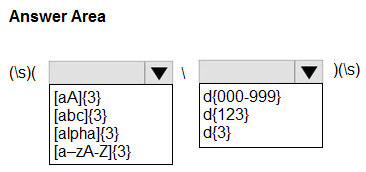
You use project codes that have a format of three alphabetical characters that represent the project type, followed by three digits, for example Abc123.
You need to create a new sensitive info type for the project codes.
How should you configure the regular expression to detect the content? To answer, select the appropriate options in the answer area.
NOTE: Each correct selection is worth one point.
Community Insight
SC-401 tests translating a fixed alphanumeric format into a precise Purview regex, and the trap is using a six-character wildcard that also matches digits-first or mixed codes.
Creating a custom sensitive information type for project codes requires a regex that matches exactly three alphabetic characters followed by exactly three digits. This page establishes the correct pattern as [a-zA-Z]{3}\d{3}, not a wildcard or six-character alphanumeric class.
A common mistake is choosing .{6} or [A-Za-z0-9]{6}, which accepts any six characters and fails to enforce three letters followed by three digits.
Community Discussion (3 comments)
Comments & Corrections
No comments yet — spotted an error or have a note? Share it below.
Expert Analysis
Why the Answer Is Correct
The project code format is explicitly three alphabetic characters followed by three digits, and the example Abc123 confirms mixed-case letters are allowed. In a Purview custom sensitive information type regex, [a-zA-Z]{3} matches exactly three letters and \d{3} matches exactly three digits, so [a-zA-Z]{3}\d{3} matches Abc123. The quantifier {3} is fixed, which is important because the requirement specifies exact lengths rather than a minimum or maximum. If the interface asks for the pattern only, that regex is the correct selection; any additional word-boundary setting would only affect whether longer strings can contain a match.Why Other Candidate Answers Are Wrong
A pattern such as [A-Za-z0-9]{6} accepts any six alphanumeric characters and would match 123Abc, Ab12Cd, or 123456, so it ignores the letters-then-digits structure. Similarly,.{6} matches punctuation and spaces, and [a-zA-Z]{6} or \d{6} handles only one half of the required format. Patterns like [a-zA-Z]{3}\w{3} or [a-zA-Z]{3}[0-9]{1,3} are wrong because they admit underscores, letters in the digit portion, or variable digit counts. Using {0,3} or * would also permit too few characters, which conflicts with three digits.Community Comment Notes
Eltooth's highly liked note says you should "configure the regular expression as [a-zA-Z]{3}\d{3}", which matches the literal requirement. NeerajSap expresses the same split as "Alphabetic characters: [A-Za-z]{3} Digits: \d{3}", confirming that the two character classes must be concatenated in that order. gabbinu adds "Given answer is correct", reinforcing the community consensus. I treat these comments as corroboration only; the decisive evidence is the question's exact three-letters-then-three-digits format.Official Reference
Exam Strategy
Read the format literally: letters first, then digits, each with an exact length. Use character classes plus a fixed quantifier, and do not add optional separators unless the question mentions them.
Frequently Asked Questions
Should the SC-401 regex for Abc123-style project codes include anchors or word boundaries?
The core required pattern is [a-zA-Z]{3}\d{3}; add boundaries only if the requirement must prevent a match inside a longer alphanumeric string, because the stem stresses exactly three letters and three digits.
Why not use [A-Za-z0-9]{6} for the project code sensitive info type?
That class accepts any mix of six letters and digits, such as 123Abc or Ab12Cd, so it does not enforce the required three letters followed by three digits.