How Many Sensitivity Labels and Auto-Labeling Policies for Passport Data?
HOTSPOT
You need to implement an information compliance policy to meet the following requirements:
• Documents that contain passport numbers from the United States, Germany, Australia, and Japan must be identified automatically.
• When a user attempts to send an email or an attachment that contains a passport number, the user must receive a tooltip in Microsoft Outlook.
• Users must be blocked from using Microsoft SharePoint Online or OneDrive for Business to share a document that contains a passport number.
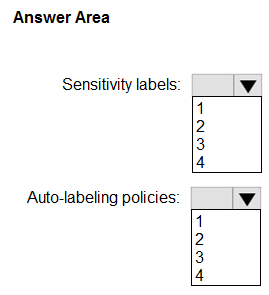
What is the minimum number of sensitivity labels and auto-labeling policies you should create? To answer, select the appropriate options in the answer area.
Community Insight
It tests whether you know a single sensitivity label can include multiple built-in passport SITs and a single auto-labeling policy can detect all four, while the Outlook tooltip and SharePoint/OneDrive block are DLP actions that do not increase the label or auto-labeling-policy count.
This SC-401 hotspot asks for the minimum sensitivity label and auto-labeling policy count to detect US, German, Australian, and Japanese passport numbers. The page establishes that one label and one auto-labeling policy suffice, while Outlook policy tips and SharePoint/OneDrive blocking are delivered by separate DLP policies.
Creating four labels or four auto-labeling policies, one per country, instead of combining the US, German, Australian, and Japanese passport SITs into one label and one auto-labeling policy.
Community Discussion (5 comments)
Comments & Corrections
No comments yet — spotted an error or have a note? Share it below.
Expert Analysis
Why the Answer Is Correct
A sensitivity label's auto-labeling rule can use multiple built-in sensitive information types, so the US, German, Australian, and Japanese passport SITs can all sit in one label definition. One auto-labeling policy can then detect those four SITs and apply that single label across Exchange, SharePoint, and OneDrive for automatic identification. The Outlook tooltip and the SharePoint/OneDrive sharing block are DLP policy actions, not additional label or auto-labeling objects, so they do not raise the requested counts. As deeptha92 noted, the tooltip "can be done with a DLP policy," which matches the separation between labeling and DLP enforcement. The minimum selections are therefore 1 sensitivity label and 1 auto-labeling policy.Why Other Candidate Answers Are Wrong
Answers that use four labels or four auto-labeling policies wrongly assume each country's passport SIT must have its own object; a single rule can contain multiple SITs. Answers that count the Outlook policy tip or the SharePoint/OneDrive block as an auto-labeling policy confuse DLP policy actions with sensitivity-label automation. Counting the tooltip as an additional auto-labeling policy would overcount because auto-labeling applies labels, whereas the Outlook tooltip is a DLP policy tip. Nothing in the three requirements forces a second label or a second auto-labeling policy, so any count above 1/1 lacks support.Community Comment Notes
The high-value comments converge on the 1/1 pair. Eltooth explains that one label can be configured with multiple SITs, and rvln7 adds that one label can represent "Passport data US/DE/AU/JP" while one auto-labeling policy detects the four types. 1a902b2 separates the requirements by stating "The second two are for DLP," which supports excluding the Outlook tooltip and SharePoint/OneDrive block from the label and auto-labeling totals. NeerajSap likewise treats the tooltip as a DLP policy concern. The comments are useful corroboration, but the verdict rests on Microsoft Purview's label and DLP capabilities rather than vote count.Official Reference
Exam Strategy
Separate the counting question from the enforcement actions: count only the sensitivity labels and auto-labeling policies named in the prompt, then map Outlook tooltips and SharePoint/OneDrive blocking to DLP. Remember that one label and one auto-labeling policy can reference multiple country-specific passport SITs, so do not multiply by four.
Frequently Asked Questions
Does one sensitivity label cover US, German, Australian, and Japanese passport numbers?
Yes. A label's auto-labeling rule can reference multiple built-in passport SITs, so the four country types do not require four labels.
Why are the Outlook tooltip and SharePoint/OneDrive block not counted as auto-labeling policies?
Those are DLP policy actions. The question asks only for sensitivity labels and auto-labeling policies, so the DLP policy is separate from the 1 label and 1 auto-labeling policy.