Can Users Delete or Edit Files Under SharePoint Retention Labels?
HOTSPOT
You have a Microsoft SharePoint Online site named Site1 that has the users shown in the following table.
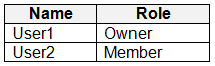 You create the retention labels shown in the following table.
 You publish the retention labels to Site1.
On March 1, 2023, you assign the retention labels to the files shown in the following table.
You publish the retention labels to Site1.
On March 1, 2023, you assign the retention labels to the files shown in the following table.
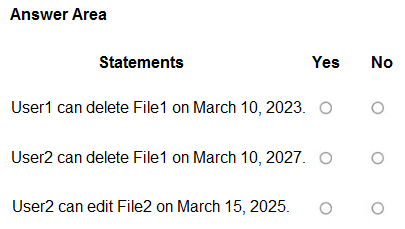
 For each of the following statements, select Yes if the statement is true. Otherwise, select No.
Community Insight
The question tests whether you can convert a retention label's duration into an exact expiry date and whether you know a retain-only label still permits user deletion (unlike a record label).
SharePoint retention labels in Microsoft Purview decide when a labeled file can be deleted, and retain-only labels preserve a copy in the Preservation Hold Library instead of blocking user deletion. This page resolves the three dated statements for File1 (Retention1, retain 4 years) and File2 (Retention2, retain-and-delete 2 years) as Yes, Yes, No.
Many candidates assume a retain-only retention label locks the file so users cannot delete it, and answer No to the first statement; in SharePoint the delete succeeds and the item is simply preserved in the Preservation Hold Library.
Community Discussion (9 comments)
Comments & Corrections
No comments yet — spotted an error or have a note? Share it below.
Expert Analysis
Why the Answer Is Correct
Retention1 is a retain-only label with a four-year duration applied on March 1, 2023, so the retention period ends March 1, 2027. When User1 deletes File1 on March 10, 2023, SharePoint removes it from the library and keeps a copy in the site's Preservation Hold Library for the remainder of the period, so the deletion is allowed and statement 1 is Yes. By March 10, 2027 the four years have elapsed, retention no longer applies, and File1 can be deleted with no hold, so statement 2 is Yes. Retention2 is retain-and-delete for two years, so File2 is automatically removed on March 1, 2025, which means there is nothing for User2 to edit on March 15, 2025, making statement 3 No. The verdict is therefore Yes, Yes, No.Why Other Candidate Answers Are Wrong
A Yes-Yes-Yes answer (as one contributor posted, arguing that "retention keeps a copy, it doesn't lock the file") is half right: deletion is indeed not blocked, but it ignores that Retention2 already deleted File2 two weeks before March 15, 2025. A No-Yes-No answer wrongly treats a retain-only label like a record label; only a label that marks content as a record blocks users from deleting or editing the item, and neither Retention1 nor Retention2 does that. A No-No-No answer confuses retention with a hard lock and also contradicts the 2027 expiry. Note that the question's "delete" means user-visible deletion, not purging the preserved copy from the Preservation Hold Library.Community Comment Notes
RickySmith captured the correct mechanic with "Y - User can delete, but it goes into Preservation Hold" and pointed to the SharePoint retention documentation. Several learners, including belyo and PAPAKIA, landed on the same Yes-Yes-No pattern, and QuwQuw stressed that date arithmetic is where people go wrong. rvln7 raised a fair nuance that "we dont know what they mean by delete" because users can delete a file but cannot purge it from the Preservation Hold Library, and kollyp2000 framed it well: "retention keeps a copy, it doesn't lock the file." When dates are miscalculated, the third statement is the usual casualty, because File2 disappears on March 1, 2025.Verification Tip
Re-derive each date from the labeling date in the table rather than from the date in the statement, and check whether the label is record-marking before deciding that deletion is blocked.Official Reference
Exam Strategy
Take the label's duration and add it to the date the label was applied to get the expiry date, then compare that with the date in the statement. Remember that only labels marking content as a record prevent editing or deletion on SharePoint; retain-only labels allow the delete and preserve a copy behind the scenes.
Frequently Asked Questions
Why can User1 delete File1 on March 10, 2023 when Retention1 retains it for four years?
A retain-only retention label does not block deletion in SharePoint. The deleted file is moved to the site's Preservation Hold Library, where it stays until the label expires on March 1, 2027.
Why can't User2 edit File2 on March 15, 2025 if Retention2 is still within its two years?
Retention2 is retain-and-delete for two years, so File2 was automatically deleted on March 1, 2025. By March 15, 2025 the file is no longer in the library to be edited.