Sensitivity Label Visual Markings in Exchange vs SharePoint
HOTSPOT
You have a Microsoft SharePoint Online site named Site1 and a sensitivity label named Sensitivity1. Sensitivity1 adds a watermark and a header to content.
You create a policy to automatically apply Sensitivity1 to emails in Microsoft Exchange Online and Site.
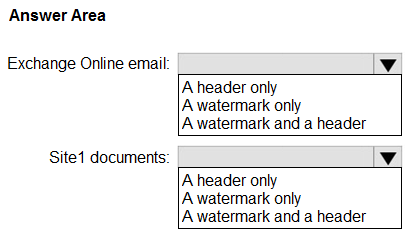
How will Sensitivity1 mark matching emails and Site1 documents? To answer, select the appropriate options in the answer area.
NOTE: Each correct selection is worth one point.
Community Insight
The question tests whether you know that auto-applied sensitivity labels add visual markings like headers and watermarks to both email messages and documents, rather than just one or the other.
This question tests the behavior of sensitivity label visual markings when automatically applied to Microsoft Exchange Online emails versus SharePoint Online documents. It establishes that headers and watermarks are applied differently depending on the content type.
Candidates often assume that because watermarks are primarily a document feature, they do not apply to emails, or conversely, that emails cannot have headers added by DLP/auto-labeling policies.
Community Discussion (4 comments)
Comments & Corrections
No comments yet — spotted an error or have a note? Share it below.
Expert Analysis
Why the Answer Is Correct
When a sensitivity label is configured with visual markings (such as a header and a watermark) and is automatically applied via an Auto-labeling policy, those markings are rendered in the respective client applications. For Exchange Online emails, the header is displayed in the message body or header area, and watermarks can be applied to the message content. For SharePoint Online documents (like Word or Excel files), both the header and the watermark are visible within the document interface. Therefore, Sensitivity1 marks matching emails with 'Watermark and a header' and Site1 documents with 'Watermark and a header'.Why Other Candidate Answers Are Wrong
Selecting 'Header only' for emails ignores the capability of sensitivity labels to apply watermarks to email content if configured. Selecting 'Watermark only' for documents is incorrect because headers are also standard visual markings supported by Office apps. The distinction lies in the fact that the label's configuration applies its defined visual elements to all supported content types where it is auto-applied.Community Comment Notes
As Eltooth noted, the correct selection includes both watermark and header for both items. Kollyp2000 referenced Microsoft Learn documentation confirming that auto-labeling policies apply content markings to both email and documents, supporting the conclusion that both options should select 'Watermark and a header'.Official Reference
Exam Strategy
Review the specific capabilities of sensitivity label visual markings for each content type (Email vs Document). Remember that if a label has both header and watermark settings enabled, they apply to both emails and documents when auto-applied.
Frequently Asked Questions
Can sensitivity labels apply watermarks to Outlook emails?
Yes, if the sensitivity label is configured with a watermark and it is applied to the email, the watermark appears in the email content.
Do auto-labeling policies apply visual markings to SharePoint documents?
Yes, auto-labeling policies can apply visual markings such as headers and watermarks to Office documents stored in SharePoint Online.