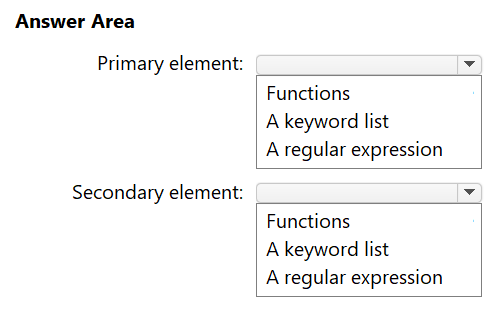
Which primary and secondary elements define the employee ID sensitive info type?
HOTSPOT
You have a Microsoft 365 tenant.
You need to create a new sensitive info type for items that contain the following:
• An employee ID number that consists of the hire date of the employee followed by a three digit number
• The words "Employee", "ID", or "Identification" within 300 characters of the employee ID number
What should you use for the primary and secondary elements? To answer, select the appropriate options in the answer area.
NOTE: Each correct selection is worth one point.
Community Insight
This item tests primary-versus-secondary element selection in a Purview SIT, and the trap is letting the prominent proximity keywords pull you into choosing a keyword list as the primary pattern.
A custom Microsoft Purview sensitive information type uses a primary element for the main pattern and supporting elements for corroborating evidence. For this employee ID scenario, the page establishes that the date-plus-three-digits value requires a regular expression, while the nearby Employee, ID, or Identification terms are a secondary keyword list.
A frequent mistake is choosing a keyword list for the primary element because the words Employee, ID, or Identification are prominent in the requirement, but the primary element must match the structured employee ID, which requires a regular expression.
Community Discussion (5 comments)
Comments & Corrections
No comments yet — spotted an error or have a note? Share it below.
Expert Analysis
Why the Answer Is Correct
A custom sensitive information type in Microsoft Purview distinguishes the main pattern, called the primary element, from corroborating evidence, called supporting elements. Here the employee ID is a variable structured value: a hire date immediately followed by a three-digit number, which is exactly what a regular expression is designed to match. The words "Employee", "ID", and "Identification" do not describe the ID itself; they are proximity evidence, so they belong in a keyword list configured to occur within 300 characters of the primary match. This aligns with the community consensus from Pavol_Misun and MultiCloudIronMan, who both select "A regular expression" for the primary and "A keyword list" for the secondary.Why Other Candidate Answers Are Wrong
Selecting a keyword list as the primary element would only detect the literal words and could never enforce the hire-date-plus-three-digits structure of the employee ID. Using a regular expression for the secondary element is technically possible but misplaces the main pattern: the regex belongs on the ID, while the three nearby terms are fixed strings that a keyword list handles more cleanly. A checksum or function-based primary element is also wrong because the scenario defines no checksum algorithm and no built-in function for date plus three digits. Treating both elements as keyword lists fails the requirement that the ID number itself be recognized as a date-plus-digits pattern.Community Comment Notes
Pavol_Misun, the highest-voted visible comment, and MultiCloudIronMan independently propose "A regular expression" as the primary element and "A keyword list" as the secondary. SSL2 explains the reasoning that "the primary element is the main pattern you want to detect", which directly supports using a regex for the structured employee ID. kollyp2000 adds that the ID is a custom format and that the words are "corroborating evidence", reinforcing the keyword-list secondary. rvln7's short comment "CORRECT regex keyword list" matches the same conclusion, so the visible discussion is consistent with the official Purview SIT design.Official Reference
Exam Strategy
Treat SIT hotspot questions as a pattern-mapping exercise: identify the structured value first, then the corroborating words. Dates, account numbers, and IDs almost always require a regular expression for the primary element, while nearby labels such as Employee, ID, or Identification become a supporting keyword list.
Frequently Asked Questions
Why does the employee ID require a regular expression in a Purview SIT?
The ID combines a hire date with three digits, so its shape varies; only a regex can match that structured date-plus-digits pattern, while a keyword list can only find fixed text.
How does the 300-character requirement map to the secondary element?
It is the proximity window for the supporting keyword list: Employee, ID, or Identification must appear within 300 characters of the regex-matched employee ID.