Does Dismissing the Purview DLP Prompt Allow ChatGPT Pastes and Uploads?
HOTSPOT
You have a Microsoft 365 ES subscription that contains a user named User1. The subscription contains an Endpoint data loss prevention (Endpoint DLP) policy as shown in the Actions exhibit. (Click the Actions tab.)
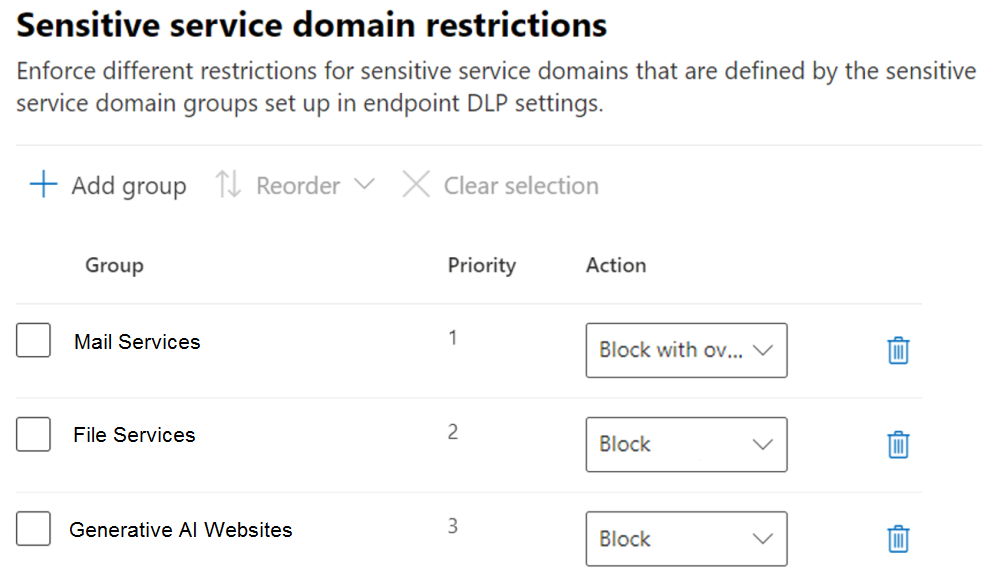
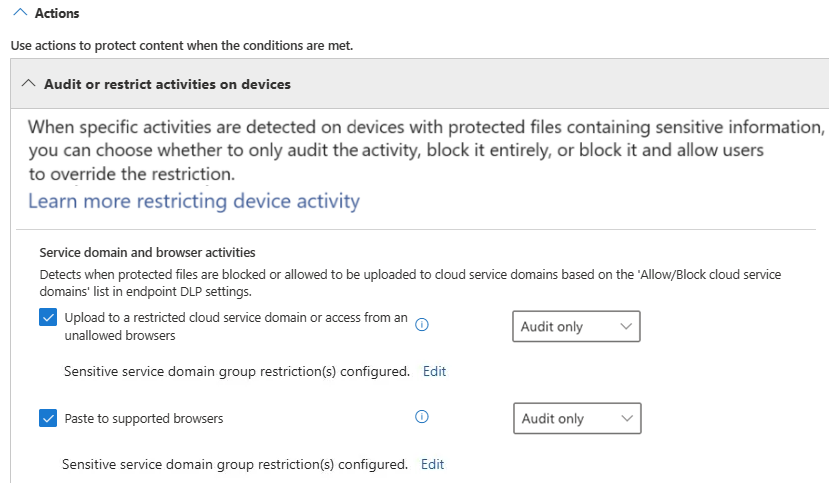 You configure the Upload to a restricted cloud service domain or access from an unallowed browsers settings as shown in the Upload restrictions exhibit. (Click the Upload restrictions tab.)
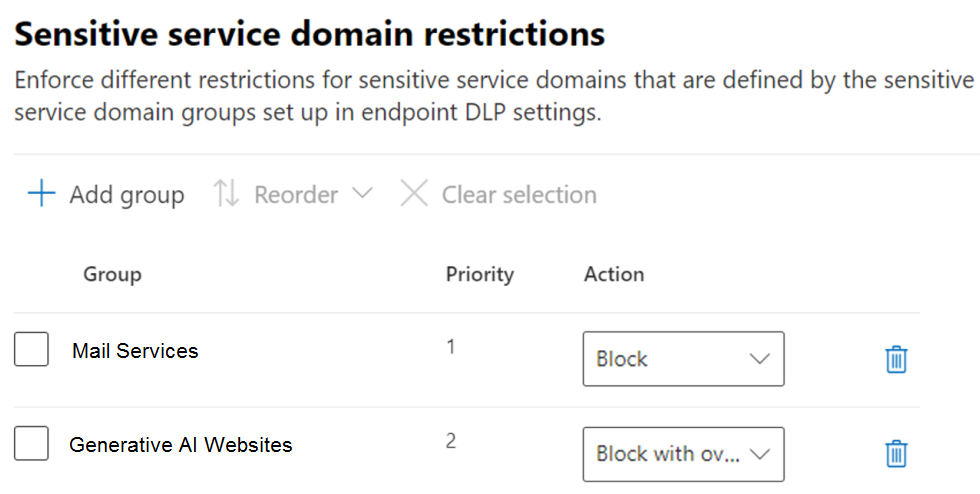
 You configure the Paste to supported browsers settings as shown in the Paste restrictions exhibit. (Click the Paste restrictions tab.)
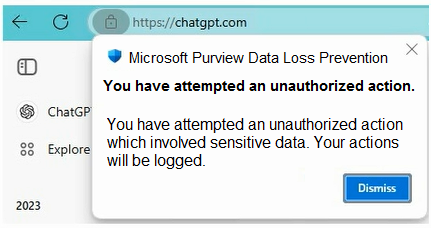
 When User1 pastes content into ChatGPT, the user receives the error message shown in the Error exhibit. (Click the Error tab.)
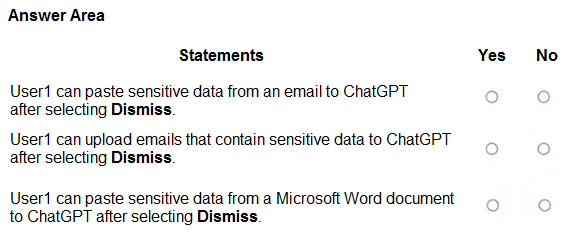
 For each of the following statements, select Yes if the statement is true. Otherwise, select No.
NOTE: Each correct selection is worth one point.
For each of the following statements, select Yes if the statement is true. Otherwise, select No.
NOTE: Each correct selection is worth one point.
Community Insight
The exam tests whether you know that a Dismiss button on an Endpoint DLP notification is an acknowledgement, not an override — only an explicit override with business justification (under Block with override) lets the action proceed.
Endpoint DLP policies can block pasting sensitive content into supported browsers and uploading to restricted cloud service domains such as the Generative AI Websites group. This page confirms that clicking Dismiss on the Purview DLP notification only closes the alert and never overrides a blocked paste or upload, so all three Yes/No statements are answered No.
Candidates assume the DLP toast is advisory and that dismissing it lets the paste or upload continue, confusing 'Audit only' behaviour with a blocking action, or confusing 'Dismiss' with the explicit override flow.
Community Discussion (8 comments)
Comments & Corrections
No comments yet — spotted an error or have a note? Share it below.
Expert Analysis
Why the Answer Is Correct
Endpoint DLP controls pasting into supported browsers and uploads to restricted cloud service domains independently of the notification UI, and the Dismiss button in a Purview DLP toast merely closes the message — it does not lift the restriction. When the action is set to Block (or Block with override), the sensitive content never reaches ChatGPT: the paste is stopped in the browser before the text is inserted, and the upload to a domain in the Generative AI Websites group is stopped at the network layer. Because the exhibit's toast offers only Dismiss, no override path is presented, so the restriction persists for pastes from email, pastes from Word, and file uploads alike. Every statement that relies on clicking Dismiss to restore the action is therefore false, producing No, No, No.
Why Other Candidate Answers Are Wrong
An all-Yes answer treats the DLP prompt as audit-only and assumes the user can proceed; that would only be true if the Actions tab were configured as Audit only rather than Block or Block with override, and the presence of a blocking error toast rules that out. A mixed Yes/No answer usually assumes that pasting from email or Word is treated differently from uploading a file, but Endpoint DLP evaluates the content by sensitive information type, not by the source application, so identical sensitive data is blocked the same way. Another misconception is that Dismiss equals Override — with Block with override the user must actively pick an override option and typically supply a business justification, and the action is permitted only for a short window.
Community Comment Notes
The strongest consensus in the thread leans to No No No, with Eltooth summing it up as "Dismiss only closes the message; the paste remains blocked" and noting that uploads to Generative AI Websites are fully blocked. kollyp2000 and JamesM9 make the same doctrinal point, explaining that Dismiss just closes the notification while an override under Block with override requires an explicit choice, and JamesM9 adds that if the pop-up only shows Dismiss there is no override available at all. John_Chee argued Yes Yes Yes on the theory that the Actions tab is Audit only, but that position contradicts the blocking error shown in the exhibit and was not supported by the majority. Alcpt's remark that "1 and 3 allow override" reflects a reading that override capability exists in the policy, yet without an override control in the toast the user still cannot complete the action.
Official Reference
Exam Strategy
When a hotspot question shows a Purview DLP notification, read the buttons in the toast before anything else: if only Dismiss appears, treat the action as blocked regardless of how the Actions tab is described. Then check whether the statement concerns paste (browser channel) or upload (cloud service domain channel), because each is governed by its own restriction setting.
Frequently Asked Questions
Why doesn't clicking Dismiss on the Purview DLP prompt let the paste into ChatGPT go through?
Dismiss only closes the notification. The browser paste is stopped by the Endpoint DLP policy itself, and only an explicit override under the Block with override action would permit it.
Would the answer change if the Paste to supported browsers setting were Audit only?
Yes. With Audit only the event is logged but the paste is not blocked, so the user could proceed; the exhibit's blocking error shows the restriction is enforced.