How Do Purview Audit Retention Policy Priorities Apply to User Actions?

Implement and manage retention Manage information security alerts and activities
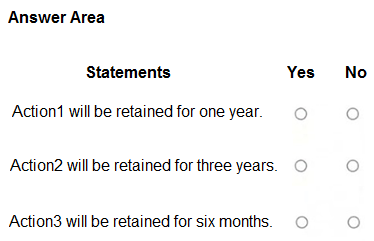
Answer Statement 1 is No, Statement 2 is Yes, and Statement 3 is Yes: Action1 is retained for three years under RP2, Action2 for three years under RP2, and Action3 for six months under RP4.

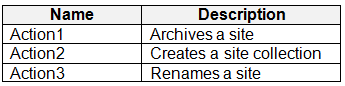
HOTSPOT You have a Microsoft 365 E5 subscription that uses Microsoft Purview Audit (Premium) with the 10-Year Audit Log Retention add-on license. The subscription contains the audit retention policies shown in the following table. exhibit From the SharePoint Online admin center, User1 performs the actions shown in the following table. exhibit For each of the following statements, select Yes if the statement is true. Otherwise, select No. NOTE: Each correct selection is worth one point. exhibit

Community Insight

The exam tests whether you can match each SharePoint action to every applicable audit retention policy and then apply Purview's priority rule, where the lowest number outranks duration and broader 'all activities' scopes.

This SC-401 hotspot tests Microsoft Purview Audit (Premium) retention policy precedence when multiple policies cover SharePoint Online actions by User1. The page establishes the correct Yes/No selections: Action1 No, Action2 Yes, and Action3 Yes, based on the lowest priority number winning.

Learners often assume the longest retention duration wins or that the highest-priority policy controls every action, instead of first filtering policies by activity scope and then selecting the lowest priority number.

Community Discussion (11 comments)

kollyp2000 👍 1
“This value determines the order in which audit log retention policies in your organization are processed. A lower value indicates a higher priority... a policy with a value of 5 takes priority over a policy with a value of 10.” A policy can also cover “All activities in one or more Microsoft services.” That’s what RP2’s None means: every SharePoint activity by User1. Source for both quotes: Manage audit log retention policies, https://learn.microsoft.com/purview/audit-log-retention-policies#create-an-audit-log-retention-policy Policies in processing order Priority Policy Applies to Duration 10 RP4 Renamed site 6 months 20 RP2 All SharePoint activities 3 years 30 RP1 Created site collection 1 year 40 RP3 Created site collection 3 years Statement 1: Action1 (archive a site), 1 year? No. Only RP2 matches, since no policy names archiving. So it’s kept for 3 years, not 1. The 1-year figure is the trap from the default Audit (Premium) policy, but Learn says “Any custom audit log retention policy takes priority over the default policy.” Source: same page. Statement 2: Action2 (create site collection), 3 years? Yes. RP2, RP1 and RP3 all match. RP2 has the lowest number (20), so it wins, giving 3 years. RP3 also says 3 years but has the lowest priority (40), so it isn’t the reason. Statement 3: Action3 (rename a site), 6 months? Yes. RP4 and RP2 both match. RP4’s priority is 10, which beats RP2’s 20, so the shorter 6 months applies. A higher-priority policy can shorten retention. Learn gives a similar example for the default policy: a custom policy “shorter than one year” means records “are retained for the shorter duration.”
rvln7 👍 4
Action 1: Archives a site Matches: - Only RP2 (None/All). Result: 3 Years. Statement: "Action1 will be retained for one year." Answer: No (It is 3 years). Action 2: Creates a site collection Matches: - RP1 (Priority 30) - RP2 (Priority 20) - RP3 (Priority 40) Winning Policy: RP2 (Priority 20 is the lowest number/highest priority). Result: 3 Years. Statement: "Action2 will be retained for three years." Answer: Yes Action 3: Renames a site Matches: - RP4 (Priority 10) - RP2 (Priority 20) Winning Policy: RP4 (Priority 10 is the lowest number/highest priority). Result: 6 Months. Statement: "Action3 will be retained for six months." Answer: Yes https://learn.microsoft.com/en-us/purview/audit-log-retention-policies
MultiCloudIronMan 👍 2
N N Y given is correct
rvln7 👍 1
RP2 has not higher priority than RP4---- rp2-20 rp4-10 so act3 is yes
Alcpt 👍 3
N - RP2 N - RP1 (priority 30) dont get caught by RP3 which has priority of 40! Y - RP4
Alcpt 👍 2
N Y Y as per florinvele
Alcpt 👍 3
first answer is wrong, heres my update: act1 = RP2 = No, act2 = RP3 = yes, act3 = RP2 = no, ( remember that RP2 has higher priority than RP4 and is "none" = "all actions")
Ender3 👍 3
I could not find any evidence that when there is overlapping scope between two audit retention policies, the longer duration wins regardless of priority. I know this principle applies to records retention but if it were applicable here it would have been explicitly stated somewhere. The materials only state that a policy with a higher priority (lower number) takes precedence here: https://learn.microsoft.com/en-us/purview/audit-log-retention-policies. Based on that, my answers are as follows: 1. No. Since there is no retention policy specific to the "Archives a site" activity, RP2 applies, so retention should be 3 years, not 1. 2. No. RP1 and RP3 apply to "Create site collection" activity, and since RP1 has a higher priority, it takes effect, and the retention shall be 1 year, not 3. 3. Yes. Only RP4 is specific to the "Renamed site" activity, so 6 months is correct.
Eltooth 👍 1
No Yes No - the 1 year retention takes precedence over the 6 month. When multiple retention policies apply to the same content—such as a SharePoint site or Microsoft 365 group—the longest retention period always wins. This is a core principle of Microsoft Purview’s retention engine. So in your case: If a 1-year and a 6-month retention policy are both applied to the same site, The 1-year policy will take precedence. This ensures that content is not deleted prematurely if any policy requires it to be retained longer.
florinvele 👍 23
NO - Action1 is retained 3 years based on RP2 (RP4 has highest prio but does not include the action mentioned) YES - Action2 is retained 3 years based on RP2 YES - Action3 is retained 6 months based on RP4 (highest prio)
Gtc_ 👍 1
No, Yes, No

Comments & Corrections

No comments yet — spotted an error or have a note? Share it below.

Log in to comment, report an error, or add a note about this question.

Submitted for moderation before publishing. Keep it helpful and respectful.

Expert Analysis

Why the Answer Is Correct

The statements resolve to No, Yes, Yes because Purview Audit (Premium) evaluates each action against every retention policy whose service/activity scope matches, then applies the policy with the lowest priority number. Action1, archiving a site, is not covered by RP4, so the broad RP2 policy with a three-year duration controls it, making the one-year statement false. Action2, creating a site collection, matches RP1, RP2, and RP3, but RP2's priority 20 outranks RP1's 30 and RP3's 40, so the three-year statement is true. Action3 matches RP4 at priority 10 and RP2 at priority 20; because 10 is higher priority, RP4's six-month retention wins, making the six-month statement true.

Why Other Candidate Answers Are Wrong

A No/No/Yes pattern fails because it ignores RP2's 'None/All' scope for Action2; once RP2 is recognized as covering all SharePoint activities, its priority 20 beats RP1 and RP3 for the site-collection creation. A No/Yes/No pattern fails because it treats RP2 as higher priority than RP4; numerically RP4's priority 10 is the highest priority, so Action3 cannot fall back to RP2's three-year duration. The longest-duration argument is also wrong for audit retention policies: Purview applies policy priority first, not the longest configured retention. Confusing content retention's longest-period rule with audit retention precedence is the main source of the N/Y/N and N/N/Y variants.

Community Comment Notes

florinvele's highly upvoted breakdown reaches the same No/Yes/Yes result, explaining that "Action3 is retained 6 months based on RP4" and that RP4 "does not include" the first action. rvln7 walks through the same policy matching for Action1 and Action2, tying the site-archive action to RP2 and the site-collection creation to RP2's priority 20. kollyp2000 clarifies that RP2's "None" scope means "every SharePoint activity by User1," which is essential for rejecting the No/No/Yes reading. Ender3 questioned whether a longer duration overrides priority and pointed back to Microsoft's priority documentation, while Alcpt's later comments illustrate how easy it is to invert RP2 and RP4's precedence.

Official Reference

Exam Strategy

Read each action separately, list every policy whose service/activity scope includes it, then discard all but the lowest priority number. Do not compare durations until you have applied the priority rule; a broad 'None/All activities' policy applies unless a more specific higher-priority policy covers the same action.

Frequently Asked Questions

Why does Action3 use RP4's six-month retention instead of RP2's three-year retention?

RP4 has priority 10, a lower number than RP2's priority 20, so RP4 takes precedence for actions it covers. Purview audit retention policy priority overrides a broader all-activities policy with a longer duration.

Does an audit retention policy with 'None' activities apply to all SharePoint actions?

Yes, in this scenario RP2's None/All scope covers every SharePoint activity by User1. It applies unless a higher-priority policy such as RP4 specifically covers the same action.

More SC-401 FAQ →

Related Analysis

← Back to SC-401 Study Guide