How Do You Build a Regex SIT for pjt123456sct Project Codes?
HOTSPOT
You have a Microsoft 365 E5 subscription that uses Microsoft Purview.
You need to create a sensitive information type (SIT) to detect project code content that starts with the letters pjt followed by six digits and ends with the letters sct. The following is an example of the project code.
pjt123456sct
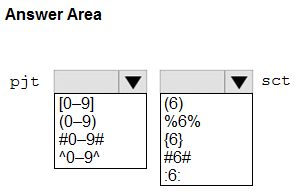
How should you complete the regular expression? To answer, select the appropriate options in the answer area.
NOTE: Each correct selection is worth one point.
Community Insight
This hotspot tests whether you can translate a literal prefix, an exact six-digit count, and a literal suffix into Purview SIT regex; the trap is misplacing the {6} quantifier or using + instead of an exact count.
A Microsoft Purview custom sensitive information type for project code pjt123456sct must use a regular expression that matches the literal pjt prefix, exactly six digits, and the literal sct suffix. This page confirms the correct pattern is pjt[0-9]{6}sct and explains why the {6} quantifier is the key hotspot selection.
A common mistake is writing pjt[0-9]sct or pjt[0-9]+sct, which matches only one digit or any number of digits instead of exactly six; the {6} quantifier must follow the digit class, not the pjt literal.
Community Discussion (5 comments)
Comments & Corrections
No comments yet — spotted an error or have a note? Share it below.
Expert Analysis
Why the Answer Is Correct
The required token begins with the literal characterspjt, then has exactly six decimal digits, then ends with literal sct. In a Microsoft Purview custom SIT regex, [0-9] denotes a single digit and the quantifier {6} repeats that class exactly six times, so pjt[0-9]{6}sct describes pjt123456sct precisely. Because the question asks how to complete the regular expression rather than how to configure thresholds or labels, the quantified digit class is the decisive element. The literal sct must remain after the six digits, not inside the quantifier.Why Other Candidate Answers Are Wrong
A choice such aspjt[0-9]sct accepts only one digit, while pjt[0-9]{5}sct accepts five digits and fails the six-digit requirement. pjt[0-9]+sct is also wrong because + means one or more digits, so it would match pjt1sct or pjt1234567sct. Writing pjt{6}[0-9]sct repeats the literal prefix pjt six times instead of repeating the digit class, and omitting the digit class entirely cannot match the numeric middle section. Anchors may be used in some SIT designs to constrain a match, but they are not the required completion for the prefix-six-digits-suffix pattern shown here.Community Comment Notes
Eltooth's explanation breaks the pattern into "pjt: Matches the literal characters", a digit class, and a six-repeat quantifier. MultiCloudIronMan notes that "Microsoft Learn confirms that custom SITs use regular expressions" and emphasizes[0-9]{6} as the six-consecutive-digit syntax. gabbinu and deeptha92 both confirm the given answer pjt[0-9]{6}sct, while NeerajSap restates the three-part requirement of pjt, exactly six digits, and sct. The visible comments align on the same regex construction, with no dissent in the provided discussion. Official Reference
Exam Strategy
In hotspot regex questions, translate each phrase into a token before touching the dropdowns: literal prefix, exact digit count with {6}, literal suffix. Verify the quantifier attaches to the digit class rather than to pjt, because moving it changes the meaning.
Frequently Asked Questions
Does pjt[0-9]{6}sct need ^ and $ anchors in a Purview custom SIT?
Not for the requested pattern. Purview can match the token within scanned content; anchors only constrain the match to the start or end of a line or string if the SIT design specifically requires that.
Why is pjt[0-9]{6}sct preferred over pjt[0-9]+sct for the six-digit project code?
The + quantifier accepts one or more digits, so it would also match pjt1sct or pjt1234567sct; {6} enforces exactly six digits as required.