DLP Block Everyone: Who Can Access File1 on Site1?
HOTSPOT
You have a Microsoft 365 E5 subscription that contains a Microsoft SharePoint Online site named Site1 and the users shown in the following table.
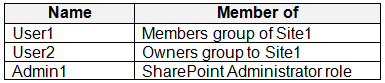 You have a data loss prevention (DLP) policy named DLP1 as shown in the following exhibit.
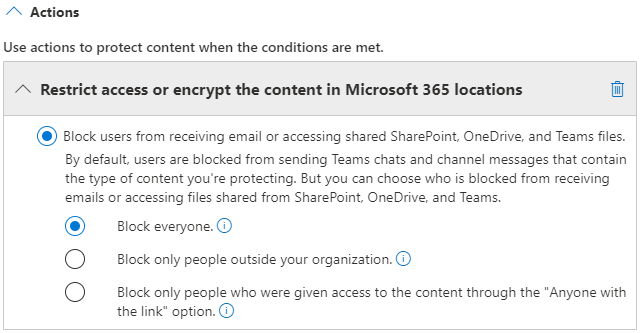 You apply DLP1 to Site1
User1 uploads a file named File1 to Site1. File does NOT match any of the DLP1 rules. User2 updates File1 to contain data that matches the DLP1 rules.
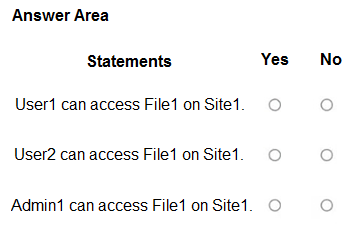
For each of the following statements, select Yes if the statement is true. Otherwise, select No.
NOTE: Each correct selection is worth one point.
You apply DLP1 to Site1
User1 uploads a file named File1 to Site1. File does NOT match any of the DLP1 rules. User2 updates File1 to contain data that matches the DLP1 rules.
For each of the following statements, select Yes if the statement is true. Otherwise, select No.
NOTE: Each correct selection is worth one point.
Community Insight
The question tests the DLP 'Block everyone' exceptions — content owner, last modifier, and site admin — and the trap is treating the tenant SharePoint Administrator as a site admin.
This SC-401 hotspot tests a SharePoint DLP policy set to Block everyone after User2 modifies File1 to match DLP1. The page establishes Yes/Yes/No: the content owner and last modifier keep access, while a SharePoint Administrator does not automatically gain site-admin access.
The common wrong approach is marking all three Yes because a SharePoint Administrator supposedly always retains access, or because DLP only blocks external sharing; DLP's block-everyone action does affect internal access but exempts only the specified roles.
Community Discussion (11 comments)
Comments & Corrections
No comments yet — spotted an error or have a note? Share it below.
Expert Analysis
Why the Answer Is Correct
DLP1 applies to Site1 and uses the SharePoint 'Block everyone' action, so access is restricted to the content owner, last modifier, and site admin. User1 uploaded File1 and remains the content owner, so User1 can still access it. User2 made the matching edit, so User2 is the last modifier and also retains access. Admin1 is only a SharePoint Administrator, not a site collection admin for Site1, so Admin1 does not inherit the DLP exception and cannot open File1 directly. That makes the three selections Yes, Yes, No.Why Other Candidate Answers Are Wrong
The all-Yes answer incorrectly treats Admin1's SharePoint Administrator role as the 'site admin' exception in the DLP documentation. The all-Yes answer also overlooks that block-everyone does affect internal users, even though block-external-only policies would not. A No for User2 is wrong because the last modifier is explicitly retained. A No for User1 is wrong because the uploader remains the owner.Community Comment Notes
Eltooth and Caezarlay both land on Yes/Yes/No, with Caezarlay arguing that a SharePoint administrator "cannot open file directly unless they are given permission". rvln7 points learners to the DLP policy reference and the "block everyone" action. Scrambles makes the decisive distinction that Admin1 is "a SharePoint Administrator, not a site admin". JamesM9 and ironbeardyyc quote the same exception but incorrectly extend "site admin" to Admin1.Official Reference
Exam Strategy
Read the DLP1 action first: 'Block everyone' behaves differently from external-only blocking. Then map each user to the exact exceptions — content owner, last modifier, and site collection admin — without assuming that a tenant-level SharePoint Administrator is a site admin.
Frequently Asked Questions
Does DLP 'Block everyone' in SharePoint block the file owner and last modifier?
No. The block-everyone action continues access for the content owner, last modifier, and site admin, so User1 and User2 retain access to File1.
Is a SharePoint Administrator automatically a site admin for DLP access?
No. The DLP exception is for a site admin, meaning a site collection administrator for Site1; Admin1's tenant SharePoint Administrator role does not automatically grant that access.