Do DLP Policies Trigger Insider Risk Management Alerts?
HOTSPOT
You have a Microsoft 365 E5 subscription that contains the users shown in the following table.
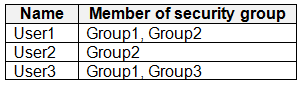 You have the data loss prevention (DLP) policies shown in the following table.
 From Insider risk management, you configure a priority user group named PriGroup1 that contains User3 as a member.
You have the insider risk policies shown in the following table.
From Insider risk management, you configure a priority user group named PriGroup1 that contains User3 as a member.
You have the insider risk policies shown in the following table.
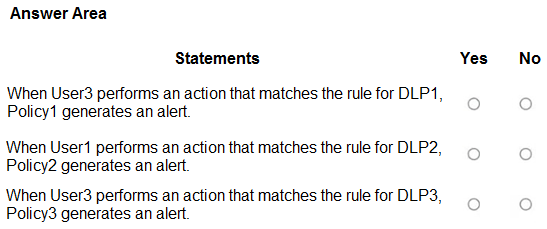
 For each of the following statements, select Yes if the statement is true. Otherwise, select No.
NOTE: Each correct selection is worth one point.
For each of the following statements, select Yes if the statement is true. Otherwise, select No.
NOTE: Each correct selection is worth one point.
Community Insight
The question tests whether a DLP match triggers an IRM alert through Policy1, Policy2, or Policy3; the trap is assuming medium-severity DLP2 or DLP3 still qualifies because the user is in scope.
This scenario tests how Microsoft Purview Insider Risk Management policies consume DLP incidents as alert triggers for User1 and User3. The page establishes Yes for the DLP1/Policy1 path, No for DLP2/Policy2, and No for DLP3/Policy3.
The common mistake is treating any DLP match in a linked policy, or any priority-user-group membership, as sufficient to generate an Insider Risk Management alert. That produces Yes/Yes/Yes or Yes/Yes/No, but the missing gate is that only high-severity DLP incidents qualify.
Community Discussion (14 comments)
Comments & Corrections
No comments yet — spotted an error or have a note? Share it below.
Expert Analysis
Why the Answer Is Correct
Insider Risk Management does not treat every DLP match as an alertable event. Microsoft's configuration guidance requires the DLP policy's Incident reports severity to be High for that DLP policy to serve as an IRM triggering event. Here DLP1 is high severity and User3 is in Group1, so User3's DLP1 match triggers Policy1: statement 1 is Yes. DLP2 and DLP3 are medium severity; even though User1 and User3 may be in the right groups and Policy2/Policy3 are linked to those DLP policies, medium-severity incidents do not generate the IRM alert, so statements 2 and 3 are No. PriGroup1 containing User3 does not override the severity gate for Policy3.Why Other Candidate Answers Are Wrong
An all-Yes answer assumes group membership and DLP-to-policy linkage are sufficient; that ignores the high-severity requirement. A Yes/Yes/No pattern often comes from focusing on User3's existing alert or the priority group, but DLP3 still fails on severity. A No/Yes/Yes answer reverses the logic: it discounts DLP1's high-severity match while accepting medium-severity DLP2 and DLP3. The correct reasoning is severity first, eligibility second.Community Comment Notes
Jideakin's comment identifies the decisive documentation: IRM alerts are not generated when DLP Incident reports are set to Low or Medium. subhuman and kanag1 reach the same Yes/No/No result, with kanag1 noting that medium-severity rules do not qualify and DLP1's high-severity match triggers Policy1 for User3. Some learners answered all Yes or Yes/Yes/No; rvln7's aggregation note about a single alert per user is a real IRM behavior but not a reason to count a medium-severity DLP3 match. Eltooth correctly rechecks User1's Group2 membership, but group eligibility cannot overcome the medium severity of DLP2.Official Reference
Exam Strategy
Read the DLP policy's Incident reports severity before checking group membership. In IRM-by-DLP hotspots, high severity is the gating condition; a matching user/group is necessary but not sufficient, so eliminate any statement relying on Low or Medium.
Frequently Asked Questions
Why does a medium-severity DLP match not create an Insider Risk Management alert?
IRM only uses high-severity DLP incidents as qualifying triggers for the Data leaks and priority-user templates, so DLP2 and DLP3 medium matches do not alert.
Does User3's PriGroup1 membership make DLP3 trigger Policy3?
No. Priority-user membership scopes Policy3 to User3, but DLP3's medium Incident reports severity still fails the high-severity trigger requirement.