How Do AutoApply1 and Retention1 Apply to Microsoft 365 Group Resources?
HOTSPOT
You have a Microsoft 365 E5 subscription that contains two Microsoft 365 groups named Group1 and Group2. Both groups use the following resources:
A group mailbox
Microsoft Teams channel messages
A Microsoft SharePoint Online teams site
You create the objects shown in the following table.
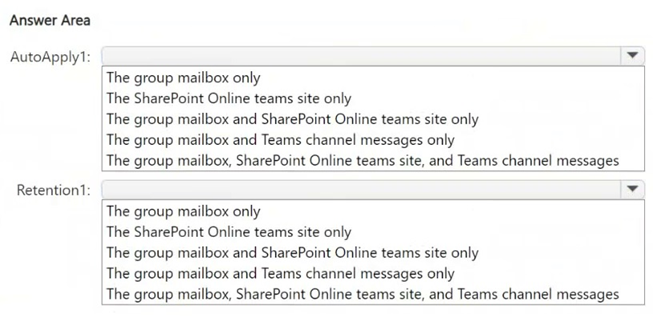
 To which resources will AutoApply1 and Retention1 be applied? To answer, select the appropriate options in the answer area.
NOTE: Each correct selection is worth one point.
To which resources will AutoApply1 and Retention1 be applied? To answer, select the appropriate options in the answer area.
NOTE: Each correct selection is worth one point.
Community Insight
The exam tests the different Microsoft 365 Groups location scope for retention labels versus retention policies; the trap is assuming the group's Teams channel messages are included automatically.
This SC-401 hotspot tests how Microsoft 365 Groups scopes differ between auto-applied retention labels and retention policies. It establishes that AutoApply1 reaches only the SharePoint teams site, while Retention1 covers the group mailbox and SharePoint teams site but not Teams channel messages.
The common mistake is treating a Microsoft 365 group as a single container that automatically includes Teams channel messages for both labels and policies; in Purview, Teams messages require the separate Teams channel messages location.
Community Discussion (14 comments)
Comments & Corrections
No comments yet — spotted an error or have a note? Share it below.
Expert Analysis
Why the Answer Is Correct
AutoApply1 is an auto-apply retention label policy scoped to Group1, and Microsoft Purview's Microsoft 365 Groups location for retention labels includes only the SharePoint teams site; it does not extend to the group mailbox or Teams channel messages. Retention1 is a retention policy scoped to Group2, and the same Microsoft 365 Groups location for retention policies includes the group mailbox and the SharePoint teams site. Teams channel messages are a separate Purview location, so they are not automatically covered just because they belong to the group's team. Therefore the hotspot selections are SharePoint Online teams site only for AutoApply1, and group mailbox plus SharePoint Online teams site for Retention1. The answer should reflect no Teams channel messages for either object unless an explicit Teams location were selected.Why Other Candidate Answers Are Wrong
The answer that adds Teams channel messages to Retention1 confuses a team's backing Microsoft 365 group with the separate Teams channel messages workload; group-scoped retention does not silently include that location. Answers that add the group mailbox to AutoApply1 override the documented label scope: "retention labels include the SharePoint teams site only" as SSL2 noted. Answers that add only the mailbox and site for both objects miss that the label policy's Microsoft 365 Groups scope is narrower than the retention policy's scope. The "cannot mix Teams and other workloads" argument is not the determining issue here; the selected location is what limits Retention1.Community Comment Notes
Jdr379, Eltooth, and gabbinu expected Retention1 to cover Teams channel messages, but that assumption is not supported by the group location's scope. rvln7 and SSL2 focused on the key distinction, with SSL2 summarizing that "retention labels include the SharePoint teams site only" for the Microsoft 365 Groups location. Other commenters debated whether a policy can mix Teams and non-Teams locations; regardless of that debate, Retention1 is scoped to Group2's group location, so Teams channel messages require a separate Teams channel messages selection. Newb007's conclusion that both objects are limited to the group mailbox and SharePoint site is partly right for Retention1 but too broad for AutoApply1.Official Reference
Exam Strategy
Map each object to its Purview workload location before answering: an auto-apply retention label scoped to a Microsoft 365 group touches only the SharePoint teams site, while a retention policy scoped to that group touches the group mailbox and SharePoint site. Do not add Teams channel messages unless the policy explicitly selects the Teams channel messages location.
Frequently Asked Questions
Does AutoApply1 apply to Group1's group mailbox?
No. For retention labels, the Microsoft 365 Groups location includes only the SharePoint teams site, so AutoApply1 does not cover the group mailbox or Teams channel messages.
Does Retention1 include Group2's Teams channel messages?
Not from the group location alone. A policy scoped to Microsoft 365 Groups covers the group mailbox and SharePoint teams site; Teams channel messages need the separate Teams location.