What must be deployed to Edge and Chrome for insider risk USB copy signals?
HOTSPOT
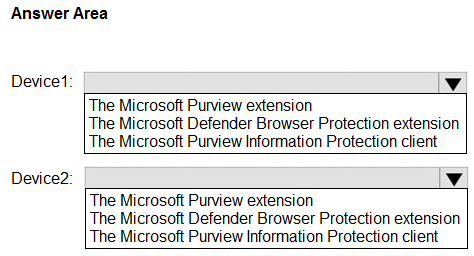
You have a Microsoft 365 E5 subscription that contains two Windows devices named Device1 and Device2. Device1 has the default browser set to Microsoft Edge. Device2 has the default browser set to Google Chrome.
You need to ensure that Microsoft Purview insider risk management can collect signals when a user copies files to a USB device by using their default browser.
What should you deploy to each device? To answer, select the appropriate options in the answer area.
NOTE: Each correct selection is worth one point.
Community Insight
The item tests the browser-signal prerequisite for insider risk management and traps candidates into giving Edge only built-in capabilities or the Information Protection client instead of the Purview extension.
This SC-401 hotspot asks which component lets Microsoft Purview insider risk management collect browser copy-to-USB signals on Edge and Chrome. It establishes that the Microsoft Purview extension is needed on both Device1 and Device2, not a file-labeling client.
A common error is choosing the Microsoft Purview Information Protection client for Device1 because Edge is Microsoft-native, while assigning the browser extension only to Chrome. That client labels files and does not provide the browser telemetry insider risk management needs for copy-to-USB events.
Community Discussion (9 comments)
Comments & Corrections
No comments yet — spotted an error or have a note? Share it below.
Expert Analysis
Why the Answer Is Correct
Microsoft Purview insider risk management relies on browser signal collection to see copy-to-USB actions performed in a browser. On Device1, Edge is the default browser, but Edge does not collect the required insider risk browser signals by itself; the Microsoft Purview extension (Microsoft Compliance Extension) must be deployed as an add-on. On Device2, Chrome likewise requires the same Microsoft Purview extension because Chrome has no native Purview signal integration. Therefore the answer area must select the Microsoft Purview extension for both Device1 and Device2, matching the question's requirement to collect signals from the user's default browser.Why Other Candidate Answers Are Wrong
The Microsoft Purview Information Protection client is a file labeling/classification component, not the browser add-on that captures copy-to-USB telemetry from Edge or Chrome. Selecting it for Device1 or either device would not satisfy the default-browser signal requirement and would leave the Chrome or Edge copy action invisible to insider risk management. Similarly, assuming Edge needs no deployment because of built-in browser capabilities is wrong for this specific insider risk signal scenario; the extension add-on is still part of the supported path. A mixed answer that puts the extension only on Chrome and a different client on Edge misreads the per-device browser requirement.Community Comment Notes
Ender3 and kanag1 both summarize the practical answer as "MS Purview Extension for both devices", and Caezarlay spells out the same extension for Device1 (Edge) and Device2 (Chrome). kollyp2000 raises the Information Protection client but describes it as something that "labels and classifies files", which actually distinguishes it from the browser extension needed here. JamesM9 points to the insider-risk browser-support documentation and says "The answer to both of these is Purview", while rvln7 adds the Chrome DLP extension article as supporting context. MultiCloudIronMan and Eltooth suggest the Information Protection client for Device1, but that minority view conflicts with the documented browser-extension requirement.Official Reference
Exam Strategy
Treat each device independently and map the default browser to the Purview browser signal source before considering any labeling client. When the scenario asks for insider risk browser copy-to-USB signals, select the Purview/Compliance extension for both Edge and Chrome rows.
Frequently Asked Questions
Does Edge need the Microsoft Purview extension for insider risk USB copy signals, or are built-in capabilities enough?
Edge still needs the Microsoft Purview extension add-on in this scenario; built-in Edge capabilities alone do not satisfy the insider risk management browser signal collection described.
Why is the Microsoft Purview Information Protection client not the right choice for Device1?
The Information Protection client labels and classifies files; it does not provide the browser extension telemetry that insider risk management uses when a user copies files to USB from Edge.