Can the Purview Information Protection Client Label PNG, Folders, and DOCX?
HOTSPOT
You have a Microsoft 365 E5 subscription that contains the resources shown in the following table.
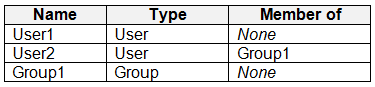 The subscription contains a Windows 11 device named Device1 and has the Microsoft Purview Information Protection client installed. Device1 contains the resources shown in the following table.
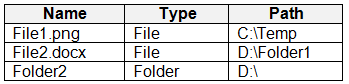 You publish a sensitivity label named Label1 to User1 and Group1.
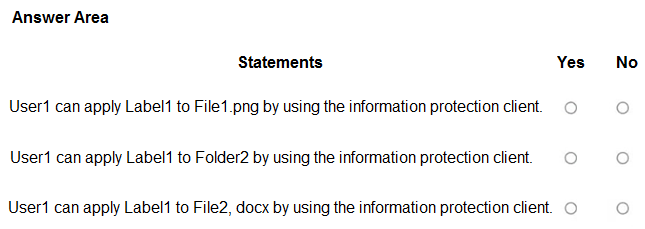
For each of the following statements, select Yes if the statement is true, Otherwise, select No.
NOTE: Each correct selection is worth one point.
You publish a sensitivity label named Label1 to User1 and Group1.
For each of the following statements, select Yes if the statement is true, Otherwise, select No.
NOTE: Each correct selection is worth one point.
Community Insight
It tests the client's file-scope labeling capability: supported images and Office files can receive Label1, but a folder cannot, and the unspecified non-Office labeling setting does not block the PNG.
This SC-401 hotspot asks whether User1 can use the Microsoft Purview Information Protection client on Device1 to label a PNG file, a folder, and a DOCX file. The statements resolve to Yes, No, Yes.
Learners often mark the PNG as No because 'Enable labeling of non-Office files' is not explicitly enabled, or they mark the folder as Yes because files inside it can be labeled; the client labels supported individual files, not directories.
Community Discussion (6 comments)
Comments & Corrections
No comments yet — spotted an error or have a note? Share it below.
Expert Analysis
Why the Answer Is Correct
The hotspot outcome is Yes, No, Yes because Label1 is published to User1, and the Microsoft Purview Information Protection client on Device1 is designed to label supported individual files rather than containers. File1.png is a supported image type, and C:\Temp is not one of the client's excluded system locations, so User1 can apply Label1 to it. Folder2 cannot receive Label1 directly: as gabbinu summarized, "The client labels files only, not folders." File2.docx is an Office document, so the client can label it even though Office applications also expose a Sensitivity button. The group publication to Group1 does not change these answers because every statement asks about User1, who receives Label1 directly.Why Other Candidate Answers Are Wrong
A No-No-Yes answer treats the absent "Enable labeling of non-Office files" mention as disqualifying the.png, but 646e337 correctly observed, "That setting is not required to apply the label to non-Office files." That setting relates to how non-Office labeling is handled, not whether the client can label a.png at all; without it the client can still wrap the file in a protected container. A Yes-Yes-Yes answer is wrong because it treats Folder2 like a file; the client's File Explorer "Classify and protect" action is file-scoped and does not label directory objects. A No-Yes-Yes answer is inconsistent with the supported image file list and with the client's ability to label files in C:\Temp. Vote counts or one learner's No on the PNG row do not override the documented client behavior.Community Comment Notes
gabbinu's accepted explanation matches the file-versus-folder distinction and explicitly says "The client labels files only, not folders." Eltooth simply agreed with Yes-No-Yes, while kollyp2000 listed supported image extensions and noted that C:\Temp is not excluded. iNazz raised the only substantive challenge, arguing No for the PNG because the non-Office labeling setting was not stated as enabled, but 646e337 rebutted that with "That setting is not required to apply the label to non-Office files." The community consensus therefore aligns with the official client behavior:.png and.docx are labelable on Device1, while Folder2 is not.Official Reference
Exam Strategy
Separate label publication from client capability: User1 receives Label1 directly, so Group1 membership is not needed for these rows. For each row, ask whether the target is a supported individual file on Device1 and outside excluded system paths; if the row names a folder, select No.
Frequently Asked Questions
Can the Purview Information Protection client label File1.png on Device1?
Yes. Supported image types such as .png can be labeled by the client; C:\Temp is not an excluded system location, so File1.png qualifies for Label1.
Why is Folder2 not labeled by the Purview Information Protection client?
The client applies sensitivity labels to individual files, not folders themselves, so Folder2 cannot receive Label1 directly even though files inside it may be labeled.