Microsoft Purview SIT Keyword Proximity Rules
Short answer
Email1: No. Email2: No. Email3: No.
Question
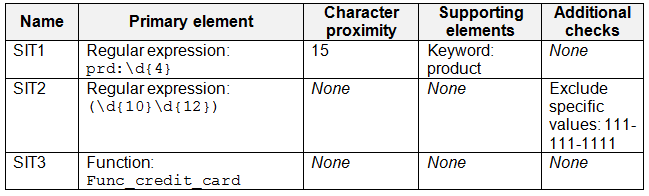
You have a Microsoft 365 E5 subscription that contains the sensitive information types (SITs) shown in the following table.
A user sends the email messages shown in the following table.

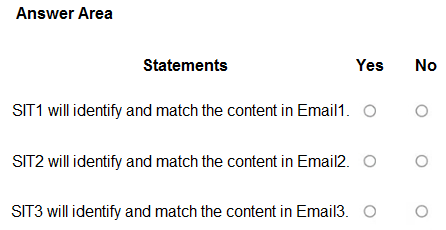
For each of the following statements, select Yes if the statement is true. Otherwise, select No.
NOTE: Each correct selection is worth one point.
Key Takeaways
The question tests your understanding of the 15-character proximity rule in SITs and the common trap of assuming token-based counting rather than character distance.
This scenario tests the precise application of Microsoft Purview Sensitive Information Types (SITs), specifically focusing on how keyword proximity is calculated for data classification. The page clarifies that 'product' is too distant from the regex match in Email1, resulting in a No.
Common mistake: Learners often incorrectly assume that the keyword 'product' is close enough to the match or confuse token count with character count, leading them to select Yes when the answer is No.
Expert Analysis
Why the Answer Is Correct
The correct selection for all three scenarios is No. For Email1, while the regex prd:\d{4} matches 'prd:1234', the required supporting keyword 'product' is more than 15 characters away from the match, failing the proximity requirement. For Email2, the regex requires exactly 22 consecutive digits, but the text only contains 12, so it does not match. For Email3, the custom function Func_credit_card typically requires the full card number, which is truncated in the email.
Why Other Candidate Answers Are Wrong
Selecting 'Yes' for any of these implies a misunderstanding of the strict matching criteria. Assuming 'product' is within range ignores the explicit character limit. Assuming Email2 matches ignores the specific digit count constraint. Assuming Email3 matches overlooks the truncation of the sensitive data.
Community Comment Notes
Many users initially struggled with the definition of proximity. As Erfan noted, the distance exceeds the limit. Some learners debated token vs. character counting, but official documentation confirms character proximity is the standard for built-in types unless specified otherwise. Comments from deeptha92 and Alcpt correctly identified the proximity failure in Email1 as the key discriminator.
Official Reference
https://learn.microsoft.com/en-us/purview/sit-sensitive-information-type-learn-about
This link opens the official vendor documentation in a new tab.
Exam Strategy
Always verify the exact character distance between the primary element (regex/keyword) and the secondary element (keyword/regex). If the gap looks large, calculate the characters precisely; do not guess based on visual spacing.
Frequently Asked Questions
How is proximity measured in Microsoft Purview SITs?
Does Email2 match if it has 12 digits instead of 22?
Discussion 12 contributions
Compiled from public community threads and reader submissions, lightly edited for clarity. Handles and vote tallies are shown as recorded, and comments reflect the views of individual contributors.
From public community threads 12
-
deeptha92 👍 22SIT1 on Email1 → No (keyword too far from regex match) SIT2 on Email2 → No (pattern requires 22 digits, text has only 12) SIT3 on Email3 → No (only last 4 digits of card number, fails Func_credit_card)
-
Lapiduse 👍 11My answer: Y - we have a matching regex + supporting keyword: product in the email N N
-
Alcpt 👍 7N > the word "product" is > 15 chars away, Y > 12 numbers as per /d{12} and 111... is ignored N > no full credit card number in the email
-
Gtc_ 👍 6Agree with No on all 3
-
337257e 👍 2The answer shown is correct1. SIT1 will identify and match the content in Email1 ✅ Regex prd:\d{4} matches prd:1234 ✅ Keyword product is present within 15 characters ✅ All conditions met 👉 Answer: Yes 2. SIT2 will identify and match the content in Email2 ✅ Contains 123456789012 → valid 12-digit match ❌ 111-111-1111 is excluded, but it's not the match 👉 Answer: Yes
Show 7 more comments
-
ironbeardyyc 👍 2For the first one, the supporting element "Product" is not within 15 characters of the primary element.
-
kollyp2000 👍 1The answer is No, No, No. SIT1 and Email1: No (character proximity) The regex prd:\d{4} does match “prd:1234.” But SIT1 also requires the supporting keyword “product” within 15 characters. Learn: “patternsProximity is the distance around that number where we’ll look for corroborative evidence.” Source: Customize a built-in sensitive information type: Term glossary The text between “product” and “prd” is “ code you requested for the bicycle is “, which is about 39 characters. That’s well outside the 15-character window, so the supporting element isn’t found and the pattern doesn’t match. SIT2 and Email2: No (the regex is the trap) (\d{10}\d{12}) means 10 digits immediately followed by 12 more, so 22 digits in a row. Learn: “{n} Matches the previous element exactly n times.” Source: Regular Expression Language: Quick Reference “123456789012” is only 12 digits, so it doesn’t match. SIT3 and Email3: No Func_credit_card needs a full card number: “14 to 19 digits... Must pass the Luhn test.” “Ends with 0023” plus an expiry date isn’t a card number. The expiry date is only corroborating evidence, and it can’t stand in for the number itself.
-
kanag1 👍 1SIT1 will identify and match the content in Email1: No Primary regex matches "prd:1234", but supporting keyword "product" is ~35 characters away (>15 proximity limit). Supporting required for confidence → no match. SIT2 will identify and match the content in Email2: Yes Regex (\d{10}|\d{12}) matches "123456789012" (12 consecutive digits). Exclude "111-111-1111" doesn't apply (different value; dashes break consecutive digits for phone). Match.The regex (\d{10}|\d{12}) means 10 OR 12 consecutive digits (not 22; | is OR operator). "123456789012" matches \d{12} SIT3 will identify and match the content in Email3: No Func_credit_card requires full valid credit card number + Luhn check. Only last 4 digits "0023" → no match.
-
Ficus22 👍 1According to co-pilot Microsoft counts proximity based on token distance, not raw character count. This is the subtlety. Microsoft’s SIT engine uses: - token proximity, not literal character count - tokens = words, numbers, symbols - proximity = number of tokens between elements So it ends up being 7 tokens, which is well within the proximity threshold of 15
-
rvln7 👍 1SIT1 will identify and match Email1: No (due to the excessive distance of the word "product"- more then 15characters) SIT2 will identify and match Email2: No (due to the regex requiring 22 digits in a row, we have to use | to search for 10 OR 12 numbers) SIT3 will identify and match Email3: No (missing the full credit card number)
-
kanag1 👍 1No No No (\d{10}\d{12}) (concatenation), not (\d{10}|\d{12}) (alternation). That means SIT2 requires 10 digits immediately followed by 12 digits → 22 consecutive digits total (equivalent to \d{22}).
-
danhc 👍 1Proximity is defined as characters in the official documentation here: https://learn.microsoft.com/en-us/purview/sit-sensitive-information-type-learn-about
Reader comments & corrections
No reader corrections yet — spotted an error or have a note? Share it below.