Which Purview Policies Can Use Fingerprint vs Regex SITs?
HOTSPOT
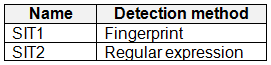
You have a Microsoft 365 E5 subscription that contains the sensitive information types (SITs) shown in the following table.
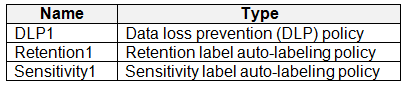
 You plan to create the policies shown in the following table and assign them to a Microsoft SharePoint Online site.
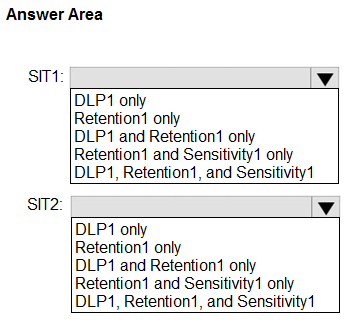
 Which policies can use SIT1, and which policies can use SIT2? To answer, select the appropriate options in the answer area.
NOTE: Each correct selection is worth one point.
Which policies can use SIT1, and which policies can use SIT2? To answer, select the appropriate options in the answer area.
NOTE: Each correct selection is worth one point.
Community Insight
The exam tests SIT compatibility across DLP, retention, and sensitivity auto-labeling; the trap is assuming every SIT works identically in retention auto-apply.
This hotspot tests which Microsoft Purview policy types can consume document-fingerprint versus regex sensitive information types. It establishes SIT1 for DLP and sensitivity auto-labeling, and SIT2 for DLP, retention auto-apply, and sensitivity auto-labeling.
Learners often treat document fingerprinting like any regex SIT and select it for retention auto-apply, but Microsoft's retention auto-labeling documentation excludes fingerprint and EDM SITs.
Community Discussion (12 comments)
Comments & Corrections
No comments yet — spotted an error or have a note? Share it below.
Expert Analysis
Why the Answer Is Correct
Document fingerprinting produces a special SIT whose matching engine is not accepted by every Purview policy type. Microsoft documents fingerprint SITs as usable in DLP and in sensitivity label auto-labeling, so SIT1 maps to DLP1 and Sensitivity1. Retention label auto-apply is the exception: Microsoft explicitly states EDM and document fingerprinting SITs are not supported there, so Retention1 is excluded for SIT1. SIT2 is a regex-based custom SIT, which is a normal SIT condition accepted by DLP1, Retention1, and Sensitivity1. If the hotspot's SIT1 dropdown really omits the DLP+Sensitivity combination, DLP1 only is the closest available selection.Why Other Candidate Answers Are Wrong
Selecting SIT1 = DLP1 only understates support when the DLP+Sensitivity choice is offered, because sensitivity auto-labeling can use fingerprint SITs. Selecting SIT1 = all three overstates support because retention auto-apply excludes fingerprint SITs. Choosing Retention1 for SIT2 but not DLP1 or Sensitivity1 also fails because regex SITs are accepted by all three policy types. The common error is treating fingerprint and regex SITs as interchangeable conditions across DLP, retention, and sensitivity labels.Community Comment Notes
Gtc_ and Nurob backed the 'DLP1 only' reading, with Nurob stating "Fingerprints can only be used with DLP policies." gabbinu and Ender3 argued the SIT1 answer choices are incomplete, quoting "I don't understand why it's not among the options" and "The options provided for SIT1 are incomplete." kollyp2000 called DLP1 only "best of the options offered" while noting Microsoft's retention auto-apply doc excludes fingerprints. Jideakin reported a lab test where "Auto-apply Retention Label policy can use Fingerprint-based SIT" and concluded SIT1 = All; that lab observation may reflect newer behavior, but the SC-401 item follows documented policy support, so retention remains excluded.Official Reference
Exam Strategy
Before answering, label each SIT by detection method: fingerprint is special, regex is general. Then eliminate retention auto-apply for the fingerprint SIT; if the item's SIT1 dropdown lacks a DLP+Sensitivity option, select DLP1 only as the closest listed choice.
Frequently Asked Questions
Can a document fingerprint SIT drive retention label auto-apply in Purview?
No. Microsoft's retention auto-apply guidance excludes document fingerprinting and EDM SITs, so use a regex or keyword SIT for retention auto-labeling instead.
Does sensitivity label auto-labeling accept document fingerprint SITs?
Yes. Document fingerprinting can be used as a condition for sensitivity auto-labeling in supported workloads, although the hotspot's dropdown may not list the exact DLP+Sensitivity combination.