Exchange Mail Flow Rule with [Encrypt] Subject and Do Not Forward Action
HOTSPOT
You have a Microsoft 365 E5 subscription.
In Microsoft Exchange Online, you have the mail flow rule shown in the following exhibit.
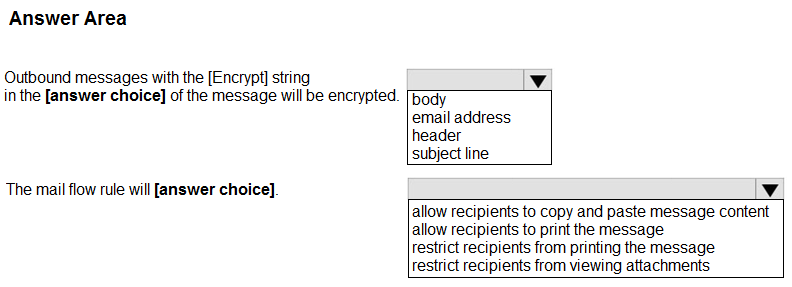
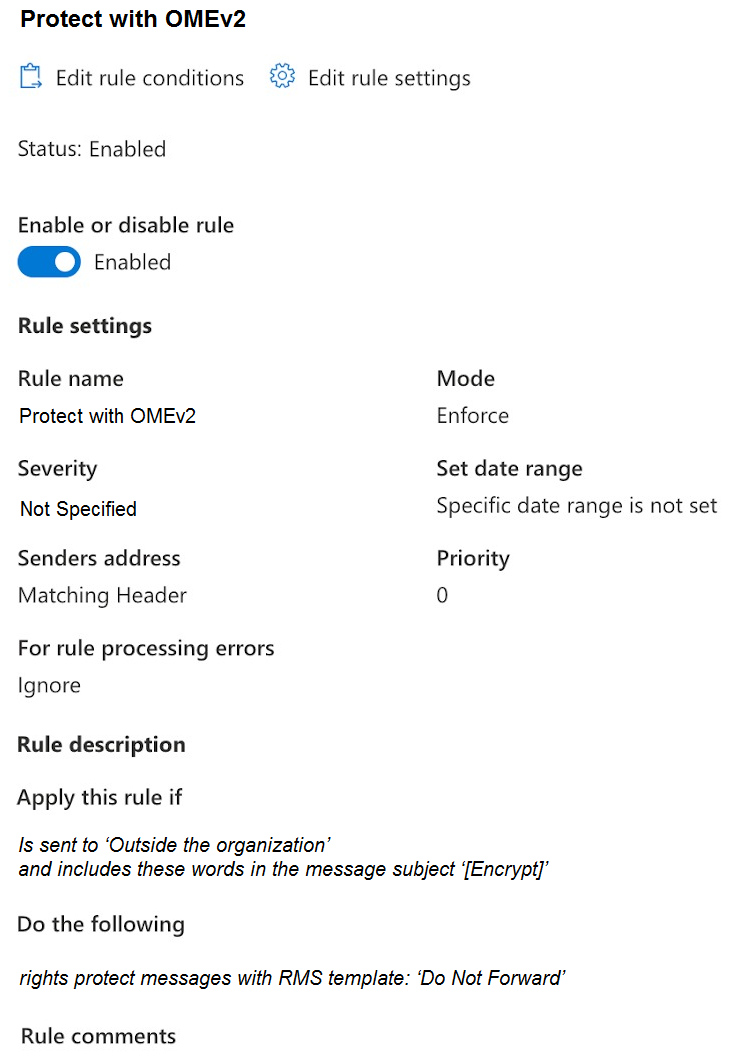 Use the drop-down menus to select the answer choice that completes each statement based on the information presented in the graphic.
NOTE: Each correct selection is worth one point.
Use the drop-down menus to select the answer choice that completes each statement based on the information presented in the graphic.
NOTE: Each correct selection is worth one point.
Community Insight
You must read the rule's condition and action straight from the exhibit screenshot, not from memory of how OME normally works; the trap is assuming the keyword is checked in the message body or headers, or that the outcome only blocks forwarding.
An Exchange Online mail flow rule that matches the literal string [Encrypt] in the message subject and applies the Do Not Forward RMS template to outbound mail. This page confirms the hotspot selections — subject line as the evaluated field and printing restriction as the enforced outcome — with rule-condition evidence and community consensus.
Learners pick "message body" or "sender address/header" for the first dropdown because they expect encryption keywords in content, and they pick "block forwarding only" for the second — but Do Not Forward also blocks printing and copying, which is exactly what the question asks about.
Community Discussion (6 comments)
Comments & Corrections
No comments yet — spotted an error or have a note? Share it below.
Expert Analysis
Why the Answer Is Correct
The first dropdown is answered by the rule's condition, which in the exhibit reads that the rule applies when the message subject includes the words "[Encrypt]" — nothing in the condition inspects the body, a header, or a recipient address. The second dropdown is answered by the rule's action, which applies the Do Not Forward RMS/Office 365 Message Encryption template to matching outbound messages. The Do Not Forward template encrypts the message and requires recipient authentication, after which recipients cannot forward, print, or copy the content. Therefore the scenario yields subject line for the first statement and restrict recipients from printing the message for the second, since printing is explicitly one of the permissions the template withholds. The rule is scoped to messages sent outside the organization, so only externally bound mail carrying [Encrypt] in the subject is wrapped with this protection.
Why Other Candidate Answers Are Wrong
"Message body" is wrong because a body-keyword condition is a separate, distinct condition in Exchange mail flow rules and would be shown as "includes these words in the message body"; the exhibit shows the subject variant, so body matching is not configured. "Sender address" or "Matching header" is wrong because sender-address matching is a rule setting describing how the sender is identified, not where the [Encrypt] token is searched for — the token lives in the subject. "Require the recipient to use OTP / block forwarding only" style answers are incomplete: the question asks what the recipients are restricted from doing, and the Do Not Forward template removes print, forward, and copy rights together. Any answer claiming the rule deletes, rejects, or redirects the message contradicts the action actually shown in the exhibit.
Community Comment Notes
Eltooth and gabbinu both land on the same pairing, with gabbinu summarizing that the rule "triggers on messages sent outside the org that have [Encrypt] in the subject" and that the Do Not Forward template "blocks forwarding, copying, and printing." kollyp2000 argues the first dropdown directly from the exhibit — "The condition reads straight off the exhibit" — and stresses that a sender-address/header setting is not where the keyword is evaluated, which is the distinction most learners miss. rvln7 supplies the supporting documentation, quoting Microsoft Learn on the action: "restrict recipients from printing the message" and noting that with Do Not Forward "the recipients can't forward it, print it, or copy from it." MultiCloudIronMan and NeerajSap reach identical conclusions, giving a strong consensus across the comment set.
Official Reference
Exam Strategy
For hotspot items built on an Exchange rule screenshot, answer from the rule's own condition and action panes rather than from general OME behaviour — the exhibit wording beats intuition. Remember that Do Not Forward is a rights-restricted template that strips print, forward, and copy in one action, so pick the printing restriction when asked what recipients cannot do.
Frequently Asked Questions
Why is the first dropdown 'subject line' and not the message body or sender address?
The rule condition shown in the exhibit is 'includes these words in the message subject [Encrypt]'. Body matching is a separate condition, and sender address/header is about how the sender is matched, not where the keyword is found.
Does the Do Not Forward template used by this rule really block printing?
Yes. Do Not Forward encrypts the message and requires recipient authentication, after which recipients cannot forward, print, or copy the content — so printing restriction is the correct second selection.