Which Devices Support the Purview Information Protection Client?
HOTSPOT
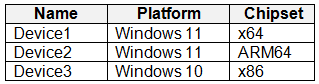
You have a Microsoft 365 5 subscription that contains the devices shown in the following table.
 You publish Microsoft Purview Information Protection sensitivity labels.
You plan to deploy the information protection client to the devices. The solution must ensure that the labels can be applied to sensitive images and documents.
On which devices can you install the information protection client, and what should users use to apply labels? To answer, select the appropriate options in the answer area.
NOTE: Each correct selection is worth one point.
You publish Microsoft Purview Information Protection sensitivity labels.
You plan to deploy the information protection client to the devices. The solution must ensure that the labels can be applied to sensitive images and documents.
On which devices can you install the information protection client, and what should users use to apply labels? To answer, select the appropriate options in the answer area.
NOTE: Each correct selection is worth one point.
Community Insight
The exam tests the client's OS/architecture support matrix and the end-user labeling entry point, with the trap being that x86 Windows 10 is unsupported while ARM64 supports the viewer and file labeler.
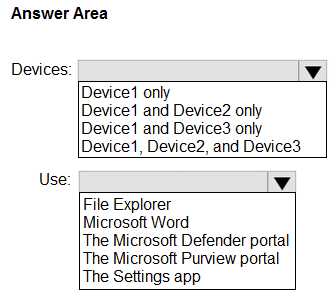
This SC-401 hotspot asks which devices can host the Microsoft Purview Information Protection client and how users label sensitive images and documents. The correct deployment is Device1 and Device2, with labels applied through File Explorer's Classify and protect option.
Learners often assume every Windows device in the table is supported, or that ARM64 is excluded because the scanner is unsupported; the question only needs labeling, so ARM64 remains valid while x86 does not.
Community Discussion (15 comments)
Comments & Corrections
No comments yet — spotted an error or have a note? Share it below.
Expert Analysis
Why the Answer Is Correct
Microsoft Purview Information Protection client supports Windows 11 including multi-session, Windows 10 x64, Windows Server 2019, and Windows Server 2016; ARM64 supports the viewer and file labeler but not the scanner or PowerShell. Device1 is Windows 11 x64 and Device2 is Windows 11 ARM64, so both can install the client for labeling. Device3 is Windows 10 x86, which is not in the supported OS list because Microsoft lists Windows 10 x64 only. The requirement is to apply labels to images and documents, which is exactly the file labeler and File Explorer integration. Users right-click in File Explorer and choose Classify and protect to apply a sensitivity label, and the scanner is not needed, so the ARM64 limitation does not disqualify Device2.Why Other Candidate Answers Are Wrong
"Device1 only" is tempting because ARM64 has scanner and PowerShell limitations, but the question does not require the scanner; ARM64 viewer and file labeler support is sufficient. "Device1 and Device3" fails because Windows 10 x86 is not supported by the client. "Device2 and Device3" fails for the same x86 reason and also ignores the clearly supported Device1. Choosing Office apps or PowerShell as the user-facing labeling method is wrong for sensitive images and non-Office documents; the client provides the File Explorer entry point for those file types.Community Comment Notes
Community answers disagree, and gabbinu's popular comment claims ARM64 is excluded and Windows 10 x86 is supported, which conflicts with Microsoft's current requirements page. rvln7 and novaCapta cite the official support details, with novaCapta noting "ARM64 is supported for the viewer and file labeler." kollyp2000 and B73 land on Device1 and Device2, and kollyp2000 identifies the chipset as "the trap." Eltooth's Device1 and Device3 selection illustrates the common x86 error, so the documented OS list should override the vote count.Official Reference
Exam Strategy
Read the device table by both OS version and processor architecture before choosing client installation targets. Separate the labeling requirement from scanner and PowerShell features, because ARM64 supports the viewer and file labeler even though it lacks scanner support. For the labeling-method dropdown, prefer the end-user File Explorer integration over administrative tools.
Frequently Asked Questions
Which Windows architectures support the Microsoft Purview Information Protection client for labeling images?
Windows 11 x64 and ARM64 are supported for the viewer and file labeler; Windows 10 x86 is not listed, and ARM64 does not support the scanner or PowerShell.
Do users need the AIP scanner to label sensitive images on a device with the Purview client?
No. The scanner is a separate discovery tool; on the device, users label files and images through File Explorer's Classify and protect menu.