Copying Sensitive Information Types in Microsoft Purview
Short answer
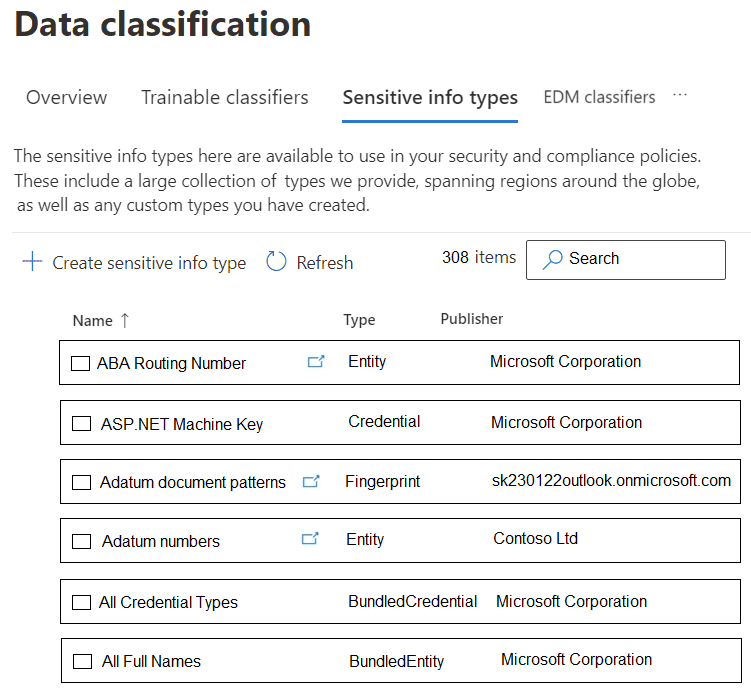
Select 'Adatum routing number' and 'Adatum numbers'. These are the only custom Sensitive Information Types listed that were created within the organization and can be copied and modified.
Question
You have a Microsoft 365 365 E5 subscription.
You plan to create a new sensitive information type (SIT) by using the Microsoft Purview portal.
You need to copy and modify an existing SIT from which to create the new SIT.
What are two SITs that you can copy and modify? To answer, select the appropriate SITs in the answer area.
NOTE: Each correct selection is worth one point.
Key Takeaways
The core trap is confusing 'Built-in' Microsoft SITs with 'Custom' tenant-specific SITs; only the latter are editable templates for new SIT creation.
This question tests the ability to identify which Sensitive Information Types (SITs) can be copied and modified in Microsoft Purview. It establishes that custom SITs created by the organization can be cloned, while built-in entity-based SITs cannot.
Common mistake: Candidates often incorrectly select built-in types like 'ABA Routing Number' or 'All Credential Types', assuming all listed patterns are modifiable, failing to distinguish between Microsoft-provided definitions and custom organizational ones.
Expert Analysis
Why the Answer Is Correct
In Microsoft Purview, you can copy and modify a Sensitive Information Type (SIT) only if it was created within your own organization (custom SIT). Built-in SITs provided by Microsoft, even those based on standard entities like ABA Routing Numbers, cannot be directly copied or edited as templates because they are part of the global Microsoft definition set. The correct selections are the custom SITs named 'Adatum routing number' and 'Adatum numbers', as these are specific to the tenant and allow for modification.
Why Other Candidate Answers Are Wrong
Options such as 'ABA Routing Number (Entity)', 'All Credential Types', and 'All Full Names' are built-in Microsoft SITs. These are standardized, fingerprinted, or bundled definitions managed by Microsoft. While you can use them in policies, you cannot duplicate them into the 'My Custom Sensitive Information Types' section to create a variant. Attempting to copy them results in an error or is simply not an available action in the UI.
Community Comment Notes
Community consensus strongly supports selecting the Adatum options. Users note that 'only repeatable, standardized patterns... can be copied' refers to custom regex/keyword patterns defined by the admin. One commenter clarified that 'Named entity sensitive information types... can't be copied,' reinforcing that built-in entities are off-limits for cloning. Another user emphasized that 'Built-in SITs... cannot be copied or modified,' confirming the distinction between publisher origins.
Official Reference
https://learn.microsoft.com/en-us/purview/sit-create-a-custom-sensitive-information-type
This link opens the official vendor documentation in a new tab.
Exam Strategy
When asked about copying or modifying SITs, immediately look for 'Custom' vs. 'Built-in'. If the SIT name includes your company name or a specific project code (like Adatum), it is likely custom and copyable. Generic names like 'Credit Card' or 'SSN' are usually built-in and not copyable.
Frequently Asked Questions
Can I copy built-in SITs like ABA Routing Number?
What defines a custom SIT that can be copied?
Discussion 10 contributions
Compiled from public community threads and reader submissions, lightly edited for clarity. Handles and vote tallies are shown as recorded, and comments reflect the views of individual contributors.
From public community threads 10
-
Gtc_ 👍 8ABA Routing and Adatum is correct. Only repeatable, standardized patterns can be copied. https://learn.microsoft.com/en-us/purview/sit-common-scenarios?utm_source=chatgpt.com https://learn.microsoft.com/en-us/purview/sit-create-a-custom-sensitive-information-type
-
Ender3 👍 6I believe the correct answers are: ABA Routing Number (Entity) Adatum numbers (Entity) All Credential Types and All Full Names cannot be copied. I tried. Please correct the official answers.
-
MultiCloudIronMan 👍 5Adatum Routing Number and Adatum number patterns You can copy and modify only custom sensitive information types that were created in your organization. Built-in SITs provided by Microsoft cannot be copied or edited
-
Eltooth 👍 4Entities are only able to be copied. ABA Routing and Adatum are only options.
-
deeptha92 👍 4ABA Routing Number and Adatum Number
Show 5 more comments
-
rvln7 👍 3Only repeatable, standardized patterns (i.e., regex/keyword‑based, non‑bundled, non‑fingerprint SITs) can be copied. ABA Routing Number Adatum numbers https://learn.microsoft.com/en-us/purview/sit-common-scenarios https://learn.microsoft.com/en-us/purview/sit-create-a-custom-sensitive-information-type
-
JamesM9 👍 2Credential or fingerprint sensitive information types (SITs) can’t be copied and modified in Microsoft Purview, so I believe the answer here is: ABA routing number (Entity) Adatum numbers (Entity)
-
8014bfe 👍 1"Built in sensitive information types: Microsoft created these SITs and they show up in the Purview portal by default. These SITs can't be edited, but YOU CAN USE THEM AS TEMPLATES BY COPYING THEM TO CREATE CUSTOM SENSITIVE INFORMATION TYPES. See, Sensitive information type entity definitions for a full list of all SITs. Named entity sensitive information types: Named entity SITs also show up in the Purview portal by default. They detect person names, physical addresses, and medical terms and conditions. They can't be edited or copied. For more information, see Learn about named entities." https://learn.microsoft.com/en-us/purview/sit-sensitive-information-type-learn-about
-
FableFa 👍 1It’s not the “Entity” type that determines whether a Sensitive Information Type (SIT) can be copied/modified. The deciding factor is the Publisher: Built‑in SITs (Publisher = Microsoft Corporation) → cannot be copied or modified. Custom SITs (Publisher = your tenant or another non‑Microsoft publisher, e.g., <tenant>.onmicrosoft.com, Contoso Ltd) → can be copied and modified. ANSWER IS : AdatumRouting number & Adatum Number pattern
-
kollyp2000 👍 1The correct answer is ABA Routing Number and Adatum numbers.- Rule: you can copy Entity-type SITs, built-in or custom. Named entity / bundled SITs (All full names, All physical addresses, All medical terms, All credentials) can’t be copied. Sources: https://learn.microsoft.com/purview/sit-create-a-custom-sensitive-information-type#before-you-begin
Reader comments & corrections
No reader corrections yet — spotted an error or have a note? Share it below.