How Do You Auto-Encrypt fabrikam.com Mail and Set a Seven-Day Expiry?
HOTSPOT
You are implementing Microsoft Purview Advanced Message Encryption for a Microsoft 365 tenant named contoso.com.
You need to meet the following requirements:
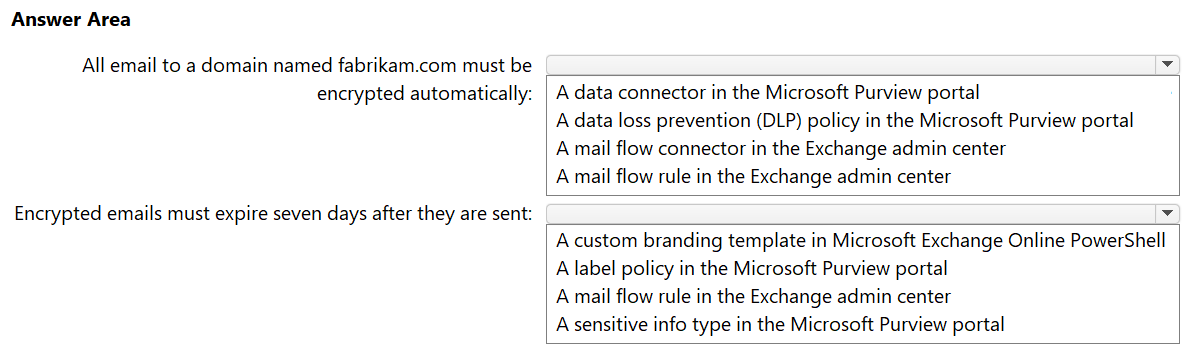
• All email to a domain named fabrikam.com must be encrypted automatically.
• Encrypted emails must expire seven days after they are sent.
What should you configure for each requirement? To answer, select the appropriate options in the answer area.
NOTE: Each correct selection is worth one point.
Community Insight
The exam tests that automatic encryption is triggered by a mail flow rule, but the seven-day expiry is only configurable inside a custom branding template — not in the rule itself.
Microsoft Purview Advanced Message Encryption uses a mail flow (transport) rule to automatically encrypt mail sent to a partner domain such as fabrikam.com, and a custom branding template to make encrypted messages expire. This page confirms the mail-flow-rule plus custom-branding-template pairing and explains why connectors or default OME settings do not satisfy the requirements.
Candidates pick a mail flow connector, or try to set the expiry directly on the encryption rule or in the default OME configuration, instead of creating a custom branding template that carries the expiration setting.
Community Discussion (4 comments)
Comments & Corrections
No comments yet — spotted an error or have a note? Share it below.
Expert Analysis
Why the Answer Is Correct
Requirement 1 asks for automatic encryption of every message addressed to fabrikam.com. In Exchange Online, that condition is expressed as a mail flow (transport) rule whose recipient domain condition is fabrikam.com and whose action applies the Office 365 Message Encryption / encryption protection action. Requirement 2 asks for a seven-day lifetime on those encrypted messages. In Advanced Message Encryption, expiration is a property of the custom branding template — you build a template, set the message expiration in days, and the mail flow rule references that template. Because a rule can only wrap mail with an expiry when it points to a custom branding template, the two answers work together: the rule decides which mail is encrypted, the template decides how long it stays readable. This matches the community consensus that the first blank is a mail flow rule and the second is a custom branding template.Why Other Candidate Answers Are Wrong
A mail flow connector only routes or secures transport between organizations; it does not apply OME encryption to messages based on a recipient domain, so it cannot satisfy requirement 1. The default (non-custom) OME configuration can encrypt mail, but it exposes no expiration control — setting a number of days there has no effect, which is exactly the trap the question sets. Applying a sensitivity label or DLP policy would encrypt content, but neither provides the classic recipient-domain-based OME experience nor the Advanced Message Encryption expiry described here. Likewise, a retention policy or label deletes or retains items for compliance; it does not expire the recipient's access to an encrypted message.Community Comment Notes
Alcpt states the key doctrine plainly: "You can only use expiration if you use custom branding," and summarises the pair as "#1 mail flow rule #2 custom branding." MultiCloudIronMan concurs with the same two selections, and rvln7 marks the answer "CORRECT" while pointing to the two Microsoft Learn articles on mail flow rules for encryption and advanced expiration. The repeated agreement across independent commenters, plus the documented behaviour that expiry lives in the branding template, makes this pairing the reliable answer rather than a simple majority vote.Official Reference
Exam Strategy
When a scenario separates the encryption trigger from the message lifetime, split the answer: the trigger is almost always a mail flow rule, and the lifetime (expiry) is a property of the custom branding template. Look for the words "expire" or "days" and immediately think custom branding template, not rule settings.
Frequently Asked Questions
Can encrypted messages expire without a custom branding template in Advanced Message Encryption?
No. Expiration is configured in the custom branding template, and Microsoft 365 only applies that wrapper, including the expiry, to mail matched by the rule bound to the template.
Why is a mail flow connector wrong for encrypting mail to fabrikam.com?
A connector controls mail routing between systems, not content encryption. Automatic encryption of messages to a partner domain requires a mail flow rule with the encryption action.