Endpoint DLP File Type Support and Block Actions
Short answer
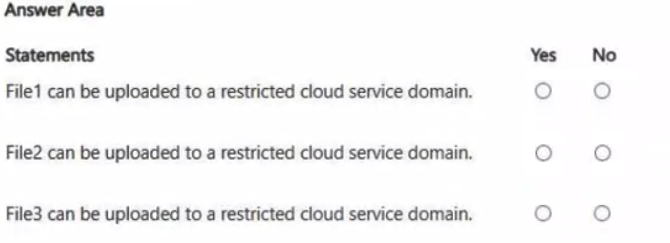
File1: No; File2: No; File3: Yes. Files 1 and 2 contain credit card numbers and are blocked by the policy on restricted domains. File 3 uses an unsupported .dwg extension, so its content is not scanned, allowing the upload.
Question
You have a Microsoft 365 subscription.
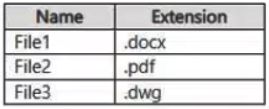
You have the sensitive files shown in the following tables.
You have an Endpoint data loss prevention (Endpoint DLP) policy that contains the actions shown in the Actions exhibit. (Click the Actions tab.)
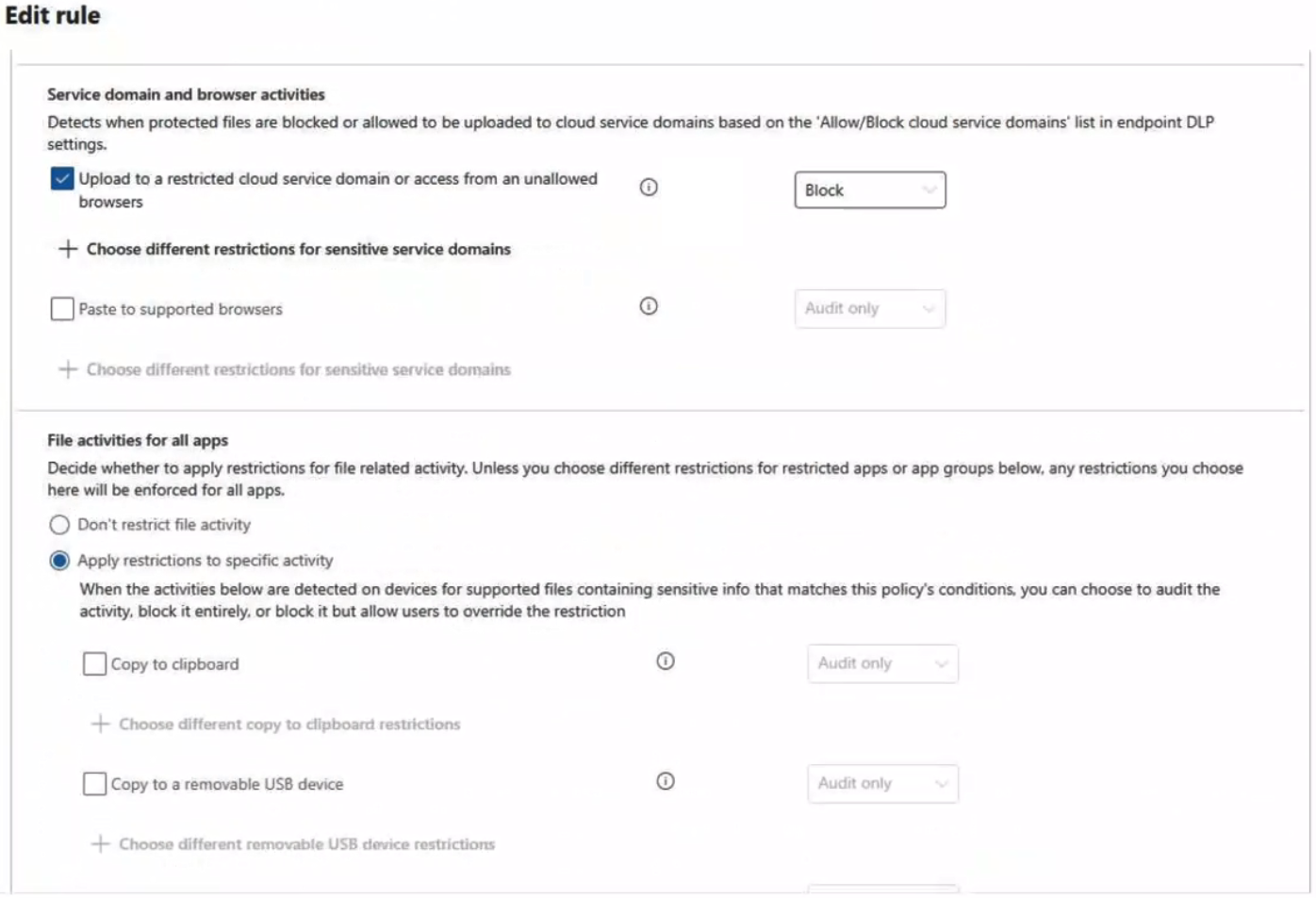
The status of the Endpoint DLP policy is shown in the Status exhibit. (Click the Status tab.)

For each of the following statements, select Yes if the statement is true. Otherwise, select No.
NOTE: Each correct selection is worth one point.
Key Takeaways
The main trap is ignoring file type support limitations. Even if content matches a sensitive info type, if the file extension is not supported for scanning (like .dwg), no match occurs and the action is not enforced.
Determine if files can be uploaded based on Endpoint DLP policies. Files with supported extensions and matched sensitive data are blocked; unsupported extensions like .dwg bypass content inspection.
Common mistake: Learners often assume all files are scanned regardless of extension. They may incorrectly mark File3 as 'No' because it contains an SSN, failing to recognize that Endpoint DLP does not inspect .dwg files.
Expert Analysis
To determine the correct Yes/No selections, we must evaluate each file against three specific Endpoint DLP policy constraints: File Type Support, Content Match (Credit Card Number), and Action Enforcement (Block). The policy is in Test Mode, which affects enforcement behavior but not the detection logic for the purpose of this question's "can be uploaded" phrasing, which typically refers to whether the rule triggers a block action.
Analysis of File1 (CC-1234.docx):
- File Type:.docx is a supported file type for Endpoint DLP.
- Content: Contains a credit card number, which matches the "Credit Card Number" sensitive information type.
- Location: Being uploaded to a restricted cloud service domain.
- Action: The policy action is set to Block. Since the content matches and the location is restricted, the policy would trigger a block. Therefore, the statement "Can be uploaded" is effectively No because the upload is blocked by the policy.
Analysis of File2 (CC-5678.pdf):
- File Type:.pdf is a supported file type.
- Content: Contains a credit card number, matching the sensitive info type.
- Location: Restricted cloud service domain.
- Action: Block. Similar to File1, the match triggers the block action. Therefore, the statement "Can be uploaded" is No.
Analysis of File3 (SSN-9999.dwg):
- File Type:.dwg is a CAD file format. Microsoft Purview Endpoint DLP does not support scanning or detecting content within.dwg files. This is a critical technical limitation.
- Content: Although it contains an SSN, the DLP engine cannot inspect the file content due to the unsupported extension.
- Result: No match occurs. No block action is triggered. The upload proceeds. Therefore, the statement "Can be uploaded" is Yes.
The common trap here is assuming all file types are scanned equally. Candidates often overlook that specialized formats like.dwg,.psd, or certain encrypted archives are not inspected by standard DLP rules unless specific exceptions or advanced configurations are applied. The comment referencing "DWG non supported" correctly identifies the key differentiator for File3.
Official Reference
https://learn.microsoft.com/en-us/purview/endpoint-dlp-learn-about#files-monitored-via-policy
This link opens the official vendor documentation in a new tab.
Exam Strategy
When analyzing DLP scenarios, always check the file extension first. If the extension is not in the supported list for the sensitive information type, the rule cannot trigger a match. Memorize common unsupported formats like CAD files (.dwg) or complex image formats to avoid false positives in content-based decisions.
Frequently Asked Questions
Does Test Mode affect whether a file is blocked?
Why is File3 allowed when it has an SSN?
Discussion 2 contributions
Compiled from public community threads and reader submissions, lightly edited for clarity. Handles and vote tallies are shown as recorded, and comments reflect the views of individual contributors.
From public community threads 2
-
jecampos2 👍 2N N Y. File1 can be uploaded to a restricted cloud service domain. .docx is a supported file type. Upload to a restricted cloud service domain is configured as Block. Answer: No File2 can be uploaded to a restricted cloud service domain. .pdf is a supported file type. Upload to a restricted cloud service domain is configured as Block. Answer: No File3 can be uploaded to a restricted cloud service domain. .dwg is not a supported Endpoint DLP file type. Endpoint DLP cannot inspect/enforce the upload restriction on that file type. Answer: Yes
-
martinods 👍 1https://learn.microsoft.com/en-us/purview/endpoint-dlp-learn-about#files-monitored-via-policy DWG non supported
Reader comments & corrections
No reader corrections yet — spotted an error or have a note? Share it below.