Enabling Custom Trainable Classifiers with Least Privilege
Short answer
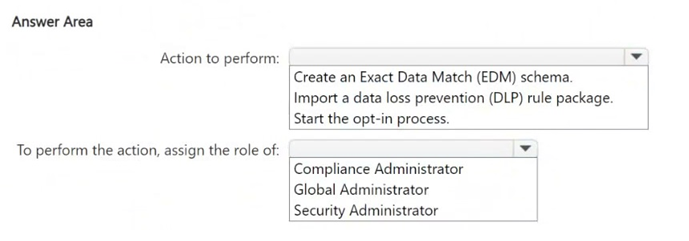
Select Start Opt-in and Global Administrator. The initial tenant enrollment for custom trainable classifiers requires the Global Administrator role, after which compliance administrators can manage the classifiers under least privilege.
Question
You have a new Microsoft 365 E5 tenant.
You need to create a custom trainable classifier that will detect product order forms. The solution must use the principle of least privilege.
What should you do first? To answer, select the appropriate options in the answer area.
NOTE: Each correct selection is worth one point.
Key Takeaways
The trap is confusing the role needed for creation (Compliance Admin) with the role needed for initial enablement (Global Admin). You cannot create what hasn't been enabled at the tenant level.
Learn how to enable custom trainable classifiers in Microsoft Purview for SC-401. The correct first step is starting the opt-in process as a Global Administrator to satisfy tenant requirements before delegating tasks.
Common mistake: Learners often select Compliance Administrator because they associate it with DLP and sensitivity labels. However, the opt-in process is a tenant-wide administrative action that strictly requires Global Administrator rights in the context of this exam objective.
Expert Analysis
The scenario requires creating a custom trainable classifier in Microsoft Purview while adhering to the principle of least privilege. The critical first step is enabling the feature itself, as it is not active by default in new tenants.
First, you must Start Opt-in. Custom trainable classifiers are an advanced capability that requires explicit tenant-level enablement. Without this opt-in, the functionality remains inaccessible regardless of user permissions. This action typically triggers a tenant-wide configuration change or registration with the underlying service.
Second, you must perform this action as a Global Administrator. While the creation and management of specific classifiers can be delegated to lower-privileged roles like Compliance Administrator, the initial opt-in process involves high-level tenant settings. According to Microsoft's official documentation and exam doctrine for SC-401, the opt-in command or portal action requires Global Administrator privileges because it modifies core tenant capabilities.
Once the opt-in is complete, subsequent tasks—such as training the model, defining labels, and applying policies—can be performed by users with the Compliance Administrator role, satisfying the least privilege requirement for the ongoing workflow. However, the question asks for the first step: enabling the feature via opt-in using the highest necessary authority.
Official Reference
https://learn.microsoft.com/en-us/purview/custom-trainable-classifier
This link opens the official vendor documentation in a new tab.
Exam Strategy
When a question mentions 'custom' features or 'trainable' models in Purview, always check if the feature requires tenant-level activation. If it does, identify the role capable of modifying tenant-wide settings (usually Global Admin). Only after activation should you switch to the role appropriate for content management (Compliance Admin). This two-step logic separates setup from operation.
Frequently Asked Questions
Can a Compliance Admin enable custom trainable classifiers?
What is the purpose of the opt-in process?
Discussion 6 contributions
Compiled from public community threads and reader submissions, lightly edited for clarity. Handles and vote tallies are shown as recorded, and comments reflect the views of individual contributors.
From public community threads 6
-
dmoorthy 👍 5Answer is correct. If you are using the trainable classifier for the first time you will have to opt-in. You can validate the same by running the powershell command get-classifier
-
nuin01 👍 4Start Opt-In and Global Admin Because "starting an opt-in process" often involves significant tenant-wide changes or enabling powerful features, it typically requires the highest level of authority.
-
pjn 👍 4Start Opt-In and Global Admin at least according to Co-Pilot
-
gabbinu 👍 3It should be an older question, you just go into the Purview portal and start creating classifiers — there’s no opt-in step anymore.
-
NeerajSap 👍 1For a custom trainable classifier, Microsoft Purview requires that the tenant first be enrolled in the trainable classifiers feature. Following the principle of least privilege, you should use the lowest privileged role capable of performing the task which is compliance administrator
Show 1 more comment
-
Feno_menal_pup 👍 1Global Administrator for the initial tenant enablement, after which a Compliance Administrator can create and manage the custom trainable classifier.
Reader comments & corrections
No reader corrections yet — spotted an error or have a note? Share it below.