Enabling Co-Authoring for Sensitivity Labels in Microsoft Purview
Short answer
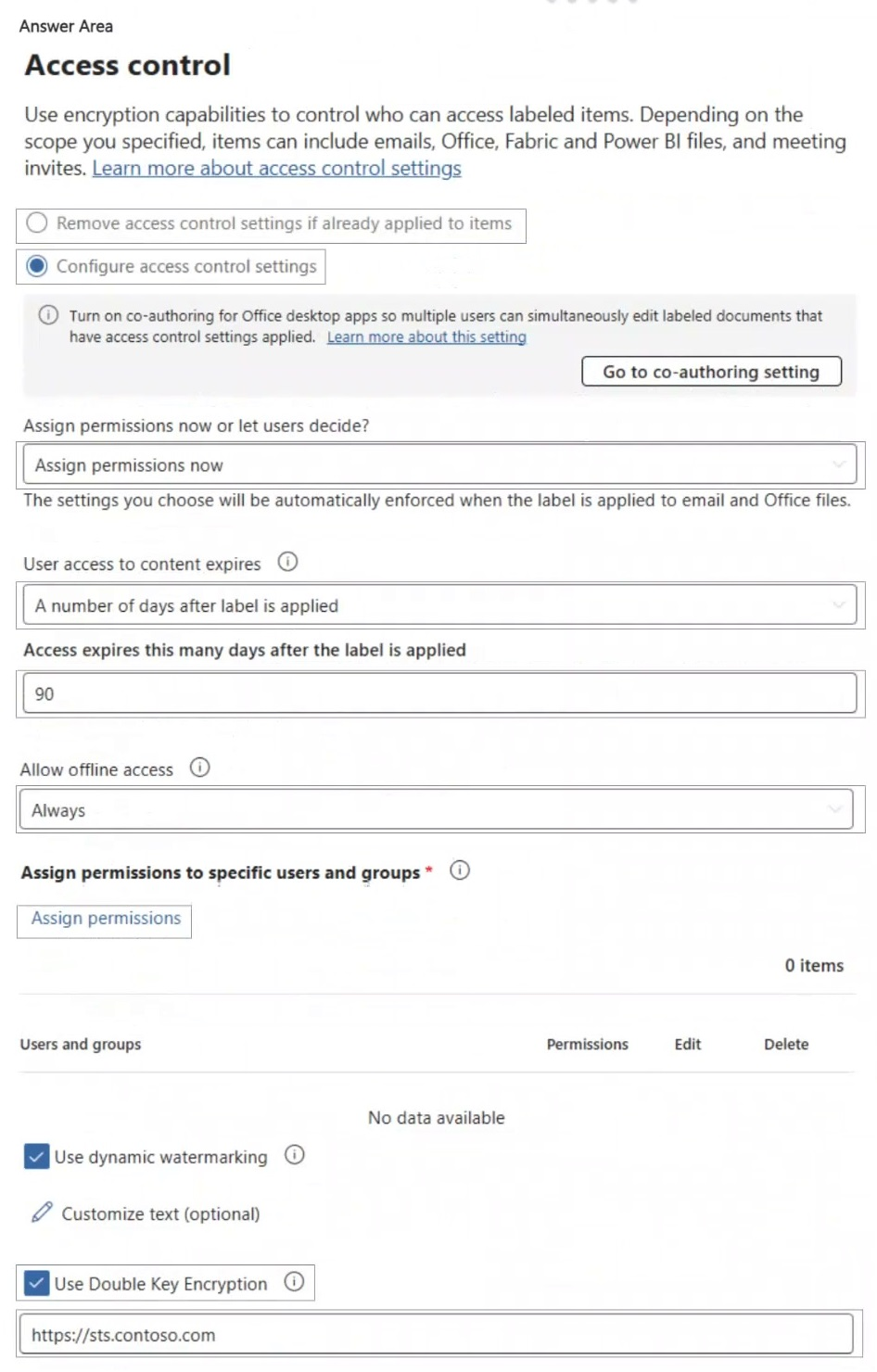
Disable Double Key Encryption and configure User access to content expires to Never.
Question
You have a Microsoft 365 E5 tenant that contains a sensitivity label named label1.
You plan to enable co-authoring for encrypted files.
You need to ensure that files that have label1 applied support co-authoring.
Which two settings should you modify? To answer, select the settings in the answer area.
NOTE: Each correct selection is worth one point.
Key Takeaways
Co-authoring fails if Double Key Encryption is enabled or if content access expiration is set to anything other than 'Never'.
This page explains how to enable co-authoring for encrypted files by disabling Double Key Encryption and setting User access to content expires to Never in Microsoft Purview sensitivity labels.
Common mistake: Learners often overlook the impact of 'User access to content expires' or assume Double Key Encryption is always required for high security, failing to recognize it explicitly blocks co-authoring.
Expert Analysis
The question requires enabling co-authoring for files protected by the sensitivity label 'label1'. The governing principle is that Microsoft Purview encryption features can conflict with real-time collaboration capabilities. Specifically, the Microsoft Learn documentation states that co-authoring and AutoSave are not supported if a sensitivity label is configured with Double Key Encryption (DKE) or if User Access to Content expires.
First, Double Key Encryption must be disabled. DKE involves encrypting files with two separate keys held by different entities, which prevents the cloud services from decrypting the file stream in real-time for collaborative editing. Therefore, the 'Double Key Encryption' setting must be unchecked or removed to allow standard encryption that supports co-authoring.
Second, the 'User access to content expires' setting must be addressed. If this setting is configured to expire after a specific period (e.g., 7 days), co-authoring is restricted because the user's access token would expire during a session, disrupting the continuous connection required for real-time editing. To ensure co-authoring works reliably, this setting should be set to 'Never', effectively meaning the expiration configuration is modified to support ongoing access. While 'Turn on co-authoring' is a prerequisite, the question asks for settings to modify to ensure support, implying the resolution of conflicting constraints. The two critical conflicting settings are Double Key Encryption and the Expiration policy.
Official Reference
https://learn.microsoft.com/en-us/purview/sensitivity-labels-coauthoring
This link opens the official vendor documentation in a new tab.
Exam Strategy
When configuring sensitivity labels, always check for mutually exclusive features. If a requirement involves real-time collaboration (co-authoring/AutoSave), immediately rule out Double Key Encryption and any time-based access expiration policies. Prioritize settings that maintain continuous, unencrypted-stream-compatible access.
Frequently Asked Questions
Why does Double Key Encryption prevent co-authoring?
Can I use co-authoring if User access expires in 7 days?
Discussion 12 contributions
Compiled from public community threads and reader submissions, lightly edited for clarity. Handles and vote tallies are shown as recorded, and comments reflect the views of individual contributors.
From public community threads 12
-
Newb007 👍 12https://learn.microsoft.com/en-us/purview/sensitivity-labels-coauthoring#limitations User access to content expirers (not supported) Double Key encryption (not supported)
-
Nurob 👍 3Both double key encryption and user access to content expiration settings can restrict the use of co-authoring and AutoSave functionalities. Specifically, if a sensitivity label is configured for double key encryption, co-authoring will not be supported. Similarly, if user access to content is set to expire when not set to “Never,” users will also face limitations in collaborating in real-time on those documents.
-
starlord45 👍 2To be honest I do not really understand that question completly. But I go for "Go to co-authoring setting" and enable that feature. ## Co-authoring for files with sensitivity labels This setting allows users in your organization to co-author in Office desktop documents that are encrypted by using sensitivity labels. To support this new capability, all users must have the latest Microsoft 365 Apps for enterprise and label metadata must be upgraded for all labeled documents that aren't encrypted. https://learn.microsoft.com/en-us/purview/sensitivity-labels-coauthoring ## And of course "Assign permissions" without this you can not click next. I do not know why I should disable or enable Double Key Encryption (DKE)? Because it is for encrypted files, and I do not see why this should not work with DKE.
-
gabbinu 👍 2Sorry, the two settings are: - User access to content expires - Double Key Encryption https://learn.microsoft.com/en-us/purview/sensitivity-labels-coauthoring Co-authoring and AutoSave aren't supported for Office documents that use the label encryption configuration User access to content expires when it's set to a value other than Never, or Double Key Encryption is configured.
-
gabbinu 👍 2• Double Key Encryption (DKE) must be disabled to support co-authoring. • Assign permissions - Users must be granted at least EDIT (DOCEDIT) rights to allow co-authoring.
Show 7 more comments
-
Ender3 👍 2I take my comment about co-authoring back because the purpose of this question is to determine what is needed so that when co-authoring is enabled it will work.
-
Ender3 👍 1I kind of agree with the last 2 posters. And based on the article link by Newb007, perhaps the expected answer is "access expires" and "double key encryption" - makes sense. However, I think "turn on co-authoring" is a third and valid part of the answer. Without it co-authoring is not possible. Thus, the exam question should have allowed for 3 correct responses, not just two. Assign permissions is not relevant here because if you don't assign permissions now, you are letting users decide when they apply the label. This one is a red herring.
-
MultiCloudIronMan 👍 1Ans given is correct - From Microsoft Learn: “Co-authoring is not supported for labels configured with Double Key Encryption.” “Users must have at least DOCEDIT rights to co-author encrypted documents.” Source: Enable co-authoring for encrypted documents (Microsoft Learn)
-
NeerajSap 👍 1Double Key Encryption (DKE) must be disabled to support co-authoring. • Assign permissions - Users must be granted at least EDIT (DOCEDIT) rights to allow co-authoring.
-
tuantmb 👍 1assign permission to user (you want to co-author) and remove DKE checked because enabled DKE cannot allow co-authoring
-
RamyKetata 👍 1If you want to enable co-authoring for encrypted files, you should disable Double Key Encryption (DKE).
-
rodscherdead 👍 1AI say´s: No, co-authoring is not supported for files protected with Double Key Encryption (DKE).
Reader comments & corrections
No reader corrections yet — spotted an error or have a note? Share it below.