Auto-Labeling Credit Card Data in SharePoint
Short answer
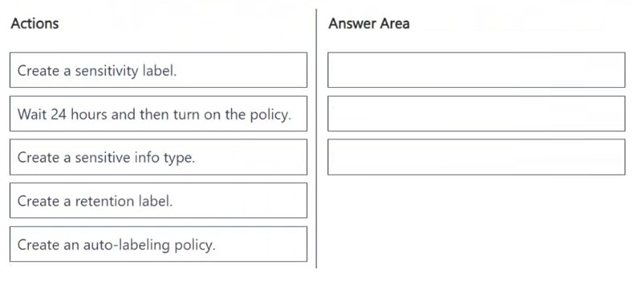
1. Create a sensitivity label. 2. Create an auto-labeling policy. 3. Wait 24 hours and then turn on the policy.
Question
Case Study
Instructions
This is a case study. Case studies are not timed separately from other exam sections. You can use as much exam time as you would like to complete each case study. However, there might be additional case studies or other exam sections. Manage your time to ensure that you can complete all the exam sections in the time provided. Pay attention to the Exam Progress at the top of the screen so you have sufficient time to complete any exam sections that follow this case study.
To answer the case study questions, you will need to reference information that is provided in the case. Case studies and associated questions might contain exhibits or other resources that provide more information about the scenario described in the case. Information provided in an individual question does not apply to the other questions in the case study.
A Review Screen will appear at the end of this case study. From the Review Screen, you can review and change your answers before you move to the next exam section. After you leave this case study, you will NOT be able to return to it.
To start the case study
To display the first question in this case study, select the "Next" button. To the left of the question, a menu provides links to information such as business requirements, the existing environment, and problem statements. Please read through all this information before answering any questions. When you are ready to answer a question, select the "Question" button to return to the question.
Overview
Contoso, Ltd. is a consulting company that has a main office in Montreal and three branch offices in Seattle, Boston, and Johannesburg.
Existing Environment
Microsoft 365 Environment
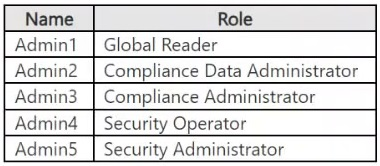
Contoso has a Microsoft 365 E5 tenant. The tenant contains the administrative user accounts shown in the following table.
Users store data in the following locations:
SharePoint sites
OneDrive accounts
Exchange email
Exchange public folders
Teams chats
Teams channel messages
When users in the research department create documents, they must add a 10-digit project code to each document. Project codes that start with the digits 999 are confidential.
SharePoint Online Environment
Contoso has four Microsoft SharePoint Online sites named Site1, Site2, Site3, and Site4.
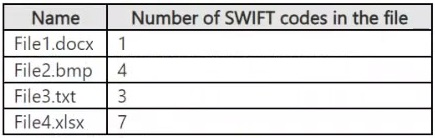
Site2 contains the files shown in the following table.
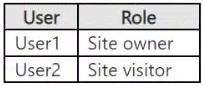
Two users named User1 and User2 are assigned roles for Site2 as shown in the following table.
Site3 stores documents related to the company's projects. The documents are organized in a folder hierarchy based on the project.
Site4 has the following two retention policies applied:
Name: Site4RetentionPolicy1
Locations to apply the policy: Site4
Delete items older than: 2 years
Delete content based on: When items were created
Name: Site4RetentionPolicy2
Locations to apply the policy: Site4
Retain items for a specific period: 4 years
Start the retention period based on: When items were created
At the end of the retention period: Do nothing
Problem Statements
Management at Contoso is concerned about data leaks. On several occasions, confidential research department documents were leaked.
Requirements
Planned Changes
Contoso plans to create the following data loss prevention (DLP) policy:
Name: DLPpolicy1
Locations to apply the policy: Site2
Conditions:
Content contains any of these sensitive info types: SWIFT Code
Instance count: 2 to any
Actions: Restrict access to the content
Technical Requirements
Contoso must meet the following technical requirements:
All administrative users must be able to review DLP reports.
Whenever possible, the principle of least privilege must be used.
For all users, all Microsoft 365 data must be retained for at least one year.
Confidential documents must be detected and protected by using Microsoft 365.
Site1 documents that include credit card numbers must be labeled automatically.
All administrative users must be able to create Microsoft 365 sensitivity labels.
After a project is complete, the documents in Site3 that relate to the project must be retained for 10 years.
You need to meet the technical requirements for the Site1 documents.
Which three actions should you perform in sequence? To answer, move the appropriate actions from the list of actions to the answer area and arrange them in the correct order.
Key Takeaways
The exam tests the specific workflow for Information Protection: Sensitivity Label creation -> Auto-labeling Policy configuration -> Simulation/Enablement, ignoring retention requirements which are handled separately.
This SC-401 scenario tests the correct sequence for implementing auto-labeling of sensitive data (credit cards) in Microsoft Purview. The solution requires creating a label, defining an auto-labeling policy, and enabling it after a simulation period.
Common mistake: Candidates often confuse sensitivity labels with retention labels or attempt to create custom sensitive info types for credit cards, despite built-in templates being available for this common data type.
Expert Analysis
Why the Answer Is Correct
To automatically apply protection to documents containing credit card numbers in Site1, you must first define the protection mechanism by creating a Sensitivity Label. Next, you configure the automation rules by creating an Auto-labeling Policy that targets Site1 and detects the credit card sensitive info type. Finally, best practice dictates running the policy in Simulation Mode (often represented as 'Wait 24 hours') before turning it on to ensure no false positives disrupt users.
Why Other Candidate Answers Are Wrong
Creating a Retention Label is incorrect because the requirement is to label (protect) the data, not just retain it; retention policies are separate from information protection labels. Creating a Sensitive Info Type is unnecessary because Microsoft Purview provides pre-built, high-confidence sensitive info types for credit card numbers. Reordering these steps breaks the dependency chain required for auto-labeling to function.
Community Comment Notes
The community consensus strongly favors the sequence: Create Sensitivity Label, Create Auto-labeling Policy, Wait 24 Hours/Simulation. Some learners initially questioned if retention was needed, but verified that the question specifically asks about meeting the technical requirement for Site1 documents regarding credit card data, which is an information protection task. One commenter noted that while built-in info types exist, customization isn't required unless specified, confirming the standard path is sufficient.
Exam Strategy
When asked about 'labeling' or 'protection', think Sensitivity Labels. When asked about 'keeping' or 'deleting' data, think Retention Policies. For auto-labeling questions, always follow the order: Label Definition -> Policy Configuration -> Testing/Simulation -> Enablement.
Frequently Asked Questions
Do I need to create a custom Sensitive Info Type for credit cards?
Why is a retention label not part of this answer?
Discussion 14 contributions
Compiled from public community threads and reader submissions, lightly edited for clarity. Handles and vote tallies are shown as recorded, and comments reflect the views of individual contributors.
From public community threads 14
-
starlord45 👍 28In my opinion the following solution is the best: 1. Create a sensitivity label. 2. Create an auto-labeling policy. 3. Wait 24 hours and then turn on the policy. Create a retention label. -> Has nothing to do with information protection. Create a sensitive info type. -> Not needed because for credit cards, there is a built-in one. To be honest, the Wait 24 hours and then turn on the policy, does not sound that good for me. But the other ones are even worse... .
-
Fiqri 👍 5i mean 1. retention label 2. sensitivity label 3. auto-labeling policy
-
Eltooth 👍 41. Create a sensitivity label. 2. Create an auto-labeling policy. 3. Wait 24 hours and then turn on the policy.
-
Fiqri 👍 3You need to meet the technical requirements for the Site1 documents. Doesn't that means all documents/data should be retained for 1 year? so we need to configure retention policy too, waiting 24 hours doesn't make any sense because that doesn't mean we wait 24 hours after we turned on the policy, it says wait 24 hours then turn on policy. The given answer is correct for me
-
KrisDeb 👍 31. Create a sensitivity label 2. Create an auto-labelling policy 3. Wait 24 hours and then turn on the policy Create a retention label - N/A Create a sensitive info type - No need, already built-in
Show 9 more comments
-
phatboi 👍 2the question said all the technical requirements for site 1 should be met. Site one contains credit data hence an SIT needs to be defined, a label created and an auto labelling applied. You may ask but there is an inbuild SIT for credit card, that is fine but you have to customize it because it might not be suitable to match your requirement.
-
J108 👍 2Create Sensitivity Label Create an Autolabeling Policy Wait 24 hours and then rurn on the policy "Create a sensitive info type" isn’t needed because credit card numbers are a built-in sensitive info type. "Create a sensitive info type" isn’t needed because credit card numbers are a built-in sensitive info type.
-
AttackOnMinion 👍 2believe the 24 hour aims to let the simulation mode complete
-
AhmedA 👍 2Are theses questions up to date?
-
TDAC 👍 1The need to wait 24hrs is mentioned here https://learn.microsoft.com/en-us/purview/create-sensitivity-labels?tabs=classic-label-scheme#when-to-expect-new-labels-and-changes-to-take-effect It's to allow changes to propagate.
-
NeerajSap 👍 1There is no retention policy listed for site1. States All M365 user documents must be retained for 1 year. 1. retention label 2. sensitivity label 3. auto-labeling policy
-
Jdr379 👍 11. Create a sensitivity label 2. Create an auto-labeling policy 3. Wait 24 hours and then turn on the policy
-
Xarou 👍 1Wouldn't the scope be wrong. This is about site1. Retention of all M365 is a global prerequisite
-
Shad_700 👍 1answer is right 1. retention label 2. sensitivity label 3. auto-labeling policy
Reader comments & corrections
No reader corrections yet — spotted an error or have a note? Share it below.