Defender for Cloud Apps File Policy Filters: Access Level vs Sensitivity Label
Short answer
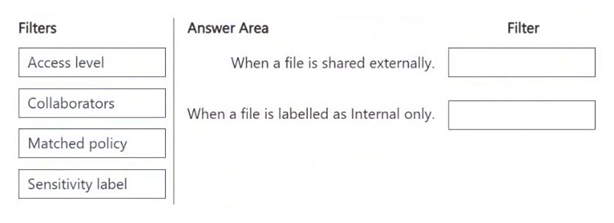
For the condition where a file is shared externally, use the Access level filter. For the condition where a file is labeled as internal only, use the Sensitivity label filter.
Question
You have a Microsoft 365 E5 subscription that uses Microsoft Defender for Cloud Apps.
You plan to deploy a Defender for Cloud Apps file policy that will be triggered when the following conditions are met:
A file is shared externally.
A file is labeled as internal only.
Which filter should you use for each condition? To answer, drag the appropriate filters to the correct conditions. Each filter may be used once, more than once, or not at all. You may need to drag the split bar between panes or scroll to view content.
NOTE: Each correct selection is worth one point.
Key Takeaways
Distinguish between Access level (sharing scope) and Sensitivity label (data classification) when defining conditional logic in MCAS policies.
Learn which Microsoft Defender for Cloud Apps filters to use for external sharing and internal labeling conditions in SC-401 file policies.
Common mistake: Learners often confuse Access level with User role or Location. Access level specifically defines the visibility boundary (Public, External, Internal, Private), whereas User role identifies the actor and Location identifies the source or destination service.
Expert Analysis
The question requires configuring two specific conditions within a Microsoft Defender for Cloud Apps (MCAS) file policy. The first condition is triggered when "A file is shared externally." In MCAS, the sharing status of a file is determined by its access level relative to the organization's boundary. Therefore, the correct filter for this condition is Access level. This filter allows administrators to define rules based on whether a file is Public, External, Internal, or Private.
The second condition is triggered when "A file is labeled as internal only." This refers directly to the classification applied to the data via Microsoft Purview Information Protection. To detect files with specific labels, such as "Internal," the appropriate filter is Sensitivity label. This filter enables the policy to evaluate the metadata associated with the file's sensitivity classification.
Substantive comments in the provided data support this mapping. One comment notes that "Access level" is used to identify how a file is shared, distinguishing between Private, Internal, External, and Public statuses. Another comment clarifies that the "Sensitivity label" filter is used to recognize files with specific Microsoft Information Protection labels, such as "Internal-Label." These insights confirm that Access level handles the sharing scope while Sensitivity label handles the content classification.
Other potential filters like File type, Location, or User role are incorrect here because they do not address the specific criteria of external sharing status or internal labeling. The key to solving this drag-and-drop question is recognizing that 'shared externally' maps to Access level and 'labeled as internal' maps to Sensitivity label.
Official Reference
- https://learn.microsoft.com/en-us/defender-cloud-apps/file-policy
- https://learn.microsoft.com/en-us/defender-cloud-apps/tutorial-file-policy
These links open the official vendor documentation in a new tab.
Exam Strategy
When configuring MCAS policies, always map the business requirement to the specific attribute being evaluated. If the rule depends on who can see the file or its distribution scope, select Access level. If the rule depends on the data's classification or regulatory tag, select Sensitivity label. Memorize the four access levels (Public, External, Internal, Private) to quickly eliminate irrelevant options.
Frequently Asked Questions
What are the available values for the Access level filter?
Can I use both Access level and Sensitivity label in the same policy?
Discussion 7 contributions
Compiled from public community threads and reader submissions, lightly edited for clarity. Handles and vote tallies are shown as recorded, and comments reflect the views of individual contributors.
From public community threads 7
-
Fiqri 👍 9the answer is correct.
-
RamyKetata 👍 5A file is shared externally → Use "Access level" This filter allows you to set conditions for files that are shared externally versus internally. You should configure it to detect files that have an external sharing status. A file is labeled as internal only → Use "Sensitivity label" This filter enables Defender for Cloud Apps to recognize files with specific sensitivity labels. Select the "Internal Only" label to trigger the policy when such files are involved.
-
starlord45 👍 1Seems right. When a file is shared externally [Access level]. The following access levels are possible: Public (Internet), Public, External, Internal, Private. When a file is labelled as internal only. [Sensivity label] Filter should look like this: Sensitivity label - Microsoft Information Protection equals Internal-Label.
-
NeerajSap 👍 1Access level is used to identify how a file is shared (Private, Internal, External, Public). Therefore, it can detect files that are shared externally. Sensitivity label is used to filter files based on Microsoft Purview sensitivity labels applied to the file, such as Internal only, Confidential, Highly Confidential, etc.
-
deeptha92 👍 1Given answer is correct.
Show 2 more comments
-
dmoorthy 👍 1Answer is correct.
-
Shad_700 👍 1Right Answer
Reader comments & corrections
No reader corrections yet — spotted an error or have a note? Share it below.