Microsoft Entra PIM Group Activation Logic
Short answer
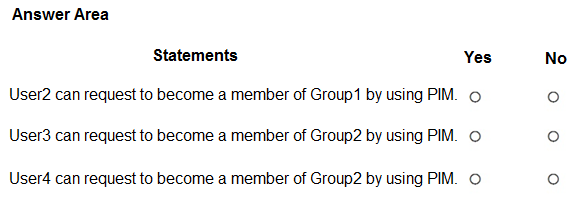
Statement 1: No; Statement 2: Yes; Statement 3: No.
Question
You have a Microsoft Entra ID P2 tenant that contains four users named User1, User2, User3, and User4. The tenant contains the groups shown in the following table.

Group2 is onboarded to Privileged Identity Management (PIM).
You assign Group2 the roles shown in the following table.
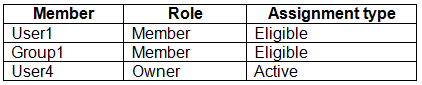
For each of the following statements, select Yes if the statement is true. Otherwise, select No.
NOTE: Each correct selection is worth one point.
Key Takeaways
PIM activation is only required for roles assigned to groups that are explicitly onboarded to Privileged Identity Management.
Determines whether users need to activate PIM roles based on group onboarding status and role assignment types in Microsoft Entra ID.
Common mistake: Assuming that all group memberships require PIM activation regardless of whether the group is onboarded, or confusing ownership rights with role activation requirements.
Expert Analysis
This scenario tests the mechanics of Privileged Identity Management (PIM) for Azure AD Groups and how it interacts with role assignments. The core principle is that PIM only governs the activation of roles assigned to a group after that group has been onboarded to PIM.
First, consider User2 and Group1. Although User2 is an owner of Group1 and possesses the Global Administrator role via PIM on Group2, Group1 itself is not onboarded to PIM. Therefore, any role assigned to Group1 (such as 'Reader') does not require activation through PIM. User2 can join Group1 immediately as a standard member without triggering a PIM request or approval workflow. Consequently, the statement regarding requiring activation is false.
Next, evaluate User3 and Group2. Group2 is onboarded to PIM and has the 'Reader' role assigned. For User3 to assume this role, they must perform an activation step within PIM. Since the role is eligible but not permanently active, User3 cannot access the permissions until they activate the role. Thus, the statement requiring activation is true.
Finally, analyze User4 and Group2. User4 is a member of Group2, which has the 'Reader' role assigned via PIM. Similar to User3, membership in a PIM-managed group with an assigned role does not grant immediate access. The user must explicitly activate the role to gain the associated permissions. Therefore, the statement claiming immediate access is false.
The correct selections are: Statement 1 (No), Statement 2 (Yes), Statement 3 (No).
Official Reference
https://learn.microsoft.com/en-us/azure/active-directory/privileged-identity-management/
This link opens the official vendor documentation in a new tab.
Exam Strategy
When analyzing PIM questions, first check if the target entity (user, group, or app) is onboarded to PIM. If it is not onboarded, no activation is needed, and access is immediate upon membership. If it is onboarded, verify if the role is 'Eligible' (requires activation) or 'Active' (immediate). Always distinguish between group ownership (administrative control) and role membership (access privileges).
Frequently Asked Questions
Does being an owner of a group allow immediate access to its roles?
What happens if a group is not onboarded to PIM?
Discussion 1 contributions
Compiled from public community threads and reader submissions, lightly edited for clarity. Handles and vote tallies are shown as recorded, and comments reflect the views of individual contributors.
From public community threads 1
-
Tuyi 👍 1NYY 1. User2 → Group1: No. Group1 isn’t onboarded to PIM, so there’s no PIM activation flow for it. User2 owns Group1 and could simply add themselves as a member, but that’s ordinary group management, not a PIM request. User2’s PIM relationship is with Group2, where they’re already a regular (non-PIM) member, so PIM gives them nothing for Group1. 2. User3 → Group2: Yes. Group1 is assigned as an eligible member of Group2. When a group gets an eligible assignment in PIM for Groups, its members inherit that eligibility. User3 is in Group1, so User3 can activate membership in Group2. 3. User4 → Group2: Yes. User4 is also a member of Group1, so the same eligible-membership path applies. The active owner assignment is a distraction: it lets User4 manage Group2, but the eligible membership comes through Group1. (As owner, User4 could also add themselves directly, but the question only asks whether a PIM request is possible.)
Reader comments & corrections
No reader corrections yet — spotted an error or have a note? Share it below.
Related Analysis
Practice All SC-300 Questions
Access 80 questions with complete answers and detailed explanations.
View Full SC-300 Practice Test →