SSPR Eligibility with Hybrid Identity and Password Writeback
Short answer
D User1 and User3 can use SSPR because User1 is cloud-only and User3 benefits from enabled password writeback.
Question
You have a Microsoft Entra tenant that syncs with the domain by using Microsoft Entra Connect Sync. Microsoft Entra Connect has password writeback enabled.
The tenant contains the users shown in the following table.
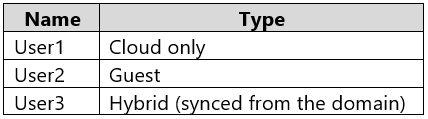
You create a security group named Group1 and add the users to the group.
From the Microsoft Entra admin center, you enable self-service password reset (SSPR).
Which users can use SSPR to reset their password?
Key Takeaways
Tests the critical dependency of SSPR for hybrid users on the 'Password Writeback' feature; without it, hybrid users cannot reset passwords via the cloud.
Determines which users can use Self-Service Password Reset (SSPR) based on identity type and password writeback settings. Correct answer is D.
Common mistake: Selecting 'A' by ignoring password writeback, or 'E' by incorrectly assuming guests can reset passwords in the home tenant. Guests are always excluded as they are managed externally.
Expert Analysis
Self-Service Password Reset (SSPR) in Microsoft Entra ID is governed by the source of authority for a user's password and specific configuration constraints. To determine eligibility, we must evaluate each user type against SSPR requirements.
Cloud-Only Users For users whose identity and password are stored exclusively in Microsoft Entra ID (cloud-only), SSPR works directly. The reset occurs within the cloud directory. Therefore, User1 is eligible.
Hybrid Identity Users (On-Premises AD DS) For users synced from on-premises Active Directory Domain Services (AD DS), the authoritative password source is the on-premises domain controller. By default, SSPR cannot reset passwords for these users because the cloud tenant cannot write changes back to AD. However, the scenario explicitly states that Microsoft Entra Connect has password writeback enabled. This feature allows the cloud tenant to update the on-premises AD database after a successful SSPR event. Consequently, User3 is eligible.
Guest Users Guest users (B2B collaboration identities) are managed by their home organization. SSPR policies in your tenant do not apply to guest credentials; only the home tenant can manage password resets for those accounts. Thus, User2 is ineligible.
The key distinction tested here is whether hybrid users can use SSPR when password writeback is active. Without writeback, User3 would be excluded, making A the answer. With writeback, both cloud and hybrid users are included.
Official Reference
- https://learn.microsoft.com/en-us/azure/active-directory/authentication/concept-authentication-methods-self-service-password-reset
- https://learn.microsoft.com/en-us/azure/active-directory/hybrid/how-connect-password-sync#password-writeback
These links open the official vendor documentation in a new tab.
Exam Strategy
Always check for 'Password Writeback' when evaluating SSPR scenarios involving hybrid identities. If writeback is enabled, hybrid users become eligible. If disabled, they are excluded. Additionally, remember that guest users are never eligible for SSPR in the current tenant as their credentials are owned by the external identity provider.
Frequently Asked Questions
Why can't Guest User2 use SSPR?
Does enabling SSPR automatically enable password writeback?
Community Votes
100% of anonymous learners picked answer D. Votes are pick records left by other test-takers — they are not the verified answer.
Discussion 1 contributions
Compiled from public community threads and reader submissions, lightly edited for clarity. Handles and vote tallies are shown as recorded, and comments reflect the views of individual contributors.
From public community threads 1
-
Tuyi 👍 1 Answered DAnswer: D. User1 and User3 only. Why: User1 (cloud only): ✅ The password lives in Entra ID, so SSPR resets it directly. User3 (hybrid): ✅ The authoritative password lives in on-prem AD DS. Password writeback is enabled, so the reset in Entra is written back to AD. Without writeback, User3 couldn’t use SSPR. That’s the detail the question is quietly checking. User2 (guest): ❌ A guest’s credentials belong to their home identity provider (their own Entra tenant, a Microsoft account, Google, etc.). Your tenant doesn’t hold their password, so it can’t reset it. Guests use their home organization’s password reset instead. Adding them to Group1 makes no difference.
Reader comments & corrections
No reader corrections yet — spotted an error or have a note? Share it below.
Related Analysis
Practice All SC-300 Questions
Access 80 questions with complete answers and detailed explanations.
View Full SC-300 Practice Test →