Microsoft Teams PowerShell Script Analysis for Auto Attendant
HOTSPOT
Case study
This is a case study. Case studies are not timed separately. You can use as much exam time as you would like to complete each case. However, there may be additional case studies and sections on this exam. You must manage your time to ensure that you are able to complete all questions included on this exam in the time provided.
To answer the questions included in a case study, you will need to reference information that is provided in the case study. Case studies might contain exhibits and other resources that provide more information about the scenario that is described in the case study. Each question is independent of the other questions in this case study.
At the end of this case study, a review screen will appear. This screen allows you to review your answers and to make changes before you move to the next section of the exam. After you begin a new section, you cannot return to this section.
To start the case study
To display the first question in this case study, click the Next button. Use the buttons in the left pane to explore the content of the case study before you answer the questions. Clicking these buttons displays information such as business requirements, existing environment, and problem statements. If the case study has an All Information tab, note that the information displayed is identical to the information displayed on the subsequent tabs. When you are ready to answer a question, click the Question button to return to the question.
General Overview
Wingtip Toys is a manufacturing company that has 5,000 users, and locations across North America and Europe.
Departments
The company has the following departments:
• IT
• Sales
• Security
• Customer support
• Human resources (HR)
• Research and development (R&D)
Microsoft Office 365 Environment
All users are assigned a Microsoft 365 E5 license and are enabled for Microsoft Teams Phone.
Users in the R&D department are assigned a Teams Premium license.
Requirements
Call Handling Requirements
Wingtip Toys identifies the following call handling requirements:
• Inbound calls to the main telephone number of Wingtip Toys must be routed to the correct department by using an auto attendant.
• During holiday periods, the auto attendant must perform the following actions:
• Route customer support calls to the customer support department.
• Play a recorded message for calls to all the other departments, and then disconnect the call.
Meeting Requirements
Wingtip Toys identifies the following meeting requirements:
• Meetings that include users from the R&D department must have a watermark applied to screen sharing sessions.
• Once a quarter, the CEO of Wingtip Toys must host a live, online event that is attended by all users.
Governance Requirements
Wingtip Toys identifies the following governance requirements:
• New teams must meet the following requirements:
• The Team type setting must be set to Private.
• Users must be able to send emails to team channels.
• Team members must be prevented from deleting messages from team channels.
• Each team name must be validated against a list of blocked team names.
• Each team name must contain a prefix of GRP and the department name as a suffix.
• Team channels must include a pinned tab that displays the Wingtip Toys website.
• When a user creates a team, the team picture must be the logo of the user's department.
• The department manager of the user that creates the team must be assigned the Owner role for the team.
• The use of animated GIFs must be prevented in team channels.
Collaboration Requirements
Wingtip Toys identifies the following collaboration requirements:
• Fabrikam users must be able to join team channels hosted by Wingtip Toys.
• Wingtip Toys users must be prevented from joining team channels hosted by Fabrikam.
Monitoring Requirements
A notification must be sent to users in the IT department when a Teams Rooms system goes offline.
Pilot Project Requirements
Wingtip Toys is currently evaluating third-party call center apps that integrate with Teams. The security department mandates that all third-party apps be reviewed by a qualified analyst and comply with industry-standard frameworks.
User Issues
Wingtip Toys users report audio and video issues when accessing Teams meetings by using a web browser.
Business Requirements
Wingtip Toys identifies the following business requirements:
• Follow the principle of least privilege.
• Minimize administrative effort.
• Minimize costs.
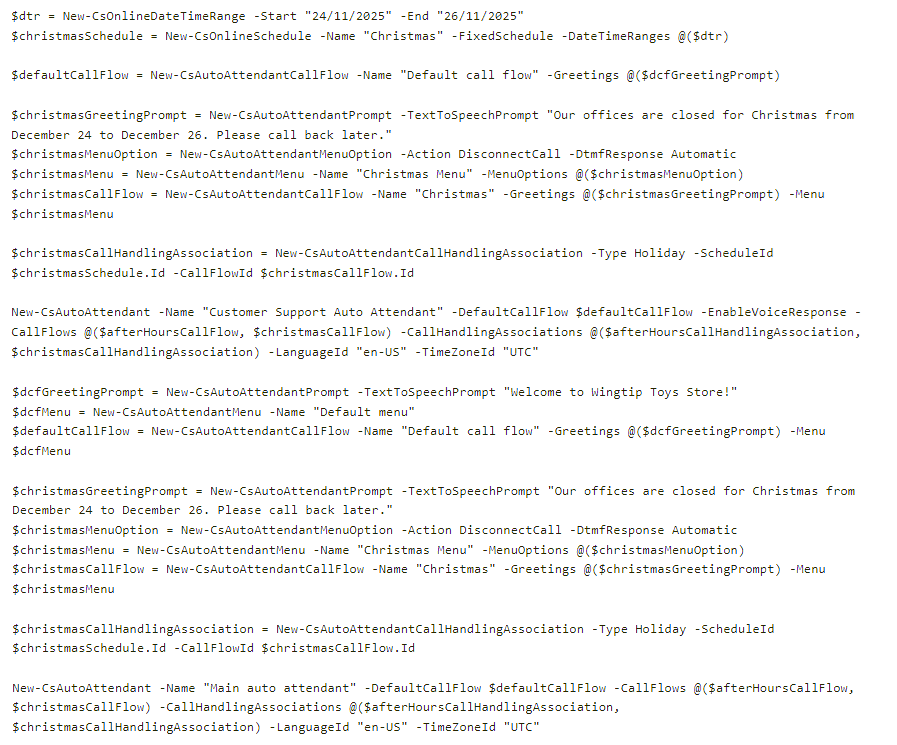
You have the following PowerShell script.
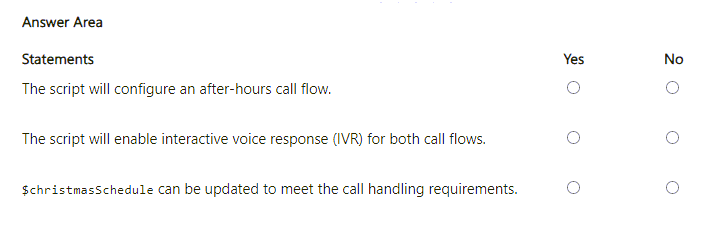
 For each of the following statements, select Yes if the statement is true. Otherwise, select No.
NOTE: Each correct selection is worth one point.
For each of the following statements, select Yes if the statement is true. Otherwise, select No.
NOTE: Each correct selection is worth one point.
Community Insight
The question tests the ability to distinguish between object creation and object reference in PowerShell commands, specifically identifying that the script only assigns variables rather than generating new call flows or IVR configurations.
Analyze a Microsoft Teams PowerShell script to determine its capabilities regarding auto attendant call flows and holiday schedules. This page explains why the script fails to create specific objects despite referencing them.
Candidates often assume that because variables like `$afterHoursCallFlow` are used in parameters, they are being created by the script. In reality, these must be pre-existing objects, and the script merely associates them.
Community Discussion (2 comments)
Comments & Corrections
No comments yet — spotted an error or have a note? Share it below.
Expert Analysis
Why the Answer Is Correct
The script provided is an assignment and configuration script, not a creation script. It references existing objects (like$afterHoursCallFlow) but does not contain the cmdlets required to instantiate them (e.g., New-CsAutoAttendant). Therefore, statements claiming the script creates these objects are false.Why Other Candidate Answers Are Wrong
Many learners select 'Yes' because the script uses terms associated with the desired outcome. However, using a variable in a parameter list (-CallFlows) implies the object exists in memory or the tenant; it does not prove the script created it. Similarly, -EnableVoiceResponse is missing from the main auto attendant command in this specific exhibit, making claims of full IVR activation incorrect.Community Comment Notes
As user 84103spam noted, the script includes$afterHoursCallFlow in -CallFlows but does not create it. Another commenter pointed out that -EnableVoiceResponse is only present for the Customer Support Auto Attendant, not the Main one, which is a key differentiator in the exam's modified exhibit compared to standard examples. Official Reference
Exam Strategy
When analyzing PowerShell scripts in MS-700, look strictly for 'Creation' cmdlets (New-, Create-) versus 'Configuration' cmdlets (Set-, Grant-). Do not assume functionality just because a variable name matches the requirement; trace the variable's origin.
Frequently Asked Questions
Does using a variable in -CallFlows mean the script created the flow?
No. It means the script is assigning an existing flow object to the auto attendant. You must check if a 'New-' cmdlet was used earlier to create it.
How do I know if Voice Response is enabled for all auto attendants?
Check each individual Auto Attendant command in the script. If -EnableVoiceResponse is absent from one, it is not enabled for that specific attendant.
Related Analysis
Practice All MS-700 Questions
Access 88 questions with complete answers and detailed explanations.
View Full MS-700 Practice Test →