Configure Common Area Teams Device Autodial and Directory Restrictions
DRAG DROP
You have a Microsoft 365 E5 subscription that includes Teams.
You plan to deploy a common area Teams device named Device1 to a reception area.
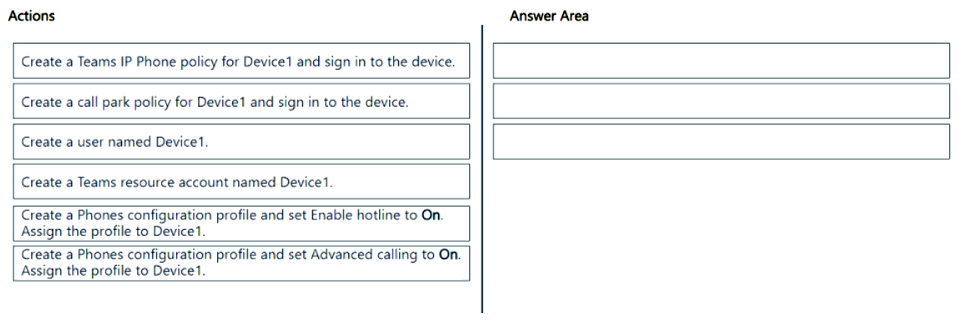
Device1 must autodial a preconfigured number when the phone handset is picked up and restrict searching the company directory.
Which three actions should you perform in sequence? To answer, move the appropriate actions from the list of actions to the answer area and arrange them in the correct order.
Community Insight
The key is recognizing that 'hotline' mode handles the autodial requirement, while 'advanced calling' settings are used to disable directory search capabilities for security.
This scenario requires configuring a Common Area Phone in Microsoft Teams to autodial upon pickup and restrict directory searches. The solution involves creating a resource account, enabling the hotline feature via a phone configuration profile, and applying advanced calling restrictions.
Learners often confuse standard user phone policies with specific Common Area Phone configurations or miss the need for a Resource Account as the prerequisite identity.
Community Discussion (2 comments)
Comments & Corrections
No comments yet — spotted an error or have a note? Share it below.
Expert Analysis
Why the Answer Is Correct
To meet the requirements, you must first establish an identity for the device by creating a Teams Resource Account named Device1. Next, to satisfy the autodial requirement, you create a Phones configuration profile where you set the Enable hotline setting to On; this ensures the phone automatically dials a preconfigured number when the handset is picked up. Finally, to restrict searching the company directory, you apply a separate policy or configure the Advanced calling settings within the phone configuration to disable directory lookups, ensuring compliance with reception area privacy standards.Why Other Candidate Answers Are Wrong
Actions involving standard user voice routing or generic meeting policies do not address the specific hardware behaviors of a Common Area Phone. Attempting to use a regular user license instead of a Resource Account fails because Common Area Phones require a dedicated resource identity to function correctly in this context without consuming a full user seat.Community Comment Notes
Community members emphasize that the correct sequence starts with provisioning the Resource Account, as confirmed by official documentation links shared in comments such as "https://learn.microsoft.com/en-us/microsoftteams/phones/set-up-common-area-phones". Users also note that the 'hotline' feature is the specific mechanism for automatic dialing, distinguishing it from standard speed dial configurations.Official Reference
Exam Strategy
When dealing with Common Area Phones, always remember they require a Resource Account. Focus on the specific features available in Phone Configuration Profiles, particularly 'Hotline' for auto-dialing and 'Advanced Calling' for restricting directory access.
Frequently Asked Questions
Why is a Resource Account required for Common Area Phones?
A Resource Account provides a dedicated identity for the device that does not consume a user license, allowing it to be managed separately and used for automated functions like hotlines.
What is the difference between Hotline and Advanced Calling in Teams?
Hotline forces the phone to dial a specific number immediately upon picking up the handset. Advanced Calling refers to broader settings like disabling directory search or call waiting features.
Related Analysis
Practice All MS-700 Questions
Access 88 questions with complete answers and detailed explanations.
View Full MS-700 Practice Test →