Teams Shared Channel External Collaboration for Marketing
Short answer
CE Configure B2B direct connect inbound access and set Invite external users to shared channels to On for the marketing department Teams policy.
Question
 -
- 
Key Takeaways
The question tests the direction of cross-tenant access (inbound vs. outbound) and the scope of Teams policies for shared channels, with the trap being to choose outbound settings or the global default policy.
Teams shared channels for external collaboration require enabling 'Invite external users to shared channels' on the specific department's Teams policy and configuring B2B direct connect inbound access settings in Azure AD. This page confirms that the correct actions for the ADatum marketing department are options C and E, not the outbound or global-default alternatives.
Common mistake: A frequent error is selecting B (outbound B2B direct connect) because learners confuse which direction controls external users accessing your shared channel; outbound applies when your users join external channels, not when you host one.
Expert Analysis
Why the Answer Is Correct
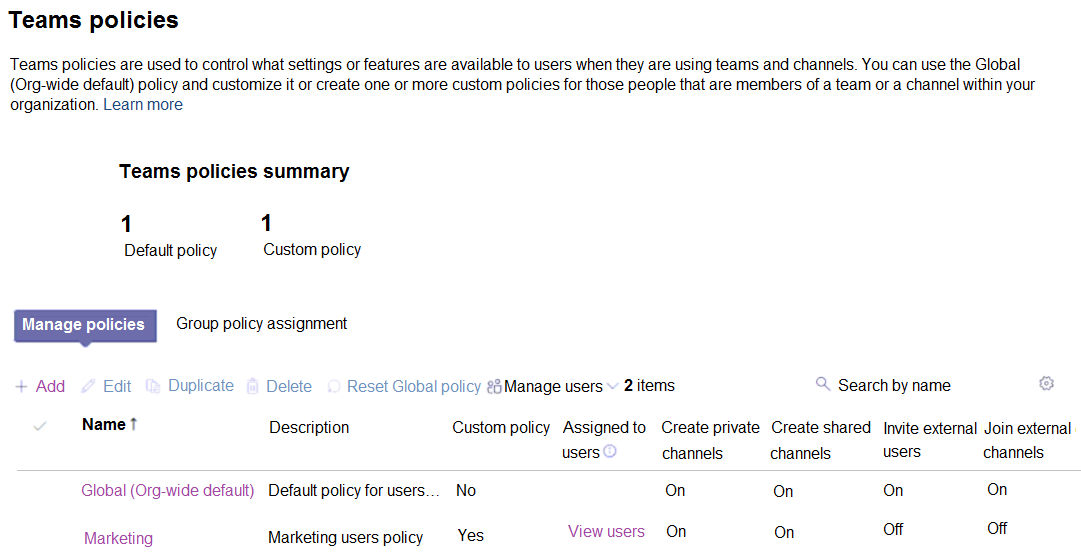
The marketing department needs a Teams channel for external collaboration, which in Microsoft Teams means a shared channel. To host a shared channel and invite external participants, the department's Teams policy must have "Invite external users to shared channels" turned On (option E). Scoping this to the marketing department's policy rather than the Global (Org-wide default) policy satisfies the least-privilege requirement. For external users from another Microsoft Entra tenant to actually access the shared channel, ADatum must configure the B2B direct connect inbound access settings in Azure AD to allow those users (option C). Inbound settings control who from other organizations can access your resources, which is exactly the direction needed when you are the host inviting guests into your shared channel.
Why the Other Options Are Wrong
Option A is incorrect because changing the Global (Org-wide default) Teams policy would enable external invitations for all users, not just marketing, violating the least-privilege requirement. Option B is wrong because outbound B2B direct connect settings control whether your users can access shared channels hosted by other organizations—the opposite direction from hosting a channel and inviting external users in. Option D is wrong because "Join external shared channels" only matters when your users need to join a shared channel created by an external tenant; the marketing department is creating its own channel, so this setting is not required.
Community Comment Notes
Community consensus strongly favors CE, with all recorded votes selecting those two options. As Bobalo observed, "The marketing channel is shared, not private," confirming the scenario is about shared channels rather than private channels. kitty73 cited Microsoft documentation noting that B2B direct connect "currently works with Microsoft Teams shared channels," reinforcing the need for cross-tenant access configuration. r2c3po explained that "Join external shared channels" (D) enables joining external channels while "Invite external users to shared channels" (E) enables inviting, correctly pointing out that only the invite setting is needed here. These perspectives align with the analysis above.
Official Reference
- https://learn.microsoft.com/en-us/microsoftteams/shared-channels
- https://learn.microsoft.com/en-us/azure/active-directory/external-identities/cross-tenant-access-overview
These links open the official vendor documentation in a new tab.
Exam Strategy
Focus on the direction of access: when you host a shared channel, you need inbound cross-tenant settings to let external users in; outbound is for when your users join external channels. Also, scope Teams policies to the specific department to meet least privilege.
Frequently Asked Questions
Why is B2B direct connect outbound access not the correct action for external collaboration?
Why not set 'Invite external users to shared channels' on the Global org-wide default Teams policy?
Community Votes
100% of anonymous learners picked answer CE. Votes are pick records left by other test-takers — they are not the verified answer.
Discussion 3 contributions
Compiled from public community threads and reader submissions, lightly edited for clarity. Handles and vote tallies are shown as recorded, and comments reflect the views of individual contributors.
From public community threads 3
-
Bobalo 👍 2Assuming this question has been answered correctly, the previous question's answer cannot be right. The marketing channel is shared, not private
-
kitty73 👍 1"B2B direct connect is a feature of Microsoft Entra External ID that lets you set up a mutual trust relationship with another Microsoft Entra organization for seamless collaboration. This feature currently works with Microsoft Teams shared channels. With B2B direct connect, users from both organizations can work together using their home credentials and a shared channel in Teams, without having to be added to each other’s organizations as guests. " Resource link: https://learn.microsoft.com/en-us/entra/external-id/b2b-direct-connect-overview?source=recommendations
-
r2c3po 👍 1D. Set Join external shared channels to On for the Teams policy of the marketing department: This action would indeed allow users in the marketing department to join external shared channels, thereby enabling external collaboration. E. Set Invite external users to shared channels to On for the Teams policy of the marketing department: Enabling this setting would allow users in the marketing department to invite external users to shared channels, facilitating collaboration with external partners.
Reader comments & corrections
No reader corrections yet — spotted an error or have a note? Share it below.
Related Analysis
Practice All MS-700 Questions
Access 88 questions with complete answers and detailed explanations.
View Full MS-700 Practice Test →