Intune Update Ring User Experience Restart Settings
Short answer
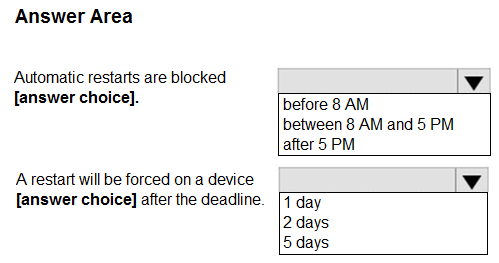
Automatic restarts are blocked between 8 AM and 5 PM. A restart will be forced on a device 1 day after the deadline.
Question
You have a Microsoft 365 subscription that uses Microsoft Intune.
You plan to manage Windows updates by using Intune.
You create an update ring for Windows 10 and later and configure the User experience settings for the ring as shown in the following exhibit.
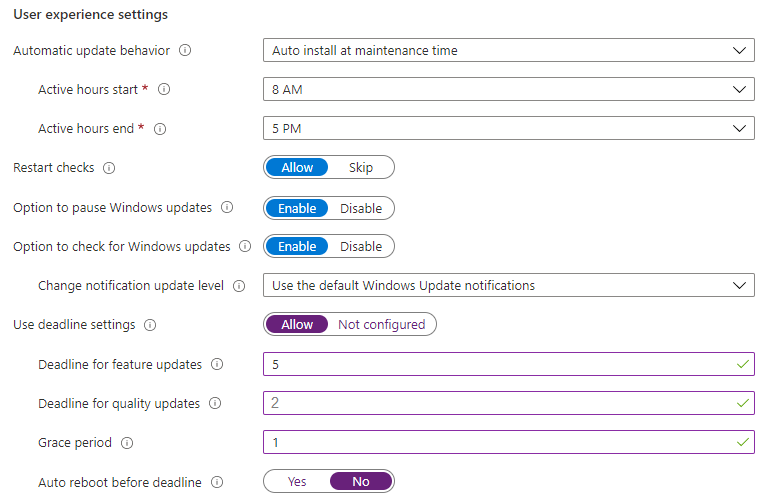
Use the drop-down menus to select the answer choice that completes each statement based on the information presented in the graphic.
NOTE: Each correct selection is worth one point.
Key Takeaways
The question tests reading active hours plus the deadline/grace-period interaction, and the common trap is answering '5 days' (the deadline) instead of the 1-day grace period after the deadline has already elapsed.
This hotspot question tests how an Intune Windows 10 and later update ring's User experience settings control when devices restart after updates. The exhibit's active-hours setting blocks automatic restarts between 8 AM and 5 PM, and the configured 1-day grace period means a restart is forced 1 day after the deadline.
Common mistake: Learners select the deadline value (5 days) for the second statement, forgetting that the question asks when a restart is forced after the deadline has passed — only the 1-day grace period applies then.
Expert Analysis
Why the Answer Is Correct
The update ring's User experience settings show active hours of 8 AM to 5 PM, so automatic restarts are blocked between 8 AM and 5 PM and the device will not reboot during a user's workday. Because the question asks when a restart is forced after the deadline has already passed, only the grace period matters: the ring configures a 1-day grace period, so a restart is forced on a device 1 day after the deadline. Microsoft's documentation confirms that when the deadline and grace period expire, the device is restarted even if it occurs during active hours.
Why Other Candidate Answers Are Wrong
Choosing the 5-day deadline for the second statement is incorrect because the deadline measures how long the update stays available before force installation, not the reboot delay after the deadline. As b0gdan433 explained, the deadline is how long the patch stays available until force installed, while the grace period is how long until a reboot is forced. Reading the active-hours window as a 24-hour or unrestricted value is wrong because the exhibit explicitly configures 8 AM to 5 PM as the blocked period. Answering that restarts are never blocked during the day ignores the 'Use active hours' configuration shown in the ring.
Community Comment Notes
Fortind1974, the top-rated comment, states the answer as "Automatic restarts are blocked between 8 AM - 5 PM" with a restart forced "1 day after the deadline," citing the Microsoft Intune Windows update settings article. benpatto directly addressed the deadline confusion, noting "there is a grace period of 1 day so 1 day is the right answer." ThomasE reinforced the reading: "The question asks when the device will reboot AFTER the deadline has passed. So don't factor in the deadline in the answer." GoombaLMAO quoted the docs that setting the restart control to No forces the system to wait until both deadline and grace period are expired before restarting.
Official Reference
https://learn.microsoft.com/en-us/mem/intune/protect/windows-update-settings
This link opens the official vendor documentation in a new tab.
Exam Strategy
When a hotspot asks about timing after a deadline, ignore the deadline value itself and apply only the grace period, since the deadline has already elapsed. Also map active hours directly from the exhibit's start and end times rather than assuming a default window.
Frequently Asked Questions
How does the grace period differ from the deadline in an Intune update ring?
Why is the forced restart answer 1 day and not 5 days in this update ring question?
Discussion 13 contributions
Compiled from public community threads and reader submissions, lightly edited for clarity. Handles and vote tallies are shown as recorded, and comments reflect the views of individual contributors.
From public community threads 13
-
Fortind1974 👍 39Automatic restarts are blocked between 8 AM - 5 PM. A restart will be forced on a device 1 day after the deadline. https://learn.microsoft.com/en-us/mem/intune/protect/windows-update-settings
-
yhano 👍 6Automatic restarts are blocked between 8 AM - 5 PM. A restart will be forced on a device 1 day after the deadline.
-
b0gdan433 👍 4Deadline - Is how long patch will stay available in Windows Update section until force installed Grace period - Is how long until a reboot is forced. So the correct response is 1 day until will force a reboot
-
benpatto 👍 3The answer is wrong for no.2 - It needs to be 1 day. The deadline is 5 days HOWEVER, there is a grace period of 1 day so 1 day is the right answer. The grace period only takes place after the deadline has ended, and as there's a grace period of 1 day, it allows for 1 day before a device is forced into shutdown.
-
GoombaLMAO 👍 2Answers are correct "Setting this value to No forces the system to wait until the deadline and grace period are expired and then restarts the device and this could occur during active hours." https://learn.microsoft.com/en-us/mem/intune/protect/windows-update-settings#user-experience-settings
Show 8 more comments
-
yosry 👍 2- between 8 AM - 5 PM. -1 day after the deadline.
-
Moot2 👍 2Grace period should be 1 day
-
ThomasE 👍 1The question asks when the device will reboot AFTER the deadline has passed. So don't factor in the deadline in the answer because it has already passed. Answer should be 1 Day.
-
reyrey 👍 1correct answer Automatic restarts are blocked [between 8 AM and 5 PM]. A restart will be forced on a device [1 day] after the deadline.
-
LiamAzure 👍 1So a restart will be forced on, when? None of the available answers seem right by that
-
7a9c653 👍 1so the restart will be forced 3 days? 1 grace + 2 deadline?
-
yosry 👍 1Box1: Between 8AM and 5PM Box2: 1 Day
-
TMpics 👍 1Correct
Reader comments & corrections
No reader corrections yet — spotted an error or have a note? Share it below.
Related Analysis
Practice All MD-102 Questions
Access 92 questions with complete answers and detailed explanations.
View Full MD-102 Practice Test →