SCEP Root Certificate Location for Intune
Short answer
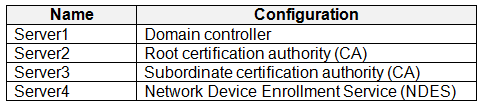
C The required root certificate is located on Server 3, which acts as the Root CA trusted by the SCEP profile.
Question
 -
- 
Key Takeaways
The exam tests the distinction between the issuing subordinate CA (NDES) and the trusted Root CA. The common trap is selecting the NDES server because it issues the certificates, ignoring that clients must trust the Root CA to validate the chain.
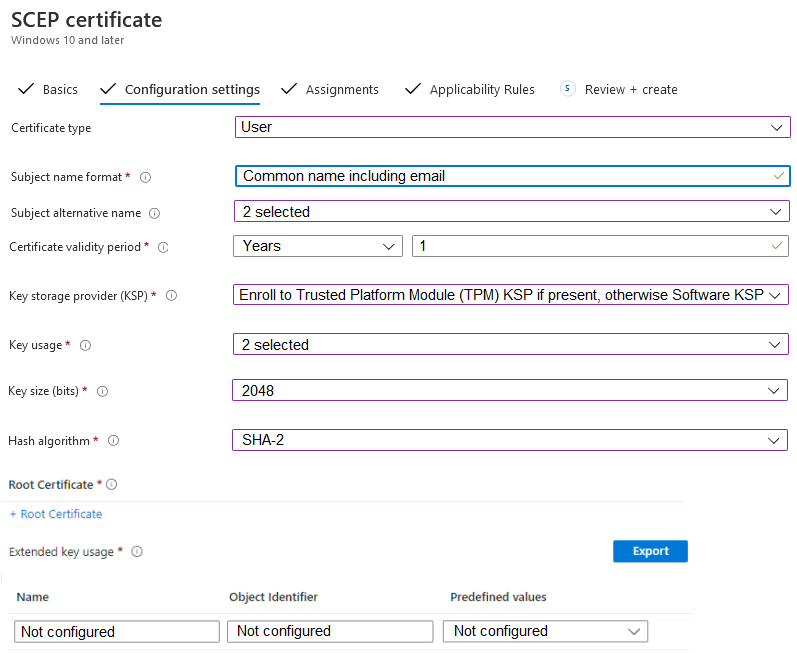
This question tests the configuration of a SCEP profile in Microsoft Intune, specifically identifying which server hosts the trusted root certificate. The correct answer is Server 3, as it represents the Root CA required for device trust validation.
Common mistake: Candidates often select Server 2 (Subordinate CA/NDES), assuming that since NDES issues the cert, its certificate is the one needed. This ignores the fundamental PKI requirement that the client must trust the Root CA to verify the signature of any certificate in the chain.
Expert Analysis
Why the Answer Is Correct
The correct option is C (Server 3). In a SCEP deployment with Intune, devices are configured to trust a specific Trusted Root Certification Authority. Even though the Network Device Enrollment Service (NDES) on the Subordinate CA (Server 2) issues the actual certificates, the client devices must have the Root CA certificate installed to validate the entire chain of trust. Therefore, the 'Trusted Root Certification Authority' field in the SCEP profile must point to the Root CA server.
Why the Other Options Are Wrong
Option A (Server 1) is incorrect as it is likely just a web server or distribution point without CA roles. Option B (Server 2) is the most common wrong answer; while Server 2 runs NDES and issues certs, it is a subordinate CA. Clients do not typically trust the subordinate directly for the root of the chain; they trust the Root CA that signed the subordinate's certificate. Option D (Server 4) is incorrect as it does not host the necessary PKI infrastructure for this scenario.
Community Comment Notes
Several users argued for Server 2 based on the fact that NDES issues the certificates. However, official Microsoft documentation clarifies that the SCEP profile requires the Trusted Root CA certificate. As noted by user Alex_UC, "The root CA certificate is needed in the SCEP profile even if the certificates are issued from a subordinate." The community consensus eventually shifted toward Server 3 upon reviewing the PKI hierarchy requirements.
Official Reference
https://learn.microsoft.com/en-us/mem/intune/protect/certificates-scep-configure
This link opens the official vendor documentation in a new tab.
Exam Strategy
When configuring SCEP in Intune, always remember that the 'Trusted Root Certification Authority' refers to the Root CA, not the NDES/Subordinate CA. The NDES server acts as the enrollment agent, but the trust anchor is the Root CA.
Frequently Asked Questions
Why can't I use Server 2 (Subordinate CA) as the trusted root?
What is the role of NDES in this SCEP configuration?
Community Votes
50% of anonymous learners picked answer C. Votes are pick records left by other test-takers — they are not the verified answer.
Discussion 6 contributions
Compiled from public community threads and reader submissions, lightly edited for clarity. Handles and vote tallies are shown as recorded, and comments reflect the views of individual contributors.
From public community threads 6
-
Merrybob 👍 8 Answered CGiven: NDES issues certificates from the subordinate CA. NDES server role – To support using the Certificate Connector for Microsoft Intune with SCEP, you must configure the Windows Server that hosts the certificate connector with the Network Device Enrollment Service (NDES) server role. In this case the NDES server pulls the certificate from the Subordinate CA and not the Root CA Ref: https://learn.microsoft.com/en-us/mem/intune/protect/certificates-scep-configure#:~:text=NDES%20server%20role%20%E2%80%93%20To%20support%20using%20the%20Certificate%20Connector%20for%20Microsoft%20Intune%20with%20SCEP%2C%20you%20must%20configure%20the%20Windows%20Server%20that%20hosts%20the%20certificate%20connector%20with%20the%20Network%20Device%20Enrollment%20Service%20(NDES)%20server%20role.
-
mp34 👍 6I think answer should be B https://learn.microsoft.com/en-us/mem/intune/protect/certificates-scep-configure To use a SCEP certificate profile, devices must trust your Trusted Root Cert. Authority CA
-
Murad01 👍 5I think the correct answer should be B/Server 2. https://learn.microsoft.com/en-us/mem/intune/protect/certificates-scep-configure
-
Alex_UC 👍 4 Answered BThe root CA certificate is needed in the SCEP profile even if the certificates are issued from a subordinate
-
NoursBear 👍 1Server 3 is correct a public discussion thread on this question
Show 1 more comment
-
pragni4321 👍 4 Answered BShould be B
Reader comments & corrections
No reader corrections yet — spotted an error or have a note? Share it below.
Related Analysis
Practice All MD-102 Questions
Access 92 questions with complete answers and detailed explanations.
View Full MD-102 Practice Test →