Does Autopilot Convert All Targeted Devices Apply Here?
HOTSPOT
You have an Azure AD tenant named contoso.com that contains the devices shown in the following table.
 The tenant contains the Azure AD groups shown in the following table.
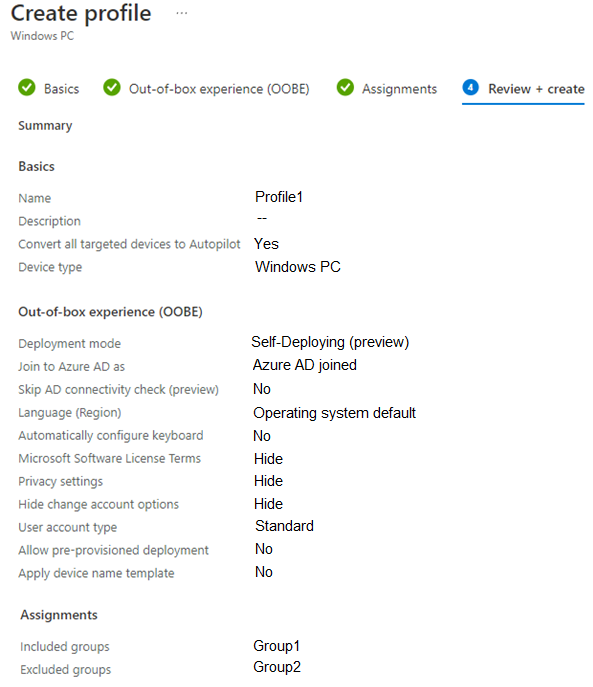
 You add an Autopilot deployment profile as shown in the following exhibit.
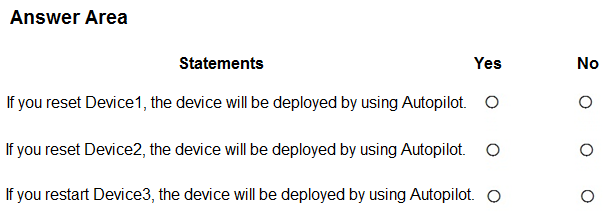
 For each of the following statements, select Yes if the statement is true. Otherwise, select No.
NOTE: Each correct selection is worth one point.
For each of the following statements, select Yes if the statement is true. Otherwise, select No.
NOTE: Each correct selection is worth one point.
Community Insight
The question tests whether 'Convert all targeted devices to Autopilot' actually harvests a hardware hash, and the trap is assuming Entra ID join alone or a restart is enough to produce an Autopilot deployment.
This MD-102 hotspot tests the Intune Windows Autopilot deployment profile setting 'Convert all targeted devices to Autopilot' against three devices in contoso.com. The page establishes that conversion only occurs for Intune-enrolled, hardware-hash-eligible devices that are not excluded by the profile's group scope, and that a restart alone triggers nothing.
The most common wrong approach is marking Device 1 Yes because it is Entra ID joined (or because the profile says 'all targeted devices'), when the hash is only collected from a device already enrolled to Intune and reporting to the service.
Community Discussion (16 comments)
Comments & Corrections
No comments yet — spotted an error or have a note? Share it below.
Expert Analysis
Why the Answer Is Correct
Device 1 answers No because 'Convert all targeted devices to Autopilot' only makes Intune request and upload the hardware hash from a device that is already enrolled in Intune; Device 1 is Entra ID joined but not Intune enrolled, so no hash is ever collected and no Autopilot deployment can occur. Device 2 answers No because it belongs to Group 2, which is configured in the profile's Exclude group box, so it is never targeted and is never converted. Device 3 answers No because the statement concerns a Restart, and rebooting an existing OS session performs no Autopilot provisioning action. Autopilot deployment only occurs during initial OOBE setup or after a Reset that re-enters that flow, so all three statements resolve to No.Why Other Candidate Answers Are Wrong
Marking Device 1 Yes relies on the false idea that Entra ID join already imports the hardware hash, but hashes must be bulk-imported or gathered through Intune enrollment, not created by joining the directory. Reading 'all targeted devices' as unconditional also ignores that 'targeted' is bounded by the Include and Exclude group selections, which is why Device 2 in the exclusion group stays out. A Y for Device 3 would require the statement to say Reset on an eligible, enrolled, included device — a Restart performs no provisioning, reset, or conversion at all. Selectors such as YNN or YNY therefore contradict both the exclusion scope and the hash-collection requirement.Community Comment Notes
Merrybob, with the highest like count, concluded that only Intune-enrolled devices can be used with Autopilot and that a restart yields No, which aligns with the configuration-requirements behavior. oopspruu and Meek_Learner both stressed that conversion means Intune must ask the device for its HWID, noting "Device1 is simple Entra Joined and not Intune enrolled so this setting doesn't take effect." OyYaGotta pushed back on the join-equals-hash idea, stating "You're confusing PRT tokens with device hashes." MR_Eliot and 665d390 argued the opposite (Y), treating Entra ID join as proof the hash exists, while krzysiek321 offered YNY; NoursBear and Valavanchandran converged on NNN, which the analysis supports.Official Reference
Exam Strategy
When a profile wording contains 'all targeted devices', first confirm the Include and Exclude group scope, then confirm the device's actual state (Entra joined vs. Intune enrolled). Treat only Reset/OOBE, never Restart, as an Autopilot trigger.
Frequently Asked Questions
Why doesn't Entra ID joining Device 1 convert it to Windows Autopilot?
Conversion requires Intune to read the device's hardware hash, which only happens on an Intune-enrolled device. An Entra ID join records directory identity, not the hardware hash, so no Autopilot profile applies.
Does restarting a device ever start a Windows Autopilot deployment?
No. Autopilot runs only during the out-of-box experience or after a Reset that re-enters setup; a Restart of an already-provisioned OS performs no Autopilot action.
Related Analysis
Practice All MD-102 Questions
Access 92 questions with complete answers and detailed explanations.
View Full MD-102 Practice Test →