Populating custom sales invoice SSRS fields with Chain of Command
Short answer
B No, the CoC extension must update the SalesInvoiceHeaderFooterTmp record already inserted by SalesInvoiceDP from CustInvoiceJour and SalesTable, not declare and populate a new buffer for the SSRS header.
Question
After you answer a question in this section, you will NOT be able to return to it. As a result, these questions will not appear in the review screen.
A company is using a Dynamics 365 finance and operations app.
The accounting department requests two custom fields named CusStatus and CusDiscount for the header of the sales invoice SSRS report. The custom fields are in the SalesTable table.
You create a duplicate of the report design and add the two new fields to a temporary table by using the following extension:
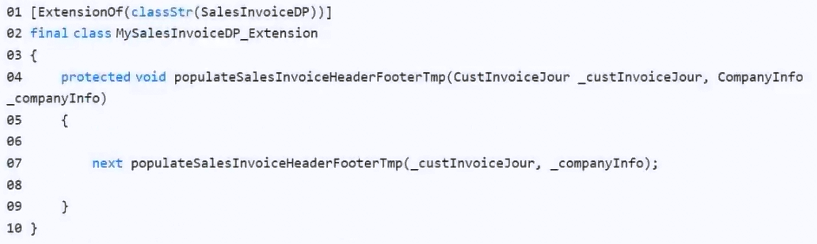
You need to populate the new fields by using Chain of Command (CoC).
Solution: Declare the SalesTable table on line 06 and insert a new line after line 06 to declare the SalesInvoiceHeaderFooterTmp table. Populate the new fields by using the custInvoiceJour parameter with a reference to SalesTable.
Does the solution meet the goal?
Key Takeaways
The question tests whether you can populate new fields on the exact SalesInvoiceHeaderFooterTmp record that SalesInvoiceDP already creates, and the trap is assuming a newly declared temporary-table buffer in CoC will be the one rendered by SSRS.
This MB-500 scenario tests whether a Chain of Command extension of the SalesInvoiceDP data provider can populate CusStatus and CusDiscount on the SalesInvoiceHeaderFooterTmp buffer. The proposed solution does not meet the goal (B) because it declares an unrelated temporary-table buffer instead of updating the record that the standard data provider inserts.
Common mistake: The most plausible wrong answer is A: adding the fields to the temp table and writing X++ in a CoC extension looks sufficient. It is wrong because the new local SalesInvoiceHeaderFooterTmp buffer is not the buffer populated and inserted by SalesInvoiceDP, so CusStatus and CusDiscount never reach the report data.
Expert Analysis
Scope of the goal. The question is not asking whether custom fields can be added to the SSRS design; it asks whether this specific CoC solution populates them on the sales invoice header. The fixed constraints are the two fields CusStatus and CusDiscount, both stored in SalesTable, the report header, the duplicated report design, the extended temporary table, and Chain of Command. A Yes answer (A) is supportable only if the extension writes those values to the exact SalesInvoiceHeaderFooterTmp record that SalesInvoiceDP inserts for each CustInvoiceJour.
What line 06 does not fix. Declaring SalesTable and then declaring SalesInvoiceHeaderFooterTmp after line 06 changes local variables, not the data flow. SalesInvoiceDP already has its SalesInvoiceHeaderFooterTmp buffer and a standard populate/insert path; the supplied discussion explicitly notes that declaring a fresh temporary-table buffer is the wrong record. Even if the code reads SalesTable through custInvoiceJour.SalesId and assigns CusStatus and CusDiscount, it is assigning them to an unrelated local buffer. Unless that buffer is the one passed to or inserted by the data provider, the SSRS report will still bind to the original inserted row.
Why the parameter matters. The custInvoiceJour parameter is useful for finding the SalesTable row through its SalesId, but it does not itself expose the inserted temp-table record. The correct CoC pattern is to extend the data-provider method that creates the header/footer temp record, call next, and then update the same inserted record, or use the supplied buffer if the method signature provides one. The solution does neither, so it does not meet the goal.
Verdict. B is correct; A is eliminated because merely declaring the tables and populating a new buffer leaves the rendered header record unchanged.
Official Reference
This link opens the official vendor documentation in a new tab.
Exam Strategy
For CoC report-data questions, first identify the standard method that inserts the temp-table record and whether its buffer is a parameter, local variable, or class member. Extend that exact method, call next(), and then update the same record, or use the supplied buffer, by joining CustInvoiceJour to SalesTable through SalesId. Treat any solution that declares a fresh temp-table buffer as suspect unless that buffer is explicitly passed to the standard logic.
Frequently Asked Questions
Why can't I declare a new SalesInvoiceHeaderFooterTmp buffer in the CoC method?
How should I populate the custom sales invoice header fields correctly?
Does duplicating the SSRS report design affect the needed X++ change?
Community Votes
100% of anonymous learners picked answer B. Votes are pick records left by other test-takers — they are not the verified answer.
Discussion 1 contributions
Compiled from public community threads and reader submissions, lightly edited for clarity. Handles and vote tallies are shown as recorded, and comments reflect the views of individual contributors.
From public community threads 1
-
cbef765 👍 1 Answered BWhy: The solution goes wrong in two ways, both because it declares a new SalesInvoiceHeaderFooterTmp buffer and populates it before next runs. 1. A new local buffer is the wrong record. SalesInvoiceDP already has its own SalesInvoiceHeaderFooterTmp buffer as a class member variable, and the standard populateSalesInvoiceHeaderFooterTmp method fills that buffer and inserts it. If you declare a fresh local variable of the same type, you get a separate, empty buffer that the report never reads. Anything you put in it is lost. 2. Filling it before next is too early. Lines 06 and the new line after it come before next, so the standard header record hasn’t been built yet. There’s nothing to add your fields to. Even if there were, the standard code inside next would build the record afterwards, without your values.
Reader comments & corrections
No reader corrections yet — spotted an error or have a note? Share it below.
Related Analysis
Practice All MB-500 Questions
Access 115 questions with complete answers and detailed explanations.
View Full MB-500 Practice Test →