Planning Optimization Fit Analysis Tool
Short answer
Use Planning Optimization Fit analysis to identify unsupported functionality and view the count of affected records.
Question
A manufacturing company uses Dynamics 365 Supply Chain Management. The company plans to move to the new Planning Optimization functionality.
Several processes are no longer operating as expected.
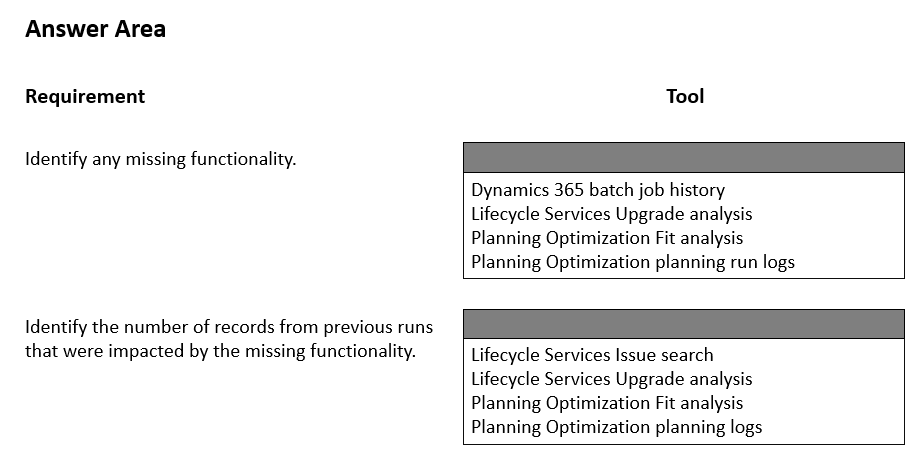
You need to identify any missing functionality and the number of records impacted.
Which tool should you use? To answer, select the appropriate options in the answer area.
NOTE: Each correct selection is worth one point.
Key Takeaways
The trap is confusing diagnostic logs with fit analysis; only Fit Analysis quantifies configuration gaps against Planning Optimization requirements.
Identify the correct tool for diagnosing missing functionality and impacted records when migrating to Planning Optimization in Dynamics 365 SCM.
Common mistake: Selecting Plan History Logs, which show past execution errors but do not analyze configuration compatibility or provide record impact counts for missing features.
Expert Analysis
The scenario involves a migration from legacy master planning to Planning Optimization in Dynamics 365 Supply Chain Management. When processes fail after such a transition, the root cause is often incompatibility between existing configurations and the new engine's requirements.
The correct tool to identify missing functionality and quantify impacted records is the Planning Optimization Fit analysis. This tool performs a diagnostic check on your current master-planning setup, highlighting features or configurations that Planning Optimization does not support. Crucially, it provides a report detailing the specific number of records affected by each identified gap, allowing administrators to prioritize remediation.
Alternative tools like Plan History Logs are incorrect because they record execution outcomes (success/failure) rather than analyzing configuration compatibility. Similarly, System Diagnostics or general Master Planning Setup screens do not provide this specific pre-migration or post-migration gap analysis with record counts. The comments correctly highlight that Fit Analysis is the designated mechanism for assessing readiness and troubleshooting configuration gaps during this upgrade.
Official Reference
This link opens the official vendor documentation in a new tab.
Exam Strategy
When facing questions about migration diagnostics or 'readiness' checks in Dynamics 365 SCM, always look for 'Fit Analysis' or 'Readiness' tools. These are distinct from runtime logs (like Plan History) and focus on configuration compatibility before or immediately after a system change.
Frequently Asked Questions
What is the difference between Fit Analysis and Plan History Logs?
Why do processes stop working after moving to Planning Optimization?
Discussion 3 contributions
Compiled from public community threads and reader submissions, lightly edited for clarity. Handles and vote tallies are shown as recorded, and comments reflect the views of individual contributors.
From public community threads 3
-
Max2969 👍 21) https://learn.microsoft.com/en-us/dynamics365/supply-chain/master-planning/planning-optimization/planning-optimization-fit-analysis 2)https://learn.microsoft.com/en-us/dynamics365/supply-chain/master-planning/planning-optimization/plan-history-logs
-
CCexamn 👍 11. Identify missing functionality → Planning Optimization Fit analysis Why: It checks your current master-planning setup for features/configurations that Planning Optimization doesn't support. 2. Identify number of impacted records → Planning Optimization Fit analysis Why: Fit analysis also reports the number (#) of records affected by each identified issue. Why not the others? - Planning Optimization planning logs → mainly information about planning runs, not the dedicated compatibility/unsupported-functionality assessment. - LCS Upgrade analysis / Issue search → intended for upgrade/code compatibility or known issues, not Planning Optimization compatibility. - Dynamics 365 batch job history → shows batch execution/status, not unsupported Planning Optimization functionality.
-
globeearth 👍 1[1] c. Planning Optimization Fit analysis : This tool is explicitly designed to analyze the transition to Planning Optimization, identifying unsupported or missing functionality that could explain why processes are no longer operating as expected. [2] c. Planning Optimization Fit analysis: The Fit Analysis not only identifies missing functionality but also quantifies the number of records (e.g., items, orders) impacted by those gaps, based on your current setup and historical data. It’s a single tool that fulfills both requirements efficiently. https://learn.microsoft.com/en-us/dynamics365/supply-chain/master-planning/planning-optimization/planning-optimization-fit-analysis
Reader comments & corrections
No reader corrections yet — spotted an error or have a note? Share it below.