Map Items to Coverage Groups or Item Coverage
Short answer
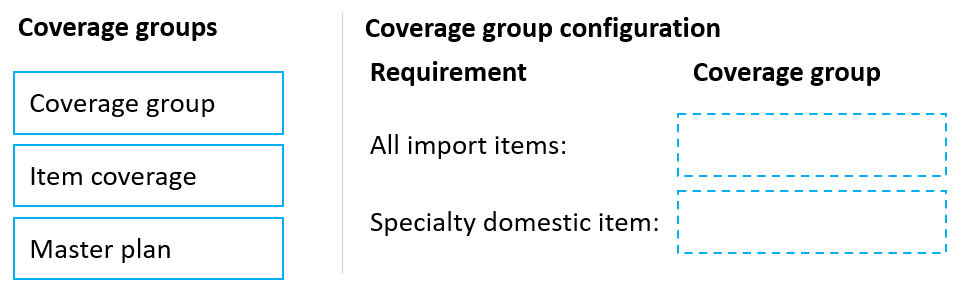
Assign all imported items to a shared coverage group holding the long lead time, most domestic items to a shared coverage group holding the short lead time, and create an item coverage override for the single specialty domestic item. The master plan is not used.
Question
A company is implementing Dynamics 365 Supply Chain Management. The company has two buying groups: one for domestic items and the other for imported items, the imported items have a long lead time for purchasing and processing once they are received at the port of entry.
Most domestic items have a short lead time. A specialty domestic item has an increased lead time.
Planners must update configurations to maintain the exceptions because there are thousands of items.
You need to configure the coverage groups for the least amount of system maintenance.
What should you configure? To answer, move the appropriate coverage groups to the correct requirements. You may use each coverage group once, more than once, or not at all. You may need to move the split bar between panes or scroll to view content.
Key Takeaways
The trap is ignoring "least amount of system maintenance" — bulk populations need a coverage group, but the one-off exception needs item coverage, and a master plan is never a per-item lead-time fix.
This MB-330 drag-drop tests where to store lead-time exceptions in Dynamics 365 Supply Chain master planning: shared coverage groups cover imported and most domestic items, while item coverage overrides handle the single specialty domestic item.
Common mistake: Creating a new coverage group for the single specialty domestic item, or trying to store lead-time exceptions on the master plan; both add needless maintenance and neither targets one item.
Expert Analysis
The qualifying phrase: "least amount of system maintenance"
Everything in this question hinges on that one constraint. The scenario gives three populations of items and three lead-time patterns, but only one design goal: minimize ongoing maintenance. That immediately rules out any approach that requires editing thousands of released products one by one.
"Thousands of items" eliminates per-item records for the groups
The imported items share a single characteristic — a long lead time for purchasing and port-of-entry processing — and there are thousands of them. Repeating that lead time on each item would be the definition of high maintenance. The correct move is to define the long lead time once on a Coverage group and assign that group to all imported items. The same logic applies to "most domestic items," which share a short lead time: they belong to a shared domestic Coverage group carrying the short lead time.
"A specialty domestic item" (singular) flips the answer
Exactly one domestic item has an increased lead time. Creating a whole new Coverage group for a single item adds a setup object you must maintain for one record — and overriding thousands is not the issue here, only one item is. The right tool for a one-off exception is an Item coverage record on that single item, which overrides the coverage group's lead time without touching the rest of the domestic population. As one comment puts it, coverage group settings apply to thousands of imported items with minimal maintenance, while item coverage "lets you override the default coverage group settings for that specific item without affecting" others.
"Master plan" is the decoy
A comment correctly notes that a master plan is for running and versioning the plan itself, not for storing item-level lead-time exceptions, so it is not used for any of these three requirements.
Final mapping
All imported items → Coverage group (long lead time). Most domestic items → Coverage group (short lead time). Specialty domestic item → Item coverage override. The Master plan is left unused.
Official Reference
https://learn.microsoft.com/en-us/dynamics365/supply-chain/master-planning/coverage-groups
This link opens the official vendor documentation in a new tab.
Exam Strategy
Read the maintenance qualifier first, then count the items behind each requirement. Anything touching thousands of records must be solved once at the coverage-group level; anything touching a single record is solved with item coverage on that record. When a choice like master plan cannot carry an item-level lead-time override, leave it unused rather than forcing every target into every source.
Frequently Asked Questions
Why not create a separate coverage group for the specialty domestic item?
Can item coverage override the lead time defined on a coverage group?
Why is the master plan not used in this scenario?
Discussion 2 contributions
Compiled from public community threads and reader submissions, lightly edited for clarity. Handles and vote tallies are shown as recorded, and comments reflect the views of individual contributors.
From public community threads 2
-
globeearth 👍 2[1] Coverage Group - Asigning a Coverage Group to all imported items is the most efficient approach. This allows you to define the long lead time once at the group level, reducing maintenance effort compared to configuring each item individually. [2] Item Coverage : using Item Coverage is appropriate. This lets you override the default coverage group settings for that specific item without affecting the broader domestic group configuration.
-
Gemami 👍 1All import items ------> Coverage group Specialty domestic item --------> Item coverage Why? - Coverage group: Applies common planning settings, including lead-time-related parameters, to thousands of imported items with minimal maintenance. - Item coverage: Overrides coverage group settings for the single domestic item with an exceptional lead time. Why not Master plan? - Master plan: Controls overall planning settings and execution, not individual item exceptions.
Reader comments & corrections
No reader corrections yet — spotted an error or have a note? Share it below.