Landed Cost Voyage Sequence for an Offshore Purchase Order
Short answer
Create a purchase order, create a voyage, post the purchase order invoice with order quantity as the default line quantity, complete the journey leg by unloading and going through customs, and receive the goods at the destination warehouse.
Question
A company uses Dynamics 365 Supply Chain Management to manage procurement operations.
A purchasing clerk must process a purchasing request from an offshore vendor with the landed cost.
You need to explain the steps needed to perform this process.
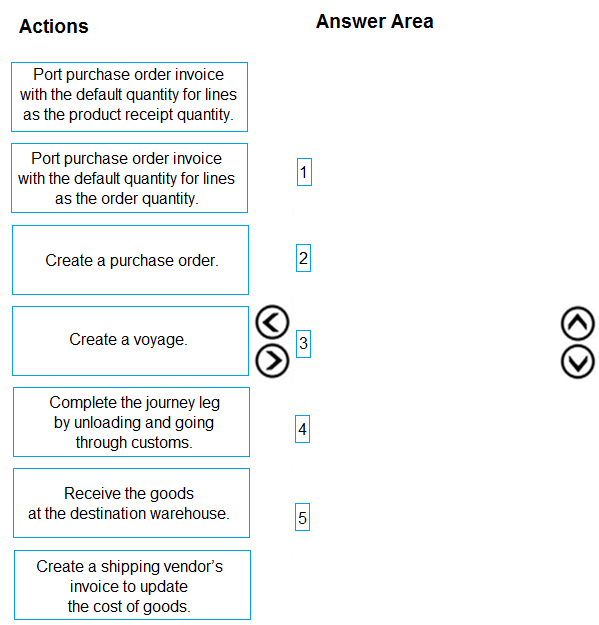
Which five actions should you perform in sequence? To answer, move the appropriate actions from the list of actions to the answer area and arrange them in the correct order.
Key Takeaways
It tests the Landed cost voyage lifecycle and the timing of the purchase order invoice relative to customs clearance and warehouse receipt, with the main trap being to post the invoice after receipt using product-receipt quantity.
This MB-330 item tests the five-step Landed cost flow for an offshore purchase order. The correct order runs from purchase order and voyage creation through invoice posting with order quantity, customs clearance, and destination receipt.
Common mistake: Posting the vendor invoice after the goods are received and defaulting lines to product-receipt quantity; that is standard AP sequencing but not the Landed cost module's offshore import demonstration, where the invoice is posted with order quantity before customs and receipt.
Expert Analysis
Governing principle: the voyage is the landed-cost control object
Landed cost is not just a freight charge on a purchase order. In Dynamics 365 Supply Chain Management, the voyage groups the purchase order lines, containers, journey legs and cost transactions that follow an import shipment. The module's end-to-end walkthrough therefore starts with the commercial document, moves into the logistics object, records the vendor invoice while the goods are still in transit, completes the customs and unloading milestone, and only then receives the goods into the destination warehouse. That ordering reflects the offshore import reality: the vendor invoices at shipment, so no product receipt exists yet.
The five actions in order
- Create a purchase order.
- Create a voyage.
- Post the purchase order invoice with the default quantity for lines set to the order quantity.
- Complete the journey leg by unloading and going through customs.
- Receive the goods at the destination warehouse.
The order quantity setting in step 3 is the tell. Because the goods have not been received when the invoice is posted, the invoice line quantity must come from the ordered quantity, not from a product receipt.
Why the competing sequence fails
A learner walkthrough proposes moving the invoice to the end and using the product receipt quantity, after customs and warehouse receipt. That is a legitimate standard accounts-payable pattern, but it is not the module's offshore import sequence. A widely repeated walkthrough of the Microsoft Learn Landed cost video lists the invoice before customs and notes that the video is unequivocal. The exam distinction is timing and default quantity: pre-receipt invoice uses order quantity; post-receipt invoice would use product-receipt quantity. Because the scenario is an offshore vendor with landed cost and the module demonstrates the pre-receipt invoice, the correct sequence is purchase order, voyage, order-quantity invoice, customs and unloading, destination receipt.
Official Reference
This link opens the official vendor documentation in a new tab.
Exam Strategy
For landed-cost drag drops, anchor the sequence on the document that starts the commercial relationship (purchase order) and the logistics object that groups the shipment (voyage). Then track the physical milestones: invoice at the point the vendor liability is recorded, customs and unloading to close the journey leg, and warehouse receipt to create on-hand inventory. If a distractor puts invoice after receipt, check the default quantity setting: order quantity implies pre-receipt invoicing, while product-receipt quantity implies post-receipt invoicing.
Frequently Asked Questions
Why is the invoice posted before the goods are received in this landed cost flow?
What changes if I post the invoice after the warehouse receipt?
What does completing the journey leg accomplish?
Discussion 5 contributions
Compiled from public community threads and reader submissions, lightly edited for clarity. Handles and vote tallies are shown as recorded, and comments reflect the views of individual contributors.
From public community threads 5
-
Oladapizee 👍 131.Create a purchase order 2.Create a voyage 3.Post purchase order invoice with the default quantity for lines as the order quantity 4.Complete the journey leg by unloading and going through the customs 5.Receive the goods at the destination warehouse Following the video in the introduction page of microsoft learning page https://learn.microsoft.com/en-us/training/modules/work-with-landed-cost-supply-chain-management/introduction
-
982be89 👍 31-->Create a purchase order. 2-->Create a voyage. 3-->Complete the journey leg by unloading and going through customs. 4-->Receive the goods at the destination warehouse. 5-->Post purchase order invoice with the default quantity for lines as the product receipt quantity.
-
H_Incandenza 👍 3I would agree with this. The video is pretty unequivocal.
-
Deetss 👍 21 & 2 seem to be incorrect. Considering a purchase request exists (PO?) wouldn't the voyage/landed cost info be created and added after creation of the PO? https://learn.microsoft.com/en-us/training/modules/work-with-landed-cost-supply-chain-management/create-voyage
-
Gemami 👍 11. Create a purchase order 2. Create a voyage 3. Post purchase order invoice with the default quantity for lines as the order quantity 4. Complete the journey leg by unloading and going through customs 5. Receive the goods at the destination warehouse
Reader comments & corrections
No reader corrections yet — spotted an error or have a note? Share it below.