Dynamics 330 Warehouse Mobile App PO Lookup Configuration
HOTSPOT
A company is using Dynamics 365 Supply Chain Management with the Warehouse mobile app.
VendorA uses its own trucks to ship products to another local warehouse. Materials are mixed on the truck with no identification of their associated purchase order.
You need to configure the mobile app to allow for purchase order lookup by item.
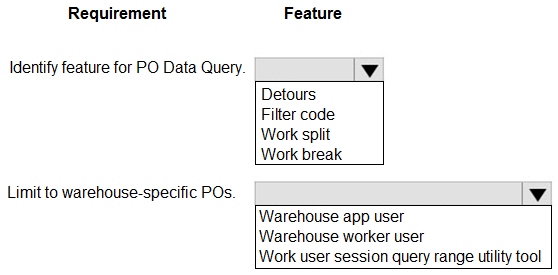
What should you configure? To answer, select the appropriate options in the answer area.
NOTE: Each correct selection is worth one point.
Community Insight
The core trap is confusing general filtering with session-based scoping; you must use 'Detours' to allow temporary diversion from the main flow and 'Warehouse app user session query range utility' to restrict results to the current worker's warehouse.
This question tests the configuration of Purchase Order lookup features in the Dynamics 365 Supply Chain Management Warehouse mobile app. The solution requires enabling Detours for item-based lookups and applying a warehouse-specific query range.
Candidates often select generic filter codes without considering the context of a mobile workflow, failing to realize that 'Detours' is the specific feature designed for temporary data queries like looking up a PO by item.
Community Discussion (2 comments)
Comments & Corrections
No comments yet — spotted an error or have a note? Share it below.
Expert Analysis
Why the Answer Is Correct
To address the requirement of allowing workers to look up a purchase order by item while using mixed materials, you must enable Detours (specifically 'PO Data Query') which permits the worker to temporarily leave the current mobile transaction flow to perform a search. Additionally, to ensure data security and relevance ('Limit to warehouse-specific POs'), you should configure the Work user session query range utility tool, which dynamically filters the query based on the worker's assigned warehouse.Why Other Candidate Answers Are Wrong
Generic options like 'Filter code' or 'User role' do not provide the necessary functionality to interrupt the current mobile process for a lookup (Detours) nor do they automatically scope the data to the specific warehouse location in the background (Session query range). Selecting only one of these would either break the workflow continuity or return irrelevant global data.Community Comment Notes
Community consensus highlights that 'Detours Lets the worker temporarily leave the current mobile flow to look up a PO by item' is the key mechanism for the first part. For the second part, users confirmed that the 'Work user session query range utility tool' is the correct setting to limit results to the current warehouse, as noted by CCexamn who provided the official Microsoft Learn documentation link.Official Reference
Exam Strategy
When configuring mobile apps for complex scenarios, always look for features that handle 'context switching' (like Detours) and 'data scoping' (like Session Query Ranges) separately. Understand the specific purpose of each utility tool rather than guessing based on similar names.
Frequently Asked Questions
What is the purpose of Detours in the Warehouse mobile app?
Detours allow workers to temporarily leave their current mobile transaction flow to perform a lookup or check information, such as finding a PO by item, before returning to the original process.
How does the Work user session query range utility tool work?
It dynamically filters query results based on the worker's current session context, specifically limiting data to the warehouse assigned to that user, ensuring they only see relevant inventory.