Dynamics 365 SCM: Item Allocation Key and Period Template
Short answer
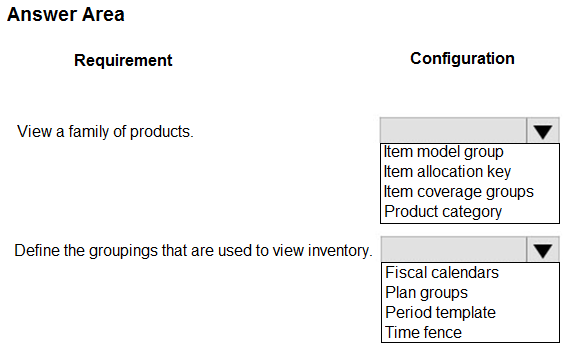
Use Item allocation key to group specific products and Period template to define the time periods for viewing supply and demand.
Question
A company uses Dynamics 365 Supply Chain Management for inventory management in a single warehouse.
The warehouse is experiencing vendor supply issues with several specific groups of products. The demand and supply for products needs to be viewed for the warehouse using a master planning model for different periods of time.
You need to view the information in a single location.
Which configuration should you use for each requirement?
To answer, select the appropriate options in the answer area.
NOTE: Each correct selection is worth one point.
Key Takeaways
The question tests the distinction between item grouping (Item allocation key) and time bucket definition (Period template) within the Supply Schedule view.
Learn how to use Item allocation key for grouping products and Period template for defining time buckets in Dynamics 365 Supply Chain Management master planning.
Common mistake: Learners often confuse Item allocation keys with Model Groups or Product Categories. Model Groups affect inventory costing and planning parameters, while Item allocation keys are specifically for grouping items for demand forecasting and schedule visibility.
Expert Analysis
Item Allocation Key for Product Grouping The scenario requires viewing demand and supply for "several specific groups of products" in a single location. In Dynamics 365 Supply Chain Management, an Item allocation key is the configuration used to group items (such as a product family) for demand forecasting and visibility. When filtering the Supply Schedule or Net Requirements form by an Item allocation key, you can view the combined inventory position for that specific group. Other options like Model Groups or Coverage Groups control planning parameters or inventory behavior but do not serve as the primary filter for viewing grouped supply/demand in this context.
Period Template for Time Periods The requirement to view information for "different periods of time" refers to the time buckets displayed in the planning views. A Period template defines these time buckets (e.g., daily, weekly, monthly). By applying a Period template to the Supply Schedule or Master Planning worksheet, users can see how supply and demand are distributed across specific time intervals. This allows for granular analysis of timing issues rather than just aggregate totals.
Official Reference
- https://learn.microsoft.com/en-us/dynamics365/supply-chain/master-planning/supply-schedule
- https://learn.microsoft.com/en-us/dynamics365/supply-chain/master-planning/planning-optimization/coverage-time-fence
These links open the official vendor documentation in a new tab.
Exam Strategy
When asked about viewing grouped inventory data, look for 'Item allocation key' as the grouping mechanism. When asked about time buckets or intervals in planning views, select 'Period template'. Always verify the context: if it's about 'groups of items', think allocation keys; if it's about 'time periods', think period templates.
Frequently Asked Questions
What is the difference between Item allocation key and Model Group?
How do I view supply and demand for a specific product group?
Discussion 6 contributions
Compiled from public community threads and reader submissions, lightly edited for clarity. Handles and vote tallies are shown as recorded, and comments reflect the views of individual contributors.
From public community threads 6
-
Vnes80 👍 14I think that it dhould be Item allocation Key and Period template https://learn.microsoft.com/en-us/dynamics365/supply-chain/master-planning/supply-schedule
-
globeearth 👍 3[1] Item allocation keys allow you to define a specific group of products (e.g., those with vendor supply issues) and view their combined supply and demand in a single location (e.g., Supply Schedule or Net Requirements) when filtered by the allocation key. [2] Period templates determine the time buckets (e.g., weekly, monthly) shown in the Supply Schedule or Net Requirements form, allowing you to view inventory supply/demand for different periods in a single location. For example, a template with 12 monthly periods lets you see inventory across a year, addressing the requirement directly.
-
H_Incandenza 👍 2Agree with this. If you look at the supply schedule form, the question is straight forward. Item allocation key = grouping of items used for demand forecasting. When you use the supply schedule, this is the only means of viewing a group of items at once. Similarly, the period template determines the time buckets.
-
75a0975 👍 2Go to Master planning > Setup > Demand forecasting > Item allocation keys. Select an item allocation key that is used as a product family. Then, on the Action Pane, select Supply schedule Same url
-
CCexamn 👍 1View a family of products → Item allocation key Why: Supply schedule uses an item allocation key to define a product family. Why not others: Model groups control inventory behavior, coverage groups control planning parameters, and product categories classify products. Define groupings used to view inventory → Period template Why: Defines the time buckets (days/weeks/months) used to display supply and demand. Why not others: Fiscal calendars are accounting periods, plan groups aren't display buckets, and time fences define how far ahead planning looks—not how data is grouped.
Show 1 more comment
-
Max2969 👍 1https://learn.microsoft.com/en-us/dynamics365/supply-chain/master-planning/planning-optimization/coverage-time-fence
Reader comments & corrections
No reader corrections yet — spotted an error or have a note? Share it below.