Dynamics 365 SCM: Calculate Safety Stock Using Standard Deviation
Short answer
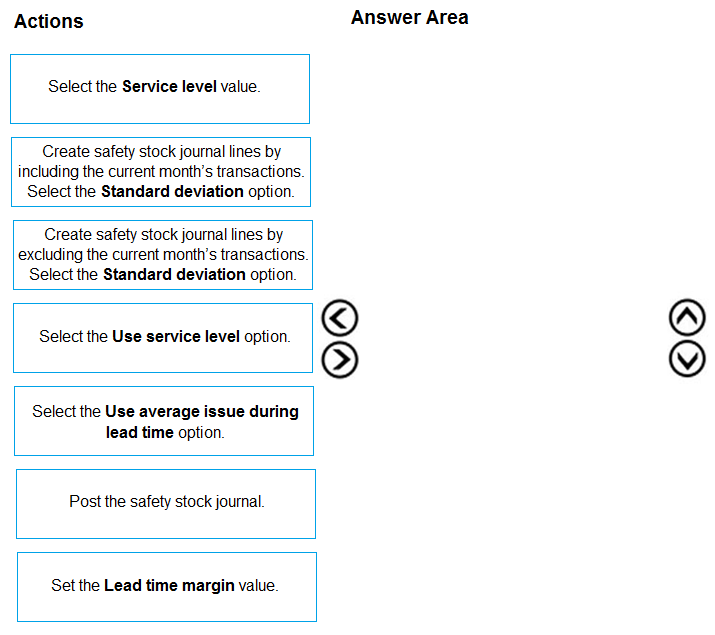
Create safety stock journal lines by excluding the current month's transactions and select the Standard Deviation option; then select the Use Service Level option; finally, post the safety stock journal.
Question
A manufacturing company uses Dynamics 365 Supply Chain Management.
You must review the safety stock level for raw materials.
You need to calculate the minimum coverage proposals based on standard deviation.
Which three actions should you perform in sequence? To answer, move the appropriate actions from the list of actions to the answer area and arrange them in the correct order.
Key Takeaways
The trap is forgetting to exclude incomplete current month transactions from the standard deviation calculation, which skews safety stock proposals.
Learn the correct three-step sequence to calculate minimum coverage proposals for raw materials in Dynamics 365 Supply Chain Management using standard deviation and service level settings.
Common mistake: Posting the journal before selecting the service level option, or including incomplete current month data in the standard deviation calculation, leading to inaccurate safety stock levels.
Expert Analysis
The scenario requires calculating minimum coverage proposals for raw material safety stock using the standard deviation method within Dynamics 365 Supply Chain Management. The correct sequence of actions is: 1. Create safety stock journal lines by excluding the current month's transactions and selecting the Standard Deviation option; 2. Select the Use Service Level option; 3. Post the safety stock journal.
Why this order matters: Safety stock calculations are performed via a batch process that generates proposal lines. First, you must generate these lines using historical data (excluding incomplete current months) to ensure statistical accuracy in the standard deviation calculation. Second, because the requirement specifies "minimum coverage proposals based on standard deviation," you must enable the service level configuration which links the calculated variance to specific target service levels. Finally, posting the journal commits these proposals to the system for execution.
Adjacent decision & operational consequence: If you skip excluding the current month's transactions, the standard deviation calculation may be skewed by partial data, leading to inaccurate safety stock levels. Conversely, if you post without selecting the service level option, the system may use default or previous values rather than the newly calculated minimum coverage based on the specified standard deviation. Getting this wrong results in either overstocking (tying up capital) or understocking (causing production delays), both of which directly impact supply chain efficiency.
Exam Strategy
When dealing with batch processes involving statistical calculations, always verify the data source integrity first (e.g., excluding incomplete periods). Then, confirm any specific calculation methods (like standard deviation vs. fixed days) are enabled. Finally, execute the transaction. This three-step verification prevents errors in automated supply chain workflows.
Frequently Asked Questions
Why exclude the current month's transactions?
What happens if I don't select 'Use Service Level'?
Discussion 4 contributions
Compiled from public community threads and reader submissions, lightly edited for clarity. Handles and vote tallies are shown as recorded, and comments reflect the views of individual contributors.
From public community threads 4
-
H_Incandenza 👍 4Create safety stock journal lines by EXCLUDING the current month's transactions. Everything else is right, IMO.
-
Backoffice 👍 3Using the service level option implies also selecting which service level value should be reached. Furthermore, the requirement is to "You need to calculate the minimum coverage proposals based on standard deviation" so posting of the journal seems not to be necessary.
-
globeearth 👍 2[1] c. Create safety stock journal lines by excluding the current month's transactions. Select the Standard deviation option: Start by generating lines with historical data (excluding incomplete March 2025) and choose standard deviation.[2] d. Select the Use service level option: Enable the service level method, which integrates with standard deviation to calculate safety stock based on demand variability and desired service level.[3] f. Post the safety stock journal: Apply the calculated minimum coverage proposals to the system.
-
CCexamn 👍 1The correct sequence is: 1. Create safety stock journal lines by excluding the current month's transactions. Select the Standard deviation option. 2. Select the Use service level option. 3. Post the safety stock journal.
Reader comments & corrections
No reader corrections yet — spotted an error or have a note? Share it below.