Dynamics 365 Freight Reconciliation Configuration
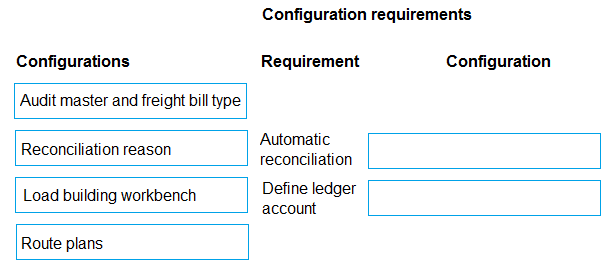
DRAG DROP
A distribution company is implementing freight reconciliation in Dynamics 365 Supply Chain Management.
The accounting manager requires that any freight invoices that cannot be automatically matched must post the difference to a specific ledger account.
You need to set up the freight reconciliation.
What should you configure? To answer, move the appropriate configurations to the correct requirements. You may use each configuration once, more than once, or not at all. You may need to move the split bar between panes or scroll to view content.
NOTE: Each correct selection is worth one point.
Community Insight
This question tests the specific setup for handling variance posting in transportation management, where the common trap is confusing the matching rules with the ledger account assignment.
Learn how to configure freight reconciliation in Dynamics 365 Supply Chain Management by mapping audit masters and reconciliation reasons to handle unmatched invoices.
Learners often mistakenly try to configure the ledger account directly on the freight bill type or confuse the 'Reconciliation reason' with the general journal configuration.
Community Discussion (2 comments)
Comments & Corrections
No comments yet — spotted an error or have a note? Share it below.
Expert Analysis
Why the Answer Is Correct
The correct configuration requires linking an Audit master (specifically the freight bill type) to control the automatic matching logic, and a Reconciliation reason to define the specific ledger accounts used for posting differences. This ensures that any freight invoice not automatically matched posts the variance correctly.Why Other Candidate Answers Are Wrong
Other potential configurations like standard payment terms or warehouse location setups do not address the specific requirement for handling unreconciled freight variances in the General Ledger.Community Comment Notes
Community consensus supports using Audit master and Reconciliation reason. As one commenter noted, "Audit master and freight bill type control how automatic freight reconciliation works... Reconciliation reason holds the debit/credit accounts used to post the variance." Another user confirmed this via Microsoft Learn documentation.Official Reference
Exam Strategy
Focus on the distinction between the 'how' of matching (Audit Master) and the 'where' of posting (Reconciliation Reason) when dealing with financial reconciliations in D365 SCM.
Frequently Asked Questions
What is the difference between Audit master and Reconciliation reason?
Audit master controls the matching logic and tolerance for freight bills, while Reconciliation reason defines the specific GL accounts used to post variances.
Where do I find the Reconciliation reason setup in D365?
It is typically found under Transportation management > Setup > Reconciliation > Reconciliation reasons.