Dynamics 365 SCM Warehouse Mobile App Deployment Strategy
DRAG DROP
A company is implementing Dynamics 365 Supply Chain Management. The company has more than 5,000 employees who will use the Warehouse Management mobile app in locations across the country/region.
Staff must deploy the Warehouse Management mobile app during the weekend. Staff is limited in the IT department.
You need to deploy the Warehouse Management mobile app.
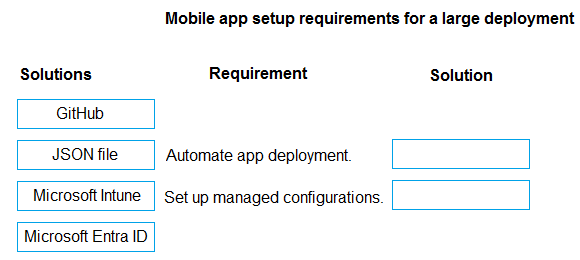
What should you do? To answer, move the appropriate solutions to the correct requirements. You may use each solution once, more than once, or not at all. You may need to move the split bar between panes or scroll to view content.
NOTE: Each correct selection is worth one point.
Community Insight
The question tests scalable deployment; the correct approach pairs automated device management (Intune) with centralized configuration imports (JSON), avoiding manual installation or complex server setups.
Learn the optimal method for deploying the Dynamics 365 Warehouse Management mobile app to thousands of devices with limited IT resources using Microsoft Intune and JSON configuration files.
Learners often choose manual installation or direct SQL updates, failing to recognize that 'limited IT staff' and '5,000 employees' necessitate an automated, remote management solution like Intune.
Community Discussion (1 comments)
Comments & Corrections
No comments yet — spotted an error or have a note? Share it below.
Expert Analysis
Why the Answer Is Correct
The scenario specifies a large scale (5,000+ users) and limited IT resources, which mandates an automated, centralized deployment strategy. Microsoft Intune is the standard tool for managing and deploying apps to mobile devices in a Dynamics 365 environment, allowing for zero-touch or semi-touch deployments. For the configuration requirement, the Warehouse Management mobile app supports importing connection details and other settings via a JSON file, which can be pushed as a managed configuration profile through Intune. This combination ensures all devices receive the app and are correctly configured without manual intervention.Why Other Candidate Answers Are Wrong
Manual installation on each device is impossible given the volume and time constraints (weekend deployment). Direct database modifications are unsupported and risky for app configurations. Using local group policies is less effective for mobile apps compared to Intune's specific MDM/MAM capabilities. Server-side configurations alone do not deploy the client application to the handheld devices.Community Comment Notes
Community consensus strongly favors the Intune + JSON pairing. As one user noted, "Automate app deployment → Microsoft Intune With 5,000+ users/devices and limited IT staff, Intune can centrally deploy..." Another comment highlighted that "Set up managed configurations → JSON file The Warehouse Management mobile app supports importing connection/configuration settings through a JSON configuration file." These comments align with official Microsoft documentation on scaling WMS deployments.Official Reference
Exam Strategy
Always map 'large number of users' or 'limited IT support' to automated enterprise management tools like Microsoft Intune. For Dynamics 365 mobile apps, remember that JSON is frequently used for bulk configuration imports rather than manual entry.
Frequently Asked Questions
Why is Microsoft Intune required for this deployment?
Intune allows centralized, automated deployment to thousands of devices, which is essential when IT staff is limited and rapid weekend deployment is needed.
How does the JSON file help in this scenario?
The JSON file allows you to import connection settings and configurations for the Warehouse Management app in bulk, ensuring consistent setup across all deployed devices.