Delay messages and coverage groups in master planning
Short answer
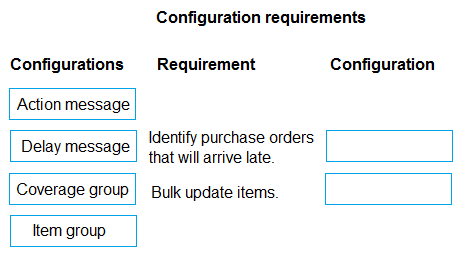
Identify purchase orders that will arrive late → Delay message; Bulk update items → Coverage group.
Question
A distribution company uses Dynamics 365 Supply Chain Management,
The materials manager reports that purchase orders for a group of items are often placed too late to full sales orders because of long lead times. To avoid creating additional work for the team, the manager requires mass update of master planning settings to items as needed.
You need to configure master planning to meet the requirements.
What should you configure? To answer, move the appropriate configurations to the correct requirements. You may use each configuration once, more than once, or not at all. You may need to move the split bar between panes or scroll to view content.
NOTE: Each correct selection is worth one point.
Key Takeaways
The question tests whether you can distinguish master planning outputs (action/delay messages) from reusable configuration (coverage groups) under a mass-update constraint.
This MB-330 drag-and-drop maps master planning requirements to the right configurations in Dynamics 365 Supply Chain Management: late-arriving purchase orders are surfaced by delay messages, while item-level master planning settings are maintained in bulk through coverage groups.
Common mistake: Choosing action messages to flag late purchase orders: action messages come from planned orders and propose rescheduling, so they neither identify in-transit PO delay nor deliver the requested bulk item update.
Expert Analysis
Why the tempting answer fails
The most attractive wrong choice is the action message. Master planning does generate action messages such as reschedule, expedite, or cancel when planned orders disagree with demand, and "identify purchase orders that will arrive late" reads like a request to flag supply that misses its needed date. That matches only part of the requirement: action messages operate on individual planned orders produced by the plan run, not on purchase orders already in flight, and acting on them still creates per-item work for the buyer. The requirement explicitly asks for identification of late-arriving POs, so the correct configuration is the delay message, which reports expected delays in supply reaching demand rather than proposing order changes.
Bulk updates point to a shared setting
The second requirement — mass-updating master planning settings across items "to avoid creating additional work" — cannot be met by editing items one at a time or by planning parameters on a single item. Coverage groups are the shared definition of coverage settings (coverage time fence, coverage method, negative inventory handling, and related rules) that many items inherit through the item's coverage group assignment. Assigning a group, or reusing one group across the affected item set, is exactly the bulk mechanism the scenario describes; delay messages and action messages are outputs of a plan run and cannot store item-level settings.
Correct mapping
- Identify purchase orders that will arrive late → Delay message
- Bulk update items → Coverage group
Official Reference
https://learn.microsoft.com/en-us/dynamics365/supply-chain/master-planning/
This link opens the official vendor documentation in a new tab.
Exam Strategy
For drag-and-drop requirements, split each requirement into two questions: is it an output the plan generates, or a setting you store? Outputs (delay, action messages) pair with detection/announcement verbs; stored, reusable settings pair with verbs like bulk update or shared configuration. Reuse is only valid when the same setting genuinely serves both requirements, which is rare.
Frequently Asked Questions
How does a delay message differ from an action message in master planning?
Why is a coverage group the right choice for bulk updating master planning settings?
Can master planning settings be mass-updated directly on each item?
Discussion 3 contributions
Compiled from public community threads and reader submissions, lightly edited for clarity. Handles and vote tallies are shown as recorded, and comments reflect the views of individual contributors.
From public community threads 3
-
mberengu 👍 2Identify POs that will arrive late - Delay messages Bulk update items - Coverage group
-
Gemami 👍 1Identify purchase orders that will arrive late ------> Delay message Bulk update items --------> Coverage group Why? - Delay message: Identifies expected delays in fulfilling demand due to late supply. - Coverage group: Allows common master planning settings to be maintained for multiple items, reducing individual updates. Why not the others? - Action message: Recommends changes to planned or existing orders, such as advancing or postponing them, rather than primarily reporting delays. - Item group: Groups items for inventory management and financial purposes, not shared master planning settings.
-
Anonymous learner 👍 1 Answered DI'm thinking D. Can anyone confirm this?
Reader comments & corrections
No reader corrections yet — spotted an error or have a note? Share it below.