Configuring Dynamic Positive Days and Negative Days in Master Planning
Short answer
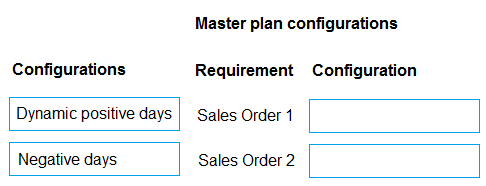
Sales Order 1 requires Dynamic Positive Days to allow master planning to reconsider existing inventory pegged to later demand for urgent earlier orders. Sales Order 2 requires Negative Days to define the tolerance for late purchase orders before triggering replenishment actions.
Question
A company uses Dynamics 365 Supply Chain Management.
The sales team reports that sales orders were not delivered on schedule, but inventory is on-hand.
A planner identifies two scenarios:
• Sales Order 1 was placed at the last minute, and existing inventory was pegged to another sales order with a later delivery date.
• Sales Order 2 had inventory pegged to a late purchase order (PO). The PO triggered an action item to cancel and reorder.
You need to configure the system to account for the scenarios when running future master plans.
Which configuration should you recommend to the planner? To answer, move the appropriate configurations to the correct requirements. You may use each configuration once, more than once, or not at all. You may need to move the split bar between panes or scroll to view content.
NOTE: Each correct selection is worth one point.
Key Takeaways
Dynamic Positive Days controls the system's ability to re-peg earlier demand to available inventory, while Negative Days sets the tolerance threshold for late supply before triggering new replenishment recommendations.
Learn how to configure Dynamic Positive Days and Negative Days in Dynamics 365 SCM Master Planning to handle urgent sales orders and late purchase orders respectively.
Common mistake: Learners frequently reverse the settings, applying Dynamic Positive Days to supply latency issues instead of demand pegging, or misunderstanding that Negative Days relates to supply timing rather than demand scheduling.
Expert Analysis
This question tests the configuration of Master Planning parameters in Dynamics 365 Supply Chain Management, specifically how the system handles time-phased demand and supply constraints. The core concept revolves around two distinct settings: Dynamic Positive Days and Negative Days.
For Sales Order 1, the issue is that existing inventory was pegged to a later-dated order, leaving the urgent last-minute order without stock. To fix this, the planner needs to allow the master plan to reconsider existing pegging for demand that occurs earlier than currently planned inventory availability. This is achieved by configuring Dynamic Positive Days. This setting tells the system to look ahead (positive days) into future demand and potentially re-peg earlier demand to available supply, effectively allowing the system to "borrow" or shift inventory from later orders to satisfy immediate needs if capacity allows. Without this, the system might stick rigidly to the original pegging, ignoring the urgency of the new order.
For Sales Order 2, the problem stems from a late Purchase Order (PO). The system should tolerate some delay before triggering a new replenishment recommendation (like canceling and reordering). This tolerance is controlled by Negative Days. This setting defines how many days into the past (negative days) the system will look at historical supply dates to determine if a supply item is significantly late. If the PO is within this tolerance window, the system might not trigger an action; if it exceeds it, it triggers recommendations. Configuring Negative Days ensures the system doesn't overreact to minor delays but does act when supply is sufficiently late to jeopardize fulfillment.
The common mistake is reversing these concepts. Learners often confuse "positive" with "future supply" and "negative" with "past demand," leading them to apply Dynamic Positive Days to the PO delay scenario. However, Dynamic Positive Days specifically addresses demand timing relative to existing inventory pegging (reconsidering earlier demand), while Negative Days addresses supply lateness tolerance.
Official Reference
https://learn.microsoft.com/en-us/dynamics365/supply-chain/master-plan/configure-master-planning
This link opens the official vendor documentation in a new tab.
Exam Strategy
When analyzing Master Planning scenarios, always distinguish between demand-side constraints (pegging shifts) and supply-side tolerances (lateness thresholds). For demand urgency involving existing pegging, look for 'Positive Days' settings. For supply delays triggering actions, look for 'Negative Days' or 'Safety Stock' logic. Map the business pain point directly to the parameter's definition in the documentation.
Frequently Asked Questions
What exactly do Dynamic Positive Days affect?
How does Negative Days differ from Safety Stock?
Discussion 1 contributions
Compiled from public community threads and reader submissions, lightly edited for clarity. Handles and vote tallies are shown as recorded, and comments reflect the views of individual contributors.
From public community threads 1
-
Gemami 👍 1Sales Order 1 ----> Dynamic positive days Sales Order 2 ------> Negative days Why? - Dynamic positive days: Helps master planning reconsider existing inventory pegged to later demand when a last-minute sales order requires it earlier. - Negative days: Controls how much delay is tolerated from an incoming purchase order before master planning recommends new replenishment. Why not the opposite? - Negative days for Sales Order 1: Addresses late supply, not the reassignment of inventory pegged to later demand. - Dynamic positive days for Sales Order 2: Addresses supply pegging across demand dates, not late purchase-order receipts.
Reader comments & corrections
No reader corrections yet — spotted an error or have a note? Share it below.